> ## Documentation Index
> Fetch the complete documentation index at: https://docs.coderabbit.ai/llms.txt
> Use this file to discover all available pages before exploring further.
# Path-based review instructions
> Customize how CodeRabbit reviews different parts of your codebase using glob patterns. Apply focused, context-aware instructions to controllers, tests, documentation, and more.
CodeRabbit provides two path controls. **Path filters** exclude files that don't benefit from review: lock files, binaries, and generated code. **Path instructions** apply targeted guidance to specific paths, such as security checks for API controllers, coverage requirements for tests, or clarity rules for documentation.
If your team already has coding guidelines and standards documented, point CodeRabbit to them using [Code Guidelines](/knowledge-base/code-guidelines).
## Path instructions
Add custom review instructions for specific file paths using glob patterns. Instructions let you tell CodeRabbit exactly what to focus on for any part of the codebase.
### Configure path instructions
```yaml .coderabbit.yaml lines icon="code" theme={null}
reviews:
path_instructions:
- path: "src/controllers/**"
instructions: |
- Focus on authentication, authorization, and input validation.
- Flag any direct database queries that bypass the ORM layer.
- path: "tests/**"
instructions: |
Review the following unit test code written using the Mocha test library. Ensure that:
- The code adheres to best practices associated with Mocha.
- Descriptive test names are used to clearly convey the intent of each test.
- Edge cases and error paths are covered.
- path: "docs/**.md"
instructions: |
Check for clarity, accuracy, and completeness.
Flag any references to deprecated APIs or outdated behavior.
```
Configure path instructions in [Organization Settings → Reviews → Behavior](https://app.coderabbit.ai/organization/settings).
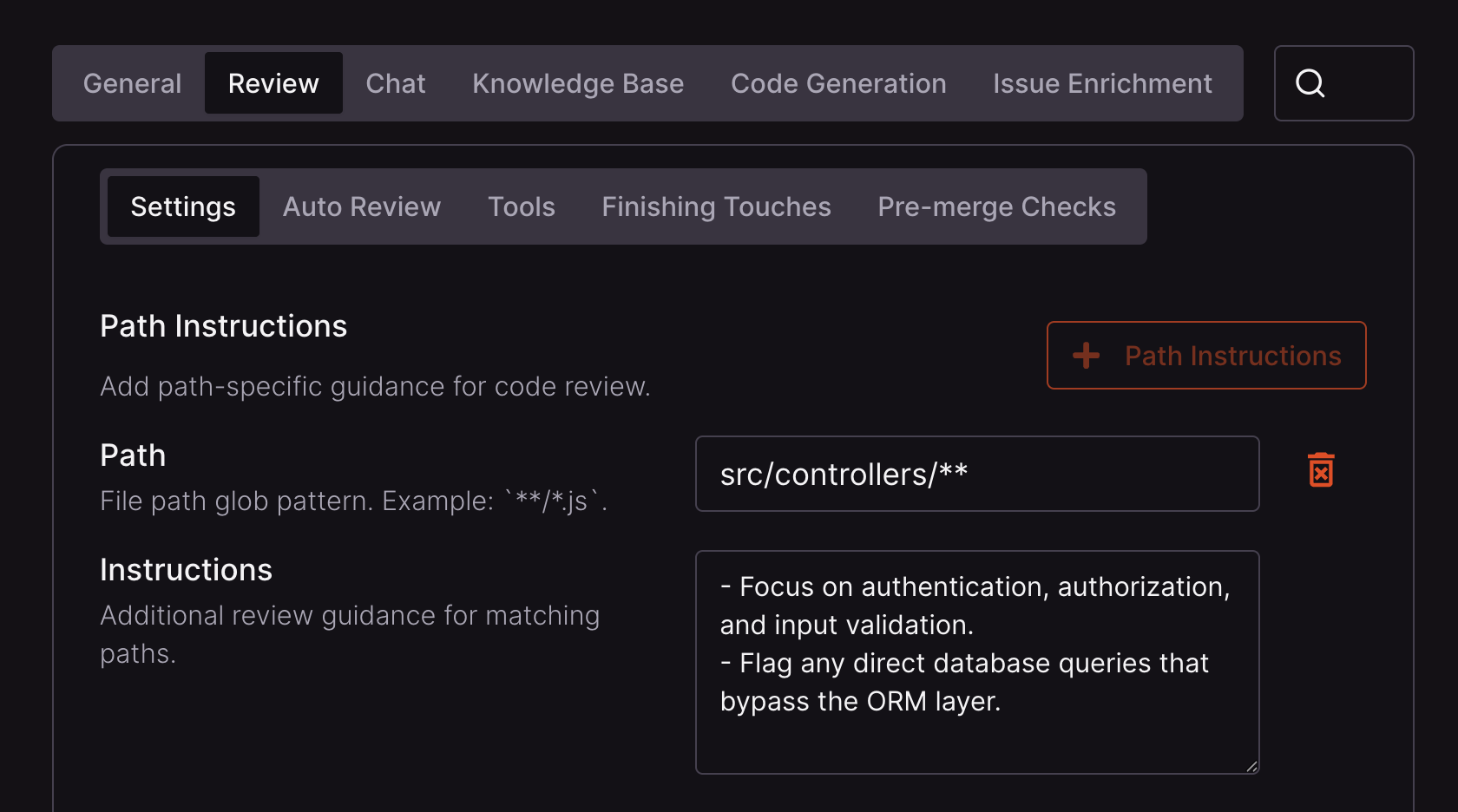 Paths accept glob patterns. See the [minimatch](https://github.com/isaacs/minimatch) documentation for more information.
Path instructions only affect CodeRabbit's review guidance for matching files. They do not disable other features that inspect the same code. For example, suppressing docstring-related review guidance with `reviews.path_instructions` does not disable [Generate docstrings](/finishing-touches/docstrings) or the [Docstring Coverage pre-merge check](/pr-reviews/pre-merge-checks).
### When to add path instructions
CodeRabbit's built-in review logic covers a wide range of issues by default. Path instructions work best as a targeted supplement, not a replacement.
* Observe a few reviews first. If something is consistently missed or needs to be applied differently for a specific part of the codebase, that's a good candidate for a path instruction.
* When you identify a gap, consider which mechanism fits best:
* **Path instructions** — rules scoped to specific files or directories in CodeRabbit's review.
* **[Code guidelines](/knowledge-base/code-guidelines)** — existing standards documents (like `AGENTS.md` or `.cursorrules`) that CodeRabbit picks up automatically, and that also benefit AI coding agents.
* **[Custom checks](/pr-reviews/custom-checks)** — pass/fail conditions you define that run as part of every review.
After CodeRabbit has reviewed several pull requests, it may have accumulated path-instruction suggestions. Post `@coderabbitai emit path instructions` as a PR comment to collect suggestions from the past 7 days and open a pull request that merges them into your `.coderabbit.yaml` without overwriting existing entries. See the [command reference](/reference/review-commands) for details.
## Path filters
Path filters control which files CodeRabbit includes or excludes from review. Excluding irrelevant files, such as lock files, binaries, and generated code, keeps reviews focused and fast. CodeRabbit ships with sensible defaults, but you can extend the ignore list with your own patterns, or override defaults to force-include paths that would otherwise be skipped.
### Configure path filters
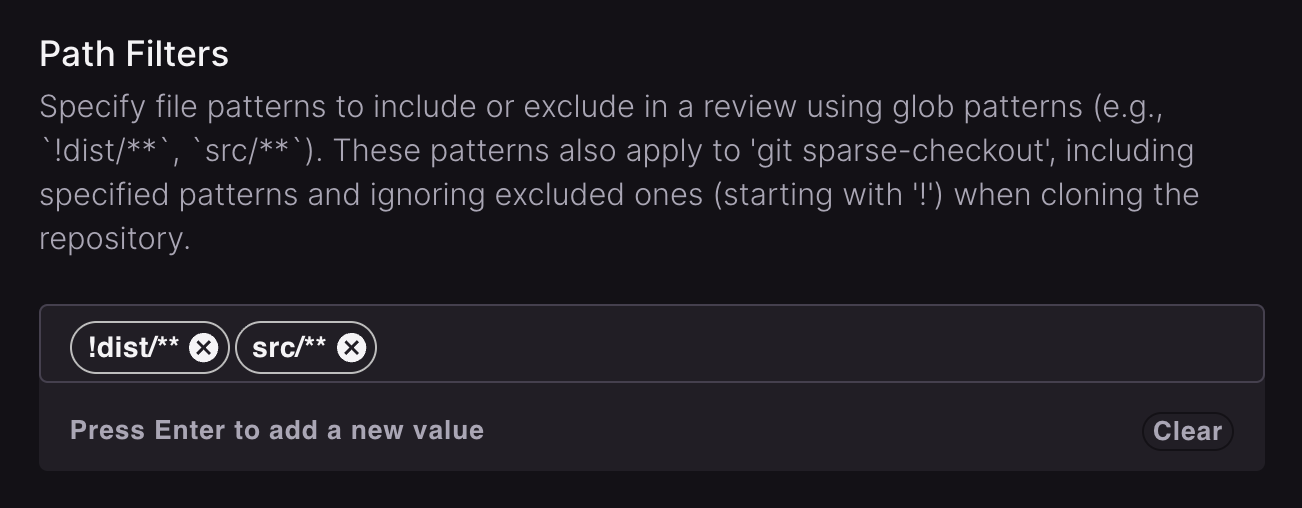
Patterns prefixed with `!` **exclude** paths from review (for example, `!dist/**` skips the `dist` folder). Patterns without `!` **include** paths explicitly, which is useful for overriding a default exclusion.
Path filters define CodeRabbit's review scope. Files excluded here, or skipped by the default ignored paths below, do not appear in CodeRabbit review surfaces such as the walkthrough or [Change Stack](/pr-reviews/change-stack). GitHub can still show those files in the pull request's full file list.
```yaml .coderabbit.yaml lines icon="code" theme={null}
reviews:
path_filters:
- "!dist/**"
- "!node_modules/**"
- "src/**"
```
Configure path filters in [Organization Settings → Reviews → Behavior](https://app.coderabbit.ai/organization/settings).
Paths accept glob patterns. See the [minimatch](https://github.com/isaacs/minimatch) documentation for more information.
Path instructions only affect CodeRabbit's review guidance for matching files. They do not disable other features that inspect the same code. For example, suppressing docstring-related review guidance with `reviews.path_instructions` does not disable [Generate docstrings](/finishing-touches/docstrings) or the [Docstring Coverage pre-merge check](/pr-reviews/pre-merge-checks).
### When to add path instructions
CodeRabbit's built-in review logic covers a wide range of issues by default. Path instructions work best as a targeted supplement, not a replacement.
* Observe a few reviews first. If something is consistently missed or needs to be applied differently for a specific part of the codebase, that's a good candidate for a path instruction.
* When you identify a gap, consider which mechanism fits best:
* **Path instructions** — rules scoped to specific files or directories in CodeRabbit's review.
* **[Code guidelines](/knowledge-base/code-guidelines)** — existing standards documents (like `AGENTS.md` or `.cursorrules`) that CodeRabbit picks up automatically, and that also benefit AI coding agents.
* **[Custom checks](/pr-reviews/custom-checks)** — pass/fail conditions you define that run as part of every review.
After CodeRabbit has reviewed several pull requests, it may have accumulated path-instruction suggestions. Post `@coderabbitai emit path instructions` as a PR comment to collect suggestions from the past 7 days and open a pull request that merges them into your `.coderabbit.yaml` without overwriting existing entries. See the [command reference](/reference/review-commands) for details.
## Path filters
Path filters control which files CodeRabbit includes or excludes from review. Excluding irrelevant files, such as lock files, binaries, and generated code, keeps reviews focused and fast. CodeRabbit ships with sensible defaults, but you can extend the ignore list with your own patterns, or override defaults to force-include paths that would otherwise be skipped.
### Configure path filters
Patterns prefixed with `!` **exclude** paths from review (for example, `!dist/**` skips the `dist` folder). Patterns without `!` **include** paths explicitly, which is useful for overriding a default exclusion.
Path filters define CodeRabbit's review scope. Files excluded here, or skipped by the default ignored paths below, do not appear in CodeRabbit review surfaces such as the walkthrough or [Change Stack](/pr-reviews/change-stack). GitHub can still show those files in the pull request's full file list.
```yaml .coderabbit.yaml lines icon="code" theme={null}
reviews:
path_filters:
- "!dist/**"
- "!node_modules/**"
- "src/**"
```
Configure path filters in [Organization Settings → Reviews → Behavior](https://app.coderabbit.ai/organization/settings).
 ### Default ignored paths
By default, CodeRabbit intentionally skips certain file paths and extensions — things like lock files, binaries, generated code, and media assets. If you want CodeRabbit to review any of these, you can explicitly include them in your Path Filters configuration.
| Path Pattern | Description |
| --------------------- | -------------------------- |
| `!**/dist/**` | Build output directory |
| `!**/node_modules/**` | Node.js dependencies |
| `!**/.svelte-kit/**` | SvelteKit build directory |
| `!**/.webpack/**` | Webpack build directory |
| `!**/.yarn/**` | Yarn cache directory |
| `!**/.docusaurus/**` | Docusaurus build directory |
| `!**/.temp/**` | Temporary files directory |
| `!**/.cache/**` | Cache directory |
| `!**/.next/**` | Next.js build directory |
| `!**/.nuxt/**` | Nuxt.js build directory |
| Path Pattern | Description |
| ----------------------- | ------------------ |
| `!**/package-lock.json` | npm lock file |
| `!**/yarn.lock` | Yarn lock file |
| `!**/pnpm-lock.yaml` | pnpm lock file |
| `!**/bun.lockb` | Bun lock file |
| `!**/*.lock` | Generic lock files |
| Path Pattern | Description |
| ---------------------- | -------------------------------------- |
| `!**/generated/**` | Generated code directory |
| `!**/@generated/**` | Generated code directory (alternative) |
| `!**/__generated__/**` | Generated code directory (alternative) |
| `!**/__generated/**` | Generated code directory (alternative) |
| `!**/_generated/**` | Generated code directory (alternative) |
| `!**/gen/**` | Generated code directory (alternative) |
| `!**/@gen/**` | Generated code directory (alternative) |
| `!**/__gen__/**` | Generated code directory (alternative) |
| `!**/__gen/**` | Generated code directory (alternative) |
| `!**/_gen/**` | Generated code directory (alternative) |
| `!**/*.generated.*` | Generated File Suffix |
| Path Pattern | Description |
| ------------- | ----------------------- |
| `!**/*.app` | Application bundle |
| `!**/*.bin` | Binary file |
| `!**/*.class` | Java compiled class |
| `!**/*.dll` | Windows dynamic library |
| `!**/*.dylib` | macOS dynamic library |
| `!**/*.exe` | Windows executable |
| `!**/*.o` | Object file |
| `!**/*.so` | Shared object file |
| `!**/*.wasm` | WebAssembly file |
| Path Pattern | Description |
| ------------ | ----------------------- |
| `!**/*.bz2` | Bzip2 archive |
| `!**/*.gz` | Gzip archive |
| `!**/*.xz` | XZ archive |
| `!**/*.zip` | ZIP archive |
| `!**/*.7z` | 7-Zip archive |
| `!**/*.rar` | RAR archive |
| `!**/*.zst` | Zstandard archive |
| `!**/*.tar` | TAR archive |
| `!**/*.jar` | Java archive |
| `!**/*.war` | Web application archive |
| `!**/*.nar` | NAR archive |
| Path Pattern | Description |
| ------------ | --------------- |
| `!**/*.mp3` | MP3 audio |
| `!**/*.wav` | WAV audio |
| `!**/*.wma` | WMA audio |
| `!**/*.mp4` | MP4 video |
| `!**/*.avi` | AVI video |
| `!**/*.mkv` | MKV video |
| `!**/*.wmv` | WMV video |
| `!**/*.m4a` | M4A audio |
| `!**/*.m4v` | M4V video |
| `!**/*.3gp` | 3GP video |
| `!**/*.3g2` | 3G2 video |
| `!**/*.rm` | RealMedia video |
| `!**/*.mov` | QuickTime video |
| `!**/*.flv` | Flash video |
| `!**/*.swf` | Flash animation |
| `!**/*.flac` | FLAC audio |
| `!**/*.ogg` | OGG audio |
| Path Pattern | Description |
| ------------- | ---------------------- |
| `!**/*.ico` | Icon file |
| `!**/*.svg` | SVG image |
| `!**/*.jpeg` | JPEG image |
| `!**/*.jpg` | JPEG image |
| `!**/*.png` | PNG image |
| `!**/*.gif` | GIF image |
| `!**/*.bmp` | BMP image |
| `!**/*.tiff` | TIFF image |
| `!**/*.webm` | WebM image |
| `!**/*.ttf` | TrueType font |
| `!**/*.otf` | OpenType font |
| `!**/*.woff` | Web Open Font Format |
| `!**/*.woff2` | Web Open Font Format 2 |
| `!**/*.eot` | Embedded OpenType font |
| Path Pattern | Description |
| --------------- | ----------------------- |
| `!**/*.pdf` | PDF document |
| `!**/*.doc` | Word document |
| `!**/*.docx` | Word document |
| `!**/*.xls` | Excel spreadsheet |
| `!**/*.xlsx` | Excel spreadsheet |
| `!**/*.ppt` | PowerPoint presentation |
| `!**/*.pptx` | PowerPoint presentation |
| `!**/*.csv` | CSV data file |
| `!**/*.tsv` | TSV data file |
| `!**/*.dat` | Data file |
| `!**/*.db` | Database file |
| `!**/*.parquet` | Parquet data file |
| Path Pattern | Description |
| -------------------- | ------------------- |
| `!**/tags` | Tags file |
| `!**/.tags` | Tags file |
| `!**/TAGS` | Tags file |
| `!**/.TAGS` | Tags file |
| `!**/.DS_Store` | macOS system file |
| `!**/.cscope.files` | Cscope files |
| `!**/.cscope.out` | Cscope output |
| `!**/.cscope.in.out` | Cscope input/output |
| `!**/.cscope.po.out` | Cscope output |
| `!**/*.log` | Log file |
| `!**/*.map` | Source map |
| `!**/*.out` | Output file |
| `!**/*.sum` | Checksum file |
| `!**/*.work` | Work file |
| `!**/*.md5sum` | MD5 checksum file |
| Path Pattern | Description |
| ------------------- | ---------------------- |
| `!**/*.tga` | Targa image |
| `!**/*.dds` | DirectDraw surface |
| `!**/*.psd` | Photoshop document |
| `!**/*.fbx` | FBX 3D model |
| `!**/*.obj` | OBJ 3D model |
| `!**/*.blend` | Blender file |
| `!**/*.dae` | COLLADA 3D model |
| `!**/*.gltf` | GL Transmission Format |
| `!**/*.hlsl` | HLSL shader |
| `!**/*.glsl` | GLSL shader |
| `!**/*.unity` | Unity scene |
| `!**/*.umap` | Unreal map |
| `!**/*.prefab` | Unity prefab |
| `!**/*.mat` | Material file |
| `!**/*.shader` | Shader file |
| `!**/*.shadergraph` | Shader graph |
| `!**/*.sav` | Save file |
| `!**/*.scene` | Scene file |
| `!**/*.asset` | Asset file |
| Path Pattern | Description |
| -------------- | --------------------- |
| `!**/*.pyc` | Python compiled file |
| `!**/*.pyd` | Python dynamic module |
| `!**/*.pyo` | Python optimized file |
| `!**/*.pkl` | Python pickle file |
| `!**/*.pickle` | Python pickle file |
| Path Pattern | Description |
| ---------------- | ------------------------------- |
| `!**/*.pb.go` | Protocol buffer Go file |
| `!**/*.pb.gw.go` | Protocol buffer gateway Go file |
| Path Pattern | Description |
| ---------------------- | ---------------------- |
| `!**/*.tfstate` | Terraform state file |
| `!**/*.tfstate.backup` | Terraform state backup |
| Path Pattern | Description |
| -------------------------------------------- | ------------------------------------------------ |
| `!**/*.xcworkspace/contents.xcworkspacedata` | Xcode workspace metadata |
| `!**/Package.resolved` | Swift Package Manager resolved-dependencies file |
| Path Pattern | Description |
| ------------------ | ------------------------------ |
| `!**/*.min.js` | Minified JavaScript |
| `!**/*.min.js.map` | Minified JavaScript source map |
| `!**/*.min.css` | Minified CSS |
## What's next
Write review instructions using ast-grep rules for precise, syntax-aware review instructions.
Point CodeRabbit to your existing coding standards documents: `AGENTS.md`, `.cursorrules`, and similar files.
Define pass/fail conditions that run as part of every review to enforce your team's standards automatically.
### Default ignored paths
By default, CodeRabbit intentionally skips certain file paths and extensions — things like lock files, binaries, generated code, and media assets. If you want CodeRabbit to review any of these, you can explicitly include them in your Path Filters configuration.
| Path Pattern | Description |
| --------------------- | -------------------------- |
| `!**/dist/**` | Build output directory |
| `!**/node_modules/**` | Node.js dependencies |
| `!**/.svelte-kit/**` | SvelteKit build directory |
| `!**/.webpack/**` | Webpack build directory |
| `!**/.yarn/**` | Yarn cache directory |
| `!**/.docusaurus/**` | Docusaurus build directory |
| `!**/.temp/**` | Temporary files directory |
| `!**/.cache/**` | Cache directory |
| `!**/.next/**` | Next.js build directory |
| `!**/.nuxt/**` | Nuxt.js build directory |
| Path Pattern | Description |
| ----------------------- | ------------------ |
| `!**/package-lock.json` | npm lock file |
| `!**/yarn.lock` | Yarn lock file |
| `!**/pnpm-lock.yaml` | pnpm lock file |
| `!**/bun.lockb` | Bun lock file |
| `!**/*.lock` | Generic lock files |
| Path Pattern | Description |
| ---------------------- | -------------------------------------- |
| `!**/generated/**` | Generated code directory |
| `!**/@generated/**` | Generated code directory (alternative) |
| `!**/__generated__/**` | Generated code directory (alternative) |
| `!**/__generated/**` | Generated code directory (alternative) |
| `!**/_generated/**` | Generated code directory (alternative) |
| `!**/gen/**` | Generated code directory (alternative) |
| `!**/@gen/**` | Generated code directory (alternative) |
| `!**/__gen__/**` | Generated code directory (alternative) |
| `!**/__gen/**` | Generated code directory (alternative) |
| `!**/_gen/**` | Generated code directory (alternative) |
| `!**/*.generated.*` | Generated File Suffix |
| Path Pattern | Description |
| ------------- | ----------------------- |
| `!**/*.app` | Application bundle |
| `!**/*.bin` | Binary file |
| `!**/*.class` | Java compiled class |
| `!**/*.dll` | Windows dynamic library |
| `!**/*.dylib` | macOS dynamic library |
| `!**/*.exe` | Windows executable |
| `!**/*.o` | Object file |
| `!**/*.so` | Shared object file |
| `!**/*.wasm` | WebAssembly file |
| Path Pattern | Description |
| ------------ | ----------------------- |
| `!**/*.bz2` | Bzip2 archive |
| `!**/*.gz` | Gzip archive |
| `!**/*.xz` | XZ archive |
| `!**/*.zip` | ZIP archive |
| `!**/*.7z` | 7-Zip archive |
| `!**/*.rar` | RAR archive |
| `!**/*.zst` | Zstandard archive |
| `!**/*.tar` | TAR archive |
| `!**/*.jar` | Java archive |
| `!**/*.war` | Web application archive |
| `!**/*.nar` | NAR archive |
| Path Pattern | Description |
| ------------ | --------------- |
| `!**/*.mp3` | MP3 audio |
| `!**/*.wav` | WAV audio |
| `!**/*.wma` | WMA audio |
| `!**/*.mp4` | MP4 video |
| `!**/*.avi` | AVI video |
| `!**/*.mkv` | MKV video |
| `!**/*.wmv` | WMV video |
| `!**/*.m4a` | M4A audio |
| `!**/*.m4v` | M4V video |
| `!**/*.3gp` | 3GP video |
| `!**/*.3g2` | 3G2 video |
| `!**/*.rm` | RealMedia video |
| `!**/*.mov` | QuickTime video |
| `!**/*.flv` | Flash video |
| `!**/*.swf` | Flash animation |
| `!**/*.flac` | FLAC audio |
| `!**/*.ogg` | OGG audio |
| Path Pattern | Description |
| ------------- | ---------------------- |
| `!**/*.ico` | Icon file |
| `!**/*.svg` | SVG image |
| `!**/*.jpeg` | JPEG image |
| `!**/*.jpg` | JPEG image |
| `!**/*.png` | PNG image |
| `!**/*.gif` | GIF image |
| `!**/*.bmp` | BMP image |
| `!**/*.tiff` | TIFF image |
| `!**/*.webm` | WebM image |
| `!**/*.ttf` | TrueType font |
| `!**/*.otf` | OpenType font |
| `!**/*.woff` | Web Open Font Format |
| `!**/*.woff2` | Web Open Font Format 2 |
| `!**/*.eot` | Embedded OpenType font |
| Path Pattern | Description |
| --------------- | ----------------------- |
| `!**/*.pdf` | PDF document |
| `!**/*.doc` | Word document |
| `!**/*.docx` | Word document |
| `!**/*.xls` | Excel spreadsheet |
| `!**/*.xlsx` | Excel spreadsheet |
| `!**/*.ppt` | PowerPoint presentation |
| `!**/*.pptx` | PowerPoint presentation |
| `!**/*.csv` | CSV data file |
| `!**/*.tsv` | TSV data file |
| `!**/*.dat` | Data file |
| `!**/*.db` | Database file |
| `!**/*.parquet` | Parquet data file |
| Path Pattern | Description |
| -------------------- | ------------------- |
| `!**/tags` | Tags file |
| `!**/.tags` | Tags file |
| `!**/TAGS` | Tags file |
| `!**/.TAGS` | Tags file |
| `!**/.DS_Store` | macOS system file |
| `!**/.cscope.files` | Cscope files |
| `!**/.cscope.out` | Cscope output |
| `!**/.cscope.in.out` | Cscope input/output |
| `!**/.cscope.po.out` | Cscope output |
| `!**/*.log` | Log file |
| `!**/*.map` | Source map |
| `!**/*.out` | Output file |
| `!**/*.sum` | Checksum file |
| `!**/*.work` | Work file |
| `!**/*.md5sum` | MD5 checksum file |
| Path Pattern | Description |
| ------------------- | ---------------------- |
| `!**/*.tga` | Targa image |
| `!**/*.dds` | DirectDraw surface |
| `!**/*.psd` | Photoshop document |
| `!**/*.fbx` | FBX 3D model |
| `!**/*.obj` | OBJ 3D model |
| `!**/*.blend` | Blender file |
| `!**/*.dae` | COLLADA 3D model |
| `!**/*.gltf` | GL Transmission Format |
| `!**/*.hlsl` | HLSL shader |
| `!**/*.glsl` | GLSL shader |
| `!**/*.unity` | Unity scene |
| `!**/*.umap` | Unreal map |
| `!**/*.prefab` | Unity prefab |
| `!**/*.mat` | Material file |
| `!**/*.shader` | Shader file |
| `!**/*.shadergraph` | Shader graph |
| `!**/*.sav` | Save file |
| `!**/*.scene` | Scene file |
| `!**/*.asset` | Asset file |
| Path Pattern | Description |
| -------------- | --------------------- |
| `!**/*.pyc` | Python compiled file |
| `!**/*.pyd` | Python dynamic module |
| `!**/*.pyo` | Python optimized file |
| `!**/*.pkl` | Python pickle file |
| `!**/*.pickle` | Python pickle file |
| Path Pattern | Description |
| ---------------- | ------------------------------- |
| `!**/*.pb.go` | Protocol buffer Go file |
| `!**/*.pb.gw.go` | Protocol buffer gateway Go file |
| Path Pattern | Description |
| ---------------------- | ---------------------- |
| `!**/*.tfstate` | Terraform state file |
| `!**/*.tfstate.backup` | Terraform state backup |
| Path Pattern | Description |
| -------------------------------------------- | ------------------------------------------------ |
| `!**/*.xcworkspace/contents.xcworkspacedata` | Xcode workspace metadata |
| `!**/Package.resolved` | Swift Package Manager resolved-dependencies file |
| Path Pattern | Description |
| ------------------ | ------------------------------ |
| `!**/*.min.js` | Minified JavaScript |
| `!**/*.min.js.map` | Minified JavaScript source map |
| `!**/*.min.css` | Minified CSS |
## What's next
Write review instructions using ast-grep rules for precise, syntax-aware review instructions.
Point CodeRabbit to your existing coding standards documents: `AGENTS.md`, `.cursorrules`, and similar files.
Define pass/fail conditions that run as part of every review to enforce your team's standards automatically.