> ## Documentation Index
> Fetch the complete documentation index at: https://docs.coderabbit.ai/llms.txt
> Use this file to discover all available pages before exploring further.
# CodeRabbit FAQs: reviews, pricing, security, and setup
> Answers to common CodeRabbit questions about triggering reviews, supported platforms, pricing, data privacy, self-hosting, and pull request automation.
export const Hint = ({type, children, headline, tip, href, cta}) => {
const TIPS = {
learnings: {
headline: "Learnings",
tip: "Review preferences CodeRabbit learns from your chat conversations and applies automatically to future reviews.",
cta: "Learn about Learnings",
href: "/knowledge-base/learnings",
content: "Learnings"
},
walkthrough: {
headline: "PR Walkthrough",
tip: "A structured comment posted by CodeRabbit at the top of every pull request, summarizing changes, sequence diagrams, review effort, and more.",
cta: "Learn about PR Walkthroughs",
href: "/pr-reviews/walkthroughs",
content: "Walkthrough"
},
"finishing-touches": {
headline: "Finishing Touches",
tip: "Post-review agentic actions (Autofix, writing docstrings or unit tests, and more) you trigger from a PR comment or a checkbox in the Walkthrough.",
cta: "See all Finishing Touches",
href: "/finishing-touches",
content: "Finishing Touches"
},
"coding-plan": {
headline: "Coding Plan",
tip: "A detailed, codebase-aware implementation plan CodeRabbit generates from an issue or description, ready to hand off to any coding agent.",
cta: "Learn about Coding Plans",
href: "/plan",
content: "Coding Plan"
},
"knowledge-base": {
headline: "Knowledge Base",
tip: "The collected context sources CodeRabbit draws on during reviews: Learnings, Code Guidelines, issue trackers, connected MCP servers, and cross-repo analysis.",
cta: "Explore the Knowledge Base",
href: "/knowledge-base",
content: "Knowledge Base"
},
"path-instructions": {
headline: "Path Instructions",
tip: "Custom review rules that only apply to files matching a glob pattern, e.g. 'src/controllers/**'.",
cta: "Configure path instructions",
href: "/configuration/path-instructions",
content: "Path Instructions"
},
"change-stack": {
headline: "Change Stack",
tip: "An improved code inspection interface that reorganizes a pull request from a flat file list into a structured, layer-by-layer walkthrough with range-specific summaries and diagrams when useful.",
cta: "Learn about Change Stack",
href: "/pr-reviews/change-stack",
content: "Change Stack"
},
scope: {
headline: "Scope",
tip: "A named set of repositories, connections, and spend limits that controls what CodeRabbit Agent can access in a given Slack conversation.",
cta: "Learn about Scopes",
href: "/slack-agent/scopes",
content: "Scope"
},
"coderabbit-agent": {
headline: "CodeRabbit Agent for Slack",
tip: "An AI agent built into Slack that investigates issues, generates implementation plans, and opens pull requests right from the Slack threads.",
cta: "Explore CodeRabbit Agent",
href: "/slack-agent",
content: "CodeRabbit Agent"
},
"configuration-inheritance": {
headline: "Configuration Inheritance",
tip: "A setting that merges configuration values across multiple levels — repository YAML, central YAML, and UI settings — instead of using only the highest-priority source.",
cta: "Learn about Configuration Inheritance",
href: "/configuration/configuration-inheritance",
content: "Configuration Inheritance"
}
};
const defaults = TIPS[type] || ({});
return
{children ?? defaults.content}
;
};
## General Questions
### How to trigger a CodeRabbit Review?
Once installed, CodeRabbit automatically triggers a review when a pull request is opened against the main branch of any repository. We automatically detect the name of the primary branch (whether this be master, main, dev, etc). You have fine-grained control over what gets reviewed: target branches, draft PRs, labels, title exclusions, and more — through [automatic review controls](/configuration/auto-review).
You can also manually trigger a review at any time by commenting on a pull request with one of these commands (see [Commands](/guides/commands) for full list):
* `@coderabbitai review` - Triggers an incremental review of new changes only
* `@coderabbitai full review` - Triggers a full review of the entire pull request
### How to run a review from my IDE?
You can trigger CodeRabbit reviews directly from your IDE using our editor plugins:
* [VS Code Extension](/ide) - For VS Code, Cursor or Windsurf users
These plugins allow you to request reviews without leaving your development environment. See the individual plugin documentation for installation and usage instructions.
### How to install CodeRabbit?
View step by step instructions depending on your platform:
See our [GitHub App installation guide](/platforms/github-com) for
step-by-step instructions.
Follow our [GitLab integration guide](/platforms/gitlab-com) to get started.
Check out the [Bitbucket installation steps](/platforms/bitbucket-cloud) for
detailed setup.
View our [Azure DevOps setup guide](/platforms/azure-devops) for complete
installation instructions.
### How accurate is CodeRabbit?
> CodeRabbit demonstrates high accuracy in code reviews based on early adoption results. While 100% accuracy isn't guaranteed due to AI's evolving nature, our technology continuously improves through:
* Regular model updates
* Enhanced pattern recognition
* Growing language support
* Refined code analysis
### Language Support
CodeRabbit works with all programming languages, with varying proficiency based on:
* Language popularity
* Available training data
* Community usage patterns
### What's the difference between CodeRabbit Code Reviews and CodeRabbit Reports?
CodeRabbit offers two distinct features that serve different roles in your development workflow:
#### CodeRabbit Code Reviews
**Role**: Developer, QA, and Code Reviewer
**Access Level**: Full code access with comprehensive analysis capabilities
**Key Features:**
* **Complete Toolchain**: Runs all available analysis tools on your codebase
* **Static Analysis**: Can execute shell commands and perform deep static analysis against your codebase
* **Direct Code Access**: Has full access to code in issues and pull requests
* **Interactive Chat**: Provides chat features for real-time collaboration and questions
* **Comprehensive Review**: Analyzes code quality, security, performance, and best practices
* **Actionable Feedback**: Provides specific, line-by-line suggestions and improvements
* **Comment Interaction**: Engages with users through comments in pull requests and issues for clarifications and discussions
* **Available in All Tiers**: All features are available across Free, OSS, Pro, Pro+, and Enterprise plans
#### CodeRabbit Reports
**Role**: Project Manager and Communication Hub
**Access Level**: Summary-only access without direct code interaction
**Key Features:**
* **Summary Generation**: Creates convenient, formatted summaries of all your recent pull requests
* **Customizable Prompts**: Allows you to select or create your own summarization templates
* **High-Level Overview**: Focuses on project progress and changes without code details
* **Comment Analysis**: Reads and summarizes existing comments and discussions
* **No Code Access**: Operates only on summaries and metadata, not the actual codebase
* **Communication Tool**: Designed for stakeholders who need updates without technical details
* **Multi-Channel Delivery**: Sends reports through various communication channels:
* Email notifications
* Slack integration
* Discord webhooks
* Microsoft Teams updates
* **Pro Plan and Above**: Reports feature is available on Pro, Pro+, and Enterprise plans
**In Summary:**
* **Code Reviews** = Technical analysis with full code access for developers
* **Reports** = High-level summaries with no code access for project management
### Data Security
Your proprietary code remains confidential with CodeRabbit. CodeRabbit never uses customer code for model training. Data retention only controls whether CodeRabbit stores code-related data on our side to support features such as learnings and related review context. Data retention governs storage of code-related Knowledge Base data. Model output logging governs whether model outputs and reasoning from private-repository reviews may enter support troubleshooting logs.
* Your code is shared with OpenAI and/or Anthropic for reviewing purposes only
* Neither CodeRabbit, OpenAI, nor Anthropic uses your code to train our models
* We adhere to rigorous privacy policies to guarantee the safety and confidentiality of your code
* Complete data isolation for your proprietary code
* Caching of encrypted code and dependency archives for faster reviews
* Code indexing in which we store vector representations of code for efficient code base context
* Longer-lived review context such as Learnings (opt out available)
* On self-hosted CodeRabbit (available for Enterprise), you can opt out of all data retention at any time
* CodeRabbit never uses customer code for training
* This remains true whether data retention is enabled or disabled
* Data retention only affects storage of code-related data such as learnings and review context
Eligible **non-open-source** organizations can enable **Account > Settings > Model output logging**. The control is **off by default**, with no automatic opt-in. Organization Settings read access governs visibility, and Organization Settings write access is required to change it. Open-source organizations and organizations without a qualifying plan cannot enable the setting.
When enabled, OpenAI and Anthropic model outputs and reasoning from **private-repository** reviews may be included in support troubleshooting logs. CodeRabbit excludes prompts, does not use logged data for training, and does not change existing logging behavior for public or open-source repositories.
Changes apply to reviews started after the setting is saved.
### Organization Management
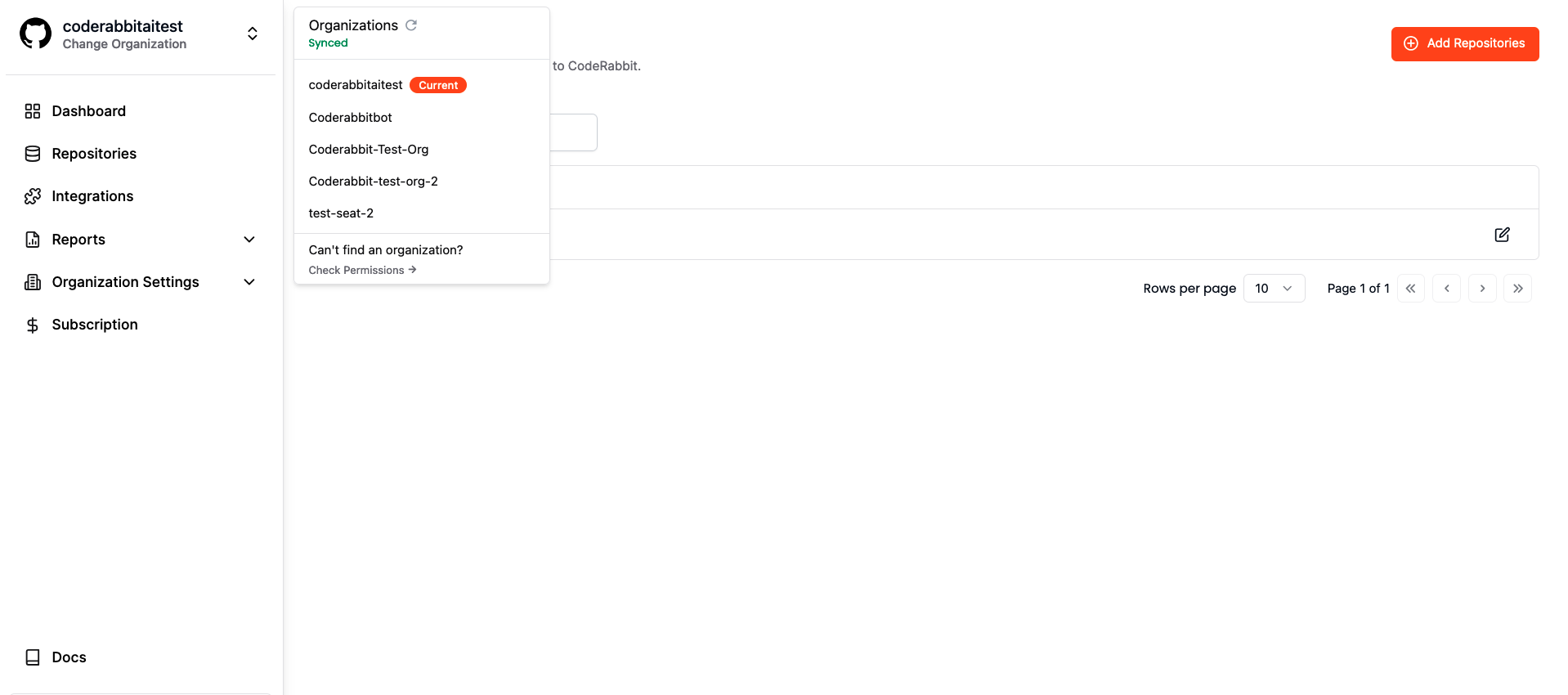
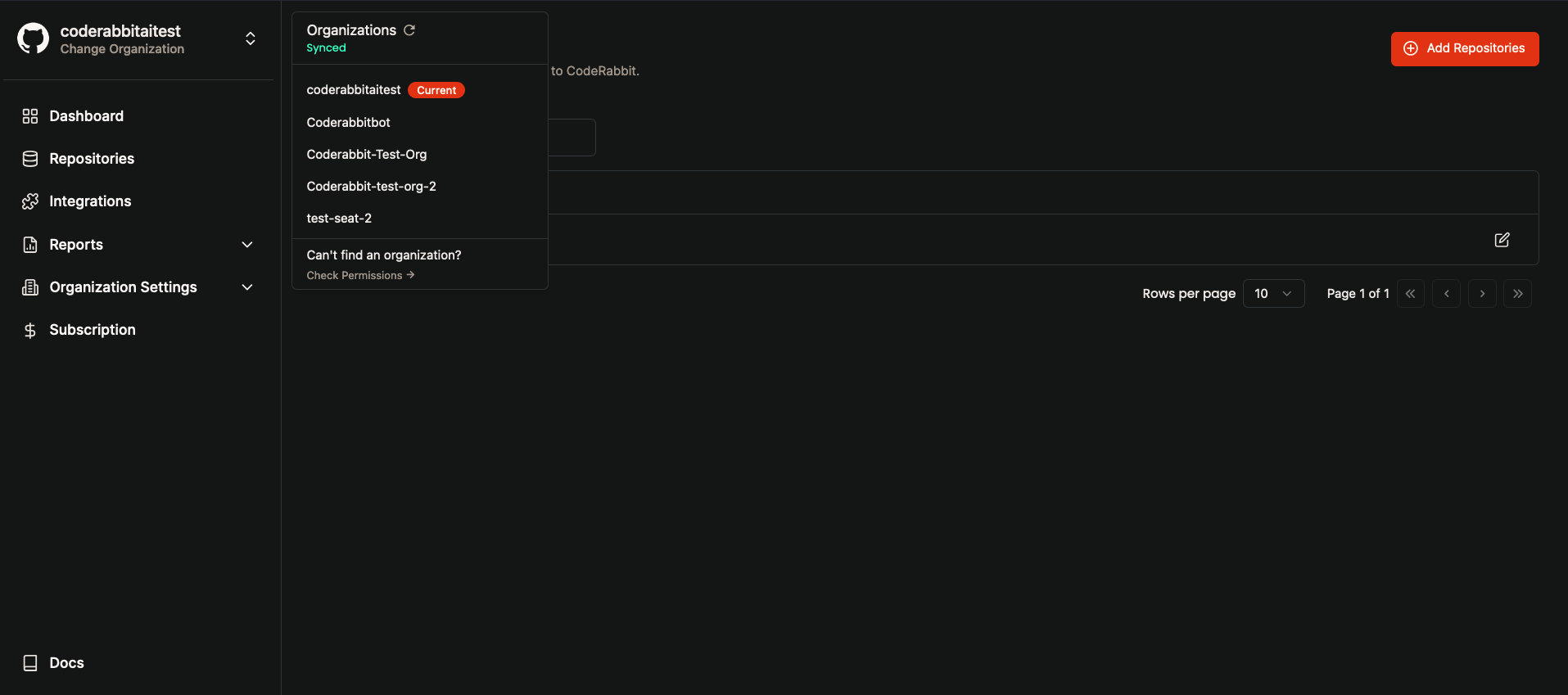
Switch between organizations easily:
1. Click organization name (top-left corner)
2. Select desired organization
3. Access organization-specific settings
 ### Comparison with Other Tools
> Code reviews remain essential, whether the code is written by a human or a bot. This is mainly because the perspective of the reviewer differs from that of the code generator, whether human or machine. This distinction is precisely why human peer reviews have been effective for so long. While AI-powered code-generation tools like GitHub Copilot hold immense potential, it's important to recognize that these generators are still in their early stages and may not be equipped to auto-generate meaningful code for moderately complex applications.
#### vs AI Code Generators
* Provides review perspective different from code generation
* Complements tools like GitHub Copilot
* Focuses on code quality and best practices
#### vs Traditional Review Tools
* Context-aware feedback
* Actionable suggestions
* Direct commit capabilities
* AI-powered intent understanding
## Usage and Configuration
### When Does CodeRabbit Review PRs?
* ✅ **New PRs**: Automatic review when created
* ✅ **New Commits**: Automatic review when pushed to any PR
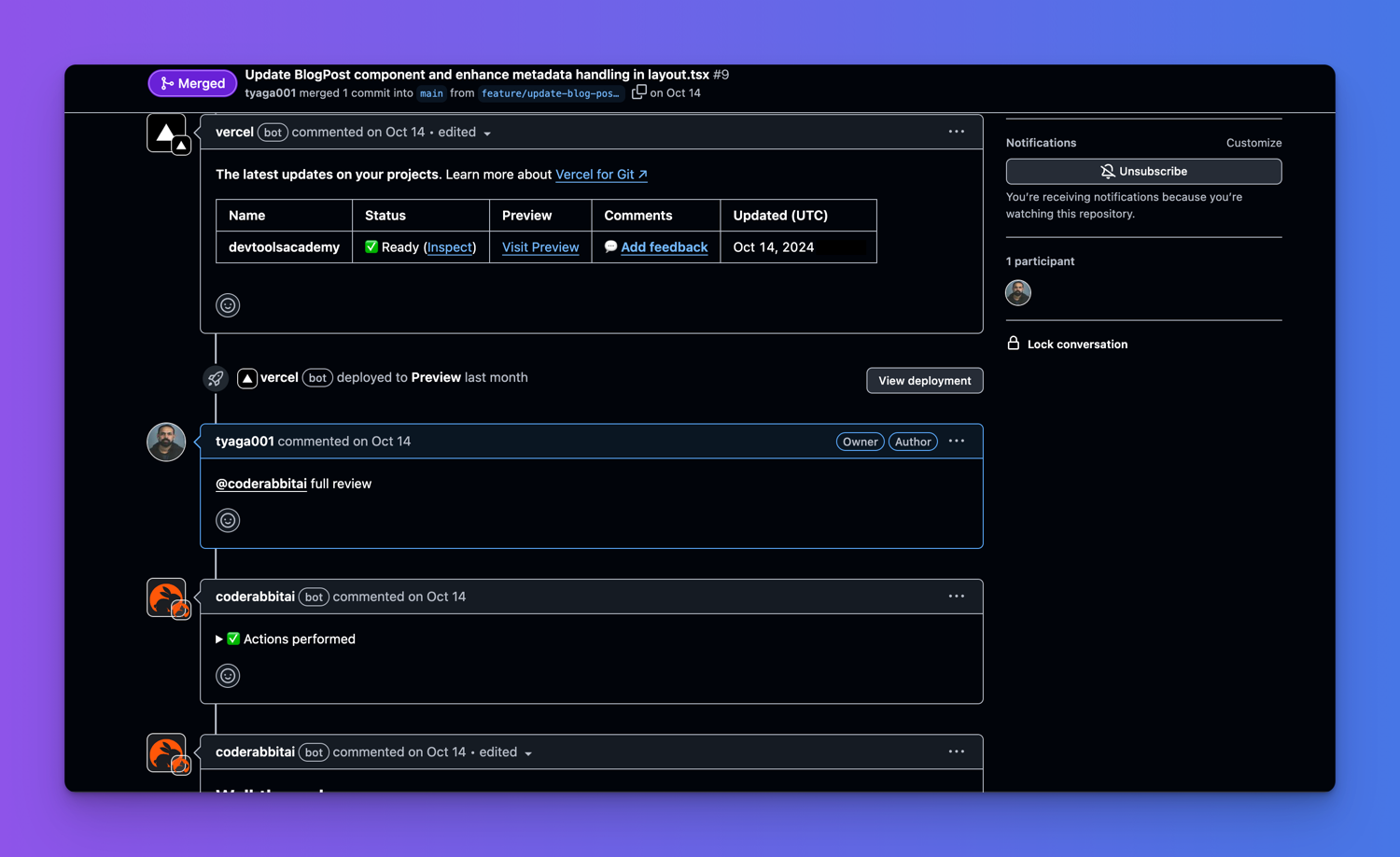
* ⚡ **Older PRs**: Use `@coderabbitai review` to trigger manually
### Comparison with Other Tools
> Code reviews remain essential, whether the code is written by a human or a bot. This is mainly because the perspective of the reviewer differs from that of the code generator, whether human or machine. This distinction is precisely why human peer reviews have been effective for so long. While AI-powered code-generation tools like GitHub Copilot hold immense potential, it's important to recognize that these generators are still in their early stages and may not be equipped to auto-generate meaningful code for moderately complex applications.
#### vs AI Code Generators
* Provides review perspective different from code generation
* Complements tools like GitHub Copilot
* Focuses on code quality and best practices
#### vs Traditional Review Tools
* Context-aware feedback
* Actionable suggestions
* Direct commit capabilities
* AI-powered intent understanding
## Usage and Configuration
### When Does CodeRabbit Review PRs?
* ✅ **New PRs**: Automatic review when created
* ✅ **New Commits**: Automatic review when pushed to any PR
* ⚡ **Older PRs**: Use `@coderabbitai review` to trigger manually
 ### Customization Options
#### How to Add or Update Your Billing Email
To add or update your billing email, go to [**Subscription and Billing**](https://app.coderabbit.ai/settings/subscription), select **Billing Overview**, then edit **Billing information**. Update the billing email or additional invoice recipients, review the change, and save.
### Usage and Configuration
* **Language Settings**: Configure review language in repository settings
* **Review Rules**: Customize via [review instructions](/configuration/path-instructions)
* **Branch Selection**: Default branch reviews enabled by default (configurable)
### Access & Permissions
* Minimal repository access required
* Review permissions during installation
* Individual developer support available
### Interaction Guide
Interact with CodeRabbit by:
1. Replying directly to CodeRabbit comments
2. Tagging `@coderabbitai` in PR discussions
3. Adding review comments for specific lines
4. Customize via [review instructions](/configuration/path-instructions)
When team members are active in PRs, use `@coderabbitai` to engage the bot.
### Usage Limits
The default 14-day trial includes Pro+ features but uses a separate rate-limit profile: 3 PR, IDE, and CLI reviews per developer per hour, plus 50 chat messages per hour. See [Plans and pricing](/management/plans#rate-limits) for the full table. Open-source and paid plans use their own rate limits. All limits use rolling windows, so capacity becomes available as earlier usage ages out.
For Pro and Pro+ PR reviews, your plan includes a set number of PR reviews per developer, per hour. Pro includes 5 PR reviews per hour and Pro+ includes 10 PR reviews per hour. Additional reviews become available as earlier reviews age out of the rolling window rather than resetting all at once.
CodeRabbit uses recent PR review activity to decide when more reviews become available. Developers with typical PR review activity continue to see reviews become available normally for their plan. When one developer identity reaches the 95th percentile or higher of recent CodeRabbit PR review usage, CodeRabbit gradually spaces out additional reviews for that developer. Reducing or pausing review activity lets recent usage come down over time, which can restore faster review availability. Your plan allowance is not changed. To learn more, see our [Fair Usage Limits Policy](/management/plans#fair-usage-limits-policy). See [Rate limits](/management/plans#rate-limits) for the per-developer limits on each plan.
To reduce unnecessary PR reviews, tune [automatic review controls](/configuration/auto-review): pause automatic incremental reviews after 1 or 2 reviewed commits, turn off automatic reviews and add a configured ready-for-review label to opt PRs in, use title exclusions for WIP or generated changes, or request reviews manually. If your organization needs uninterrupted eligible over-limit reviews, you can purchase credits through the [Usage-based Add-on](/management/usage-based-addon). CLI and agentic API-key reviews also use assigned-seat allowance first, then usage credits only for eligible over-limit reviews.
### How can I check my remaining PR review limit?
You can comment `@coderabbitai rate limit` or ask an obvious question such as `@coderabbitai reviews remaining?` to check your PR review limit and next availability timing without consuming a review.
## Plans and Pricing
### What's the difference between Pro and Pro+?
The **Pro plan** includes all the features you need for AI code reviews — PR reviews, docstrings, autofix, built-in pre-merge checks, integrations, Knowledge base, and analytics. All ongoing improvements to review functionality are included in Pro.
The **Pro+ plan** includes everything in Pro, plus tasks and actions that happen upstream and downstream of the review process — [CodeRabbit Plan](/plan) and issue planning, [unit test generation](/finishing-touches/unit-test-generation), [simplify code](/finishing-touches/simplify), [merge conflict resolution](/finishing-touches/resolve-merge-conflict), and other pre/post-merge actions. Pro+ also offers higher [rate limits](/management/plans#rate-limits) and increased limits for [MCP connections](/integrations/mcp-servers) and [linked repository analysis](/knowledge-base/multi-repo-analysis).
See [Plans and pricing](/management/plans) for the full comparison.
### What billing details are required, and how are the emails used?
CodeRabbit collects account contact details (name, company, primary email, phone) and invoice details (billing email, billing address, optional Tax ID) when you start or update a paid subscription. See [Billing and changing plans](/management/billing#what-billing-details-are-required) for the full breakdown of required fields and how each is used.
### How do upgrades and downgrades work?
Upgrade-style changes (adding seats or moving to a higher plan) take effect immediately; downgrade-style changes are scheduled for the end of the billing cycle. See [Billing and changing plans](/management/billing#how-do-upgrades-and-downgrades-work) for the full behavior table.
### Is CodeRabbit Agent for Slack or Discord included in my subscription?
No. CodeRabbit Agent is billed separately from CodeRabbit review plans. Your CodeRabbit subscription covers pull request reviews, IDE and CLI reviews, and related features. CodeRabbit Agent usage is measured in **agent minutes** — the actual runtime each run spends working, and is charged independently.
You do not need a paid CodeRabbit review plan to use CodeRabbit Agent, and a paid review plan does not include Agent usage. Some Agent trials include a limited Agent Minutes grant; after the trial grant is exhausted or expires, an admin must activate the Agent plan before new Agent runs can continue. See the [Slack Agent overview](/slack-agent) and [Usage](/slack-agent/usage) for details.
## Integration Guide
### Prerequisites
* Organization admin access
* Domain allowlist (GitLab: add `coderabbit.ai`)
* Default branch configuration
### Quick Setup
1. Sign up at [coderabbit.ai](https://coderabbit.ai) using your GitHub account
2. Add your repository through the dashboard
3. That's it. CodeRabbit will automatically start reviewing your PRs
Visit our [Support](/support) page for additional assistance or reach out to our team on [Discord](https://discord.gg/coderabbit).
#### Unable to View Repositories in GitLab
If you cannot view repositories in the CodeRabbit UI, please ensure that you
are added as a Developer in the primary group for GitLab Cloud or in the first
level group for Self-Hosted GitLab.
#### Unable to Enable Repositories in GitLab
If you're having trouble enabling the GitLab Repositories toggle, confirm that
you have Maintainer access in the primary group for GitLab Cloud or in the first
level group for Self-Hosted GitLab.
## Account Management
### How do I cancel my subscription?
If you can manage your organization's subscription, go to
[**Subscription and Billing**](https://app.coderabbit.ai/settings/subscription),
open your current plan, click **Cancel CodeRabbit paid plan**, and follow the
prompts to confirm.
If the page is read-only, ask an organization Admin or Billing Admin to make
the change. For the full flow, see [Canceling a paid subscription](/management/subscription-management#canceling-a-paid-subscription).
### How to troubleshoot CodeRabbit not functioning on certain repositories?
If CodeRabbit is not functioning on certain repositories, it is likely due to the repository not being accessible to CodeRabbit and you must reinstall the GitHub App or GitLab Integration.
For newly added GitHub organizations, first use **Refresh organization list** in CodeRabbit after returning from GitHub. If the organization or repositories are not visible immediately, refresh or retry the add flow; CodeRabbit preserves your place while setup is active. If setup is not completed promptly (about 30 minutes), restart **Add organization**.
To troubleshoot this issue, please attempt to reinstall the GitHub App or GitLab Integration by following the steps below:
1. Confirm that the author of a pull request has an active seat in CodeRabbit. If not please provide a seat to the user under [Subscription](https://app.coderabbit.ai/settings/subscription) page to enable CodeRabbit for the user. Then have the user close/reopen a new pull request for the change to see CodeRabbit active on the new user.
### Customization Options
#### How to Add or Update Your Billing Email
To add or update your billing email, go to [**Subscription and Billing**](https://app.coderabbit.ai/settings/subscription), select **Billing Overview**, then edit **Billing information**. Update the billing email or additional invoice recipients, review the change, and save.
### Usage and Configuration
* **Language Settings**: Configure review language in repository settings
* **Review Rules**: Customize via [review instructions](/configuration/path-instructions)
* **Branch Selection**: Default branch reviews enabled by default (configurable)
### Access & Permissions
* Minimal repository access required
* Review permissions during installation
* Individual developer support available
### Interaction Guide
Interact with CodeRabbit by:
1. Replying directly to CodeRabbit comments
2. Tagging `@coderabbitai` in PR discussions
3. Adding review comments for specific lines
4. Customize via [review instructions](/configuration/path-instructions)
When team members are active in PRs, use `@coderabbitai` to engage the bot.
### Usage Limits
The default 14-day trial includes Pro+ features but uses a separate rate-limit profile: 3 PR, IDE, and CLI reviews per developer per hour, plus 50 chat messages per hour. See [Plans and pricing](/management/plans#rate-limits) for the full table. Open-source and paid plans use their own rate limits. All limits use rolling windows, so capacity becomes available as earlier usage ages out.
For Pro and Pro+ PR reviews, your plan includes a set number of PR reviews per developer, per hour. Pro includes 5 PR reviews per hour and Pro+ includes 10 PR reviews per hour. Additional reviews become available as earlier reviews age out of the rolling window rather than resetting all at once.
CodeRabbit uses recent PR review activity to decide when more reviews become available. Developers with typical PR review activity continue to see reviews become available normally for their plan. When one developer identity reaches the 95th percentile or higher of recent CodeRabbit PR review usage, CodeRabbit gradually spaces out additional reviews for that developer. Reducing or pausing review activity lets recent usage come down over time, which can restore faster review availability. Your plan allowance is not changed. To learn more, see our [Fair Usage Limits Policy](/management/plans#fair-usage-limits-policy). See [Rate limits](/management/plans#rate-limits) for the per-developer limits on each plan.
To reduce unnecessary PR reviews, tune [automatic review controls](/configuration/auto-review): pause automatic incremental reviews after 1 or 2 reviewed commits, turn off automatic reviews and add a configured ready-for-review label to opt PRs in, use title exclusions for WIP or generated changes, or request reviews manually. If your organization needs uninterrupted eligible over-limit reviews, you can purchase credits through the [Usage-based Add-on](/management/usage-based-addon). CLI and agentic API-key reviews also use assigned-seat allowance first, then usage credits only for eligible over-limit reviews.
### How can I check my remaining PR review limit?
You can comment `@coderabbitai rate limit` or ask an obvious question such as `@coderabbitai reviews remaining?` to check your PR review limit and next availability timing without consuming a review.
## Plans and Pricing
### What's the difference between Pro and Pro+?
The **Pro plan** includes all the features you need for AI code reviews — PR reviews, docstrings, autofix, built-in pre-merge checks, integrations, Knowledge base, and analytics. All ongoing improvements to review functionality are included in Pro.
The **Pro+ plan** includes everything in Pro, plus tasks and actions that happen upstream and downstream of the review process — [CodeRabbit Plan](/plan) and issue planning, [unit test generation](/finishing-touches/unit-test-generation), [simplify code](/finishing-touches/simplify), [merge conflict resolution](/finishing-touches/resolve-merge-conflict), and other pre/post-merge actions. Pro+ also offers higher [rate limits](/management/plans#rate-limits) and increased limits for [MCP connections](/integrations/mcp-servers) and [linked repository analysis](/knowledge-base/multi-repo-analysis).
See [Plans and pricing](/management/plans) for the full comparison.
### What billing details are required, and how are the emails used?
CodeRabbit collects account contact details (name, company, primary email, phone) and invoice details (billing email, billing address, optional Tax ID) when you start or update a paid subscription. See [Billing and changing plans](/management/billing#what-billing-details-are-required) for the full breakdown of required fields and how each is used.
### How do upgrades and downgrades work?
Upgrade-style changes (adding seats or moving to a higher plan) take effect immediately; downgrade-style changes are scheduled for the end of the billing cycle. See [Billing and changing plans](/management/billing#how-do-upgrades-and-downgrades-work) for the full behavior table.
### Is CodeRabbit Agent for Slack or Discord included in my subscription?
No. CodeRabbit Agent is billed separately from CodeRabbit review plans. Your CodeRabbit subscription covers pull request reviews, IDE and CLI reviews, and related features. CodeRabbit Agent usage is measured in **agent minutes** — the actual runtime each run spends working, and is charged independently.
You do not need a paid CodeRabbit review plan to use CodeRabbit Agent, and a paid review plan does not include Agent usage. Some Agent trials include a limited Agent Minutes grant; after the trial grant is exhausted or expires, an admin must activate the Agent plan before new Agent runs can continue. See the [Slack Agent overview](/slack-agent) and [Usage](/slack-agent/usage) for details.
## Integration Guide
### Prerequisites
* Organization admin access
* Domain allowlist (GitLab: add `coderabbit.ai`)
* Default branch configuration
### Quick Setup
1. Sign up at [coderabbit.ai](https://coderabbit.ai) using your GitHub account
2. Add your repository through the dashboard
3. That's it. CodeRabbit will automatically start reviewing your PRs
Visit our [Support](/support) page for additional assistance or reach out to our team on [Discord](https://discord.gg/coderabbit).
#### Unable to View Repositories in GitLab
If you cannot view repositories in the CodeRabbit UI, please ensure that you
are added as a Developer in the primary group for GitLab Cloud or in the first
level group for Self-Hosted GitLab.
#### Unable to Enable Repositories in GitLab
If you're having trouble enabling the GitLab Repositories toggle, confirm that
you have Maintainer access in the primary group for GitLab Cloud or in the first
level group for Self-Hosted GitLab.
## Account Management
### How do I cancel my subscription?
If you can manage your organization's subscription, go to
[**Subscription and Billing**](https://app.coderabbit.ai/settings/subscription),
open your current plan, click **Cancel CodeRabbit paid plan**, and follow the
prompts to confirm.
If the page is read-only, ask an organization Admin or Billing Admin to make
the change. For the full flow, see [Canceling a paid subscription](/management/subscription-management#canceling-a-paid-subscription).
### How to troubleshoot CodeRabbit not functioning on certain repositories?
If CodeRabbit is not functioning on certain repositories, it is likely due to the repository not being accessible to CodeRabbit and you must reinstall the GitHub App or GitLab Integration.
For newly added GitHub organizations, first use **Refresh organization list** in CodeRabbit after returning from GitHub. If the organization or repositories are not visible immediately, refresh or retry the add flow; CodeRabbit preserves your place while setup is active. If setup is not completed promptly (about 30 minutes), restart **Add organization**.
To troubleshoot this issue, please attempt to reinstall the GitHub App or GitLab Integration by following the steps below:
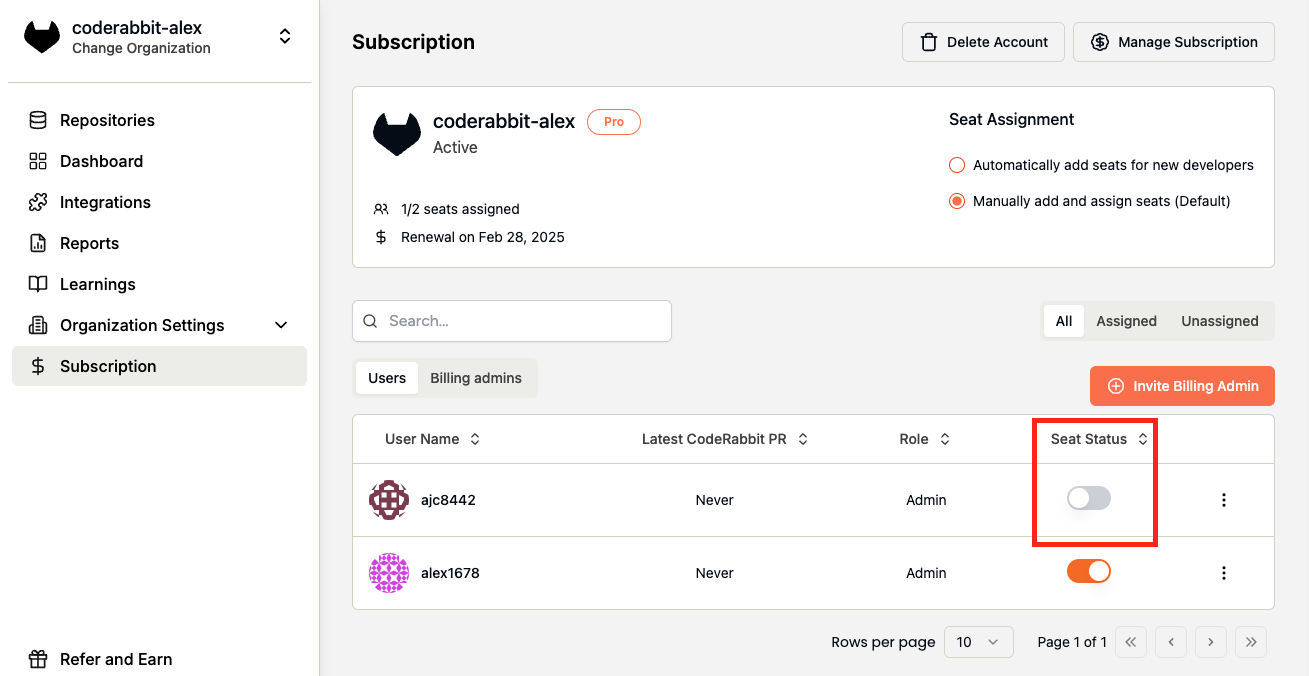
1. Confirm that the author of a pull request has an active seat in CodeRabbit. If not please provide a seat to the user under [Subscription](https://app.coderabbit.ai/settings/subscription) page to enable CodeRabbit for the user. Then have the user close/reopen a new pull request for the change to see CodeRabbit active on the new user.
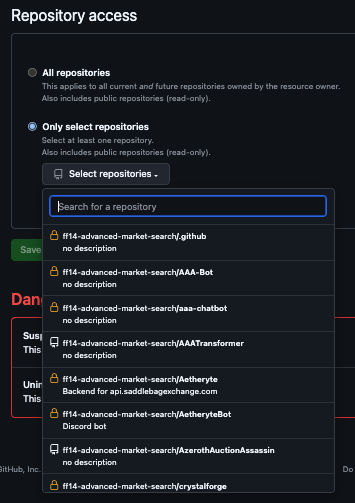
 2. Please ensure if not selecting all repositories, that you have added all repositories that you would like to enable to the selected list in the app configuration.
3. If the repository is not in the list, you do not have to uninstall and reinstall the CodeRabbit App. Please add it to the list.
2. Please ensure if not selecting all repositories, that you have added all repositories that you would like to enable to the selected list in the app configuration.
3. If the repository is not in the list, you do not have to uninstall and reinstall the CodeRabbit App. Please add it to the list.
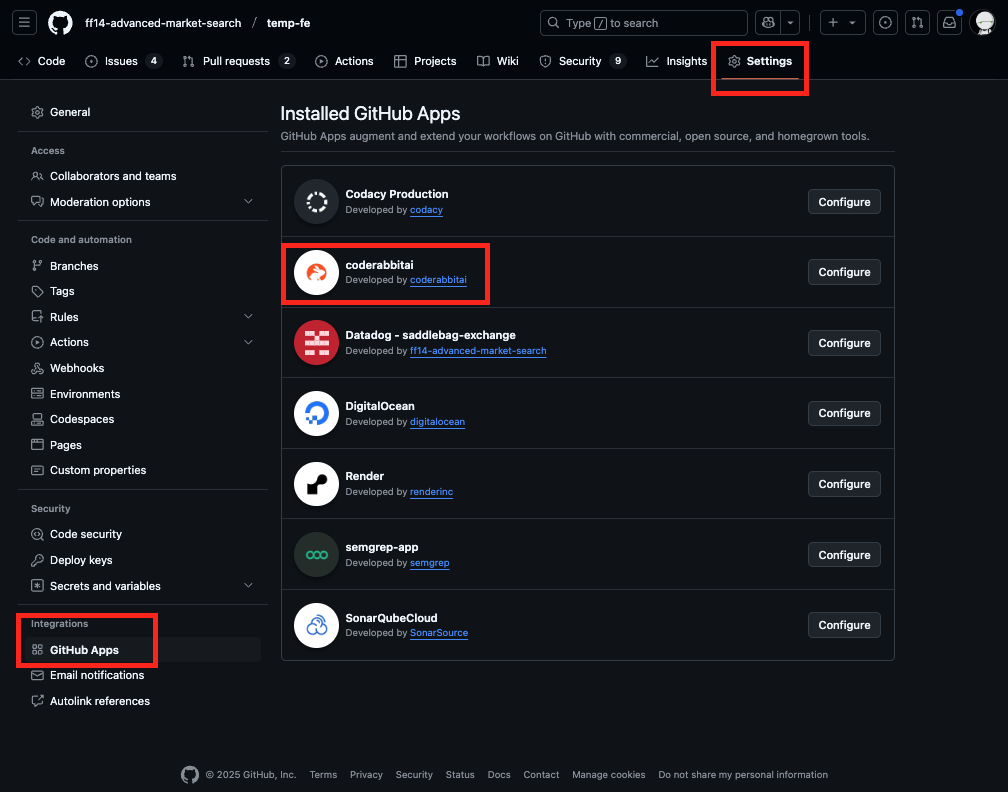
 1. Go to Repository settings
2. Click **GitHub Apps** in the left sidebar under **Integrations**
3. Select **Configure**
1. Go to Repository settings
2. Click **GitHub Apps** in the left sidebar under **Integrations**
3. Select **Configure**
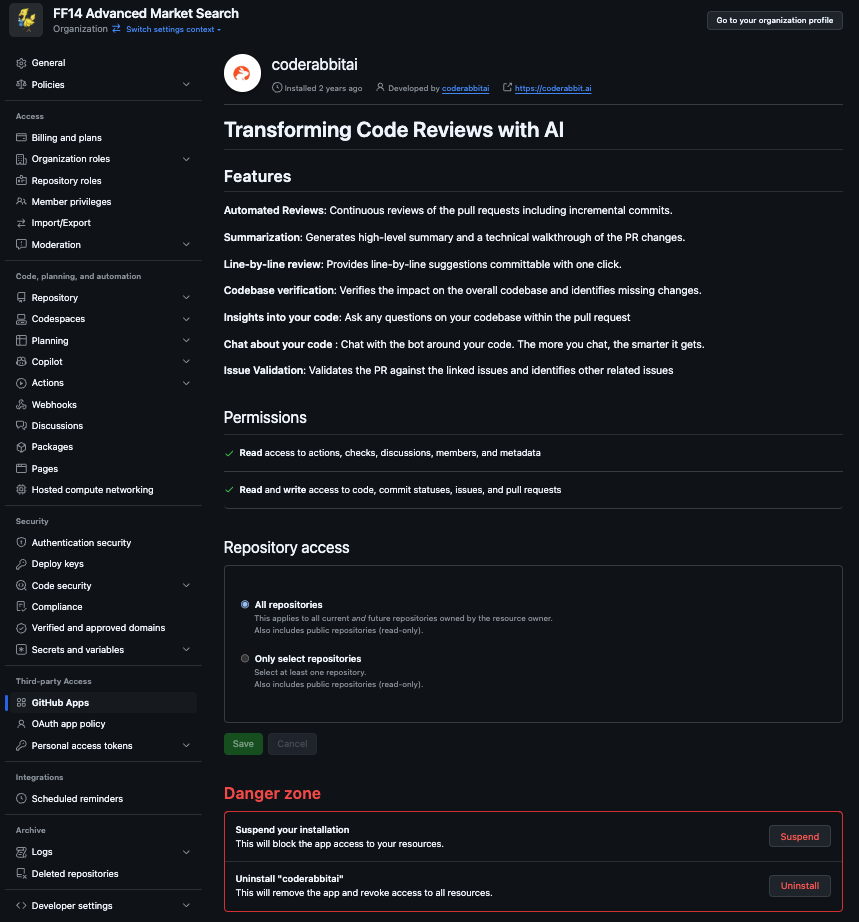
 4. Click **Uninstall** at the bottom of the app configuration page.
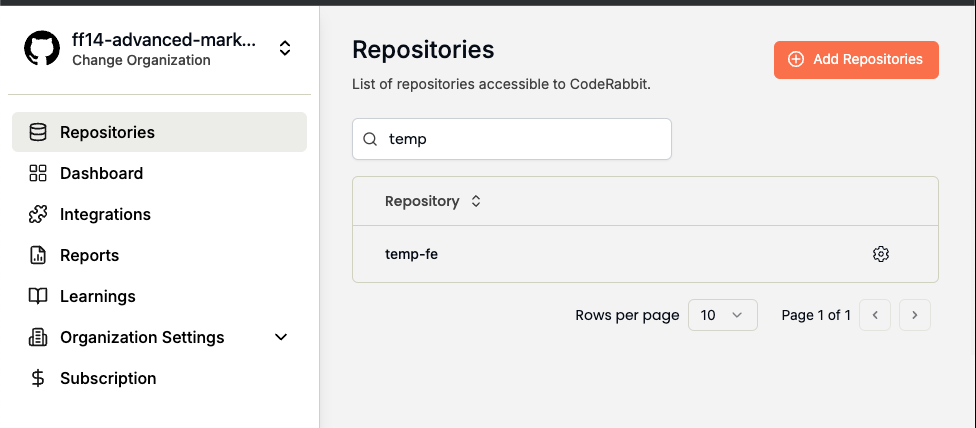
 5. Go into the [CodeRabbit App](https://github.com/apps/coderabbitai) and install it again with the **Add Repository** button.
 1. Remove OAuth App from User Settings > Applications
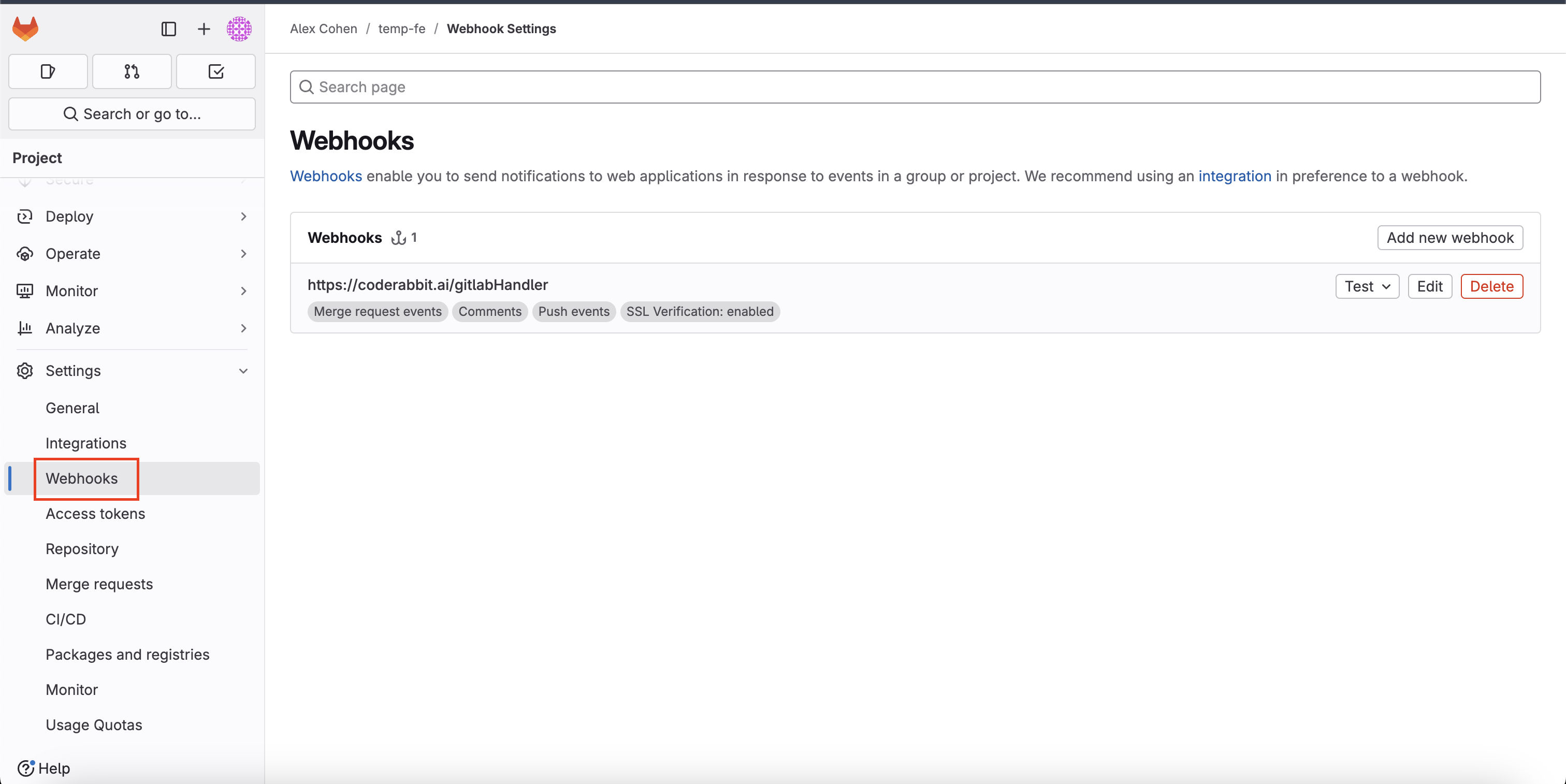
2. Remove Webhook from Group > Project Settings > Webhooks
3. Go into the [CodeRabbit App](https://gitlab.com/apps/coderabbitai) and install it again.
1. Remove OAuth App from User Settings > Applications
2. Remove Webhook from Group > Project Settings > Webhooks
3. Go into the [CodeRabbit App](https://gitlab.com/apps/coderabbitai) and install it again.
 ### How do I delete my CodeRabbit account?
Irreversible Account Deletion
Deleting your CodeRabbit account is permanent and cannot be undone. This action will permanently erase:
* Organization and Repository data
* AI Bot learnings and insights
* Subscriptions and billing information
* All settings and configurations
* Reports and recurring reports
* Third-party service integrations
Deleting the organization immediately cancels any active subscription rather than leaving it active through the end of the current billing term.
1. Sign into your CodeRabbit account
2. Navigate to the [**Subscription and Billing**](https://app.coderabbit.ai/settings/subscription) page
3. Select the **Danger Zone** tab
4. In the **Delete account** section, click **Delete account**
5. Review the deletion confirmation drawer and acknowledge the required warnings
6. Type `delete ` to confirm
7. Complete platform-specific cleanup on the tab above.
The **Danger Zone** tab and **Delete account** action are only visible to admin users.
A confirmation drawer will appear explaining the consequences of account deletion. You can expand each section for detailed information.
After account deletion, you must:
**Remove OAuth App:**
1. Go to Organization settings
2. Click **OAuth Application Policy**
3. Find **coderabbitai** and click the pencil icon
4. Click **Revoke**
**Uninstall GitHub App:**
1. Go to Organization settings
2. Click **GitHub Apps**
3. Select **Configure**
4. Click **Uninstall**
Complete these steps:
1. Remove OAuth App from User Settings > Applications
2. Remove Webhook from Group > Project Settings > Webhooks
3. Remove Bot User from Group > Manage > Members
1. Go to Project Settings > Service Hooks
2. Delete CodeRabbit webhooks
3. Remove CodeRabbit user or delete associated Personal Access Token
1. Go to Project Settings > Webhooks
2. Delete CodeRabbit webhooks
3. Remove CodeRabbit user or delete associated App Passwords
The platform-specific cleanup steps are necessary to completely remove CodeRabbit access. Without completing these steps:
* CodeRabbit may retain some platform permissions
* Signing back in will recreate minimal account data
### How do I delete my CodeRabbit account?
Irreversible Account Deletion
Deleting your CodeRabbit account is permanent and cannot be undone. This action will permanently erase:
* Organization and Repository data
* AI Bot learnings and insights
* Subscriptions and billing information
* All settings and configurations
* Reports and recurring reports
* Third-party service integrations
Deleting the organization immediately cancels any active subscription rather than leaving it active through the end of the current billing term.
1. Sign into your CodeRabbit account
2. Navigate to the [**Subscription and Billing**](https://app.coderabbit.ai/settings/subscription) page
3. Select the **Danger Zone** tab
4. In the **Delete account** section, click **Delete account**
5. Review the deletion confirmation drawer and acknowledge the required warnings
6. Type `delete ` to confirm
7. Complete platform-specific cleanup on the tab above.
The **Danger Zone** tab and **Delete account** action are only visible to admin users.
A confirmation drawer will appear explaining the consequences of account deletion. You can expand each section for detailed information.
After account deletion, you must:
**Remove OAuth App:**
1. Go to Organization settings
2. Click **OAuth Application Policy**
3. Find **coderabbitai** and click the pencil icon
4. Click **Revoke**
**Uninstall GitHub App:**
1. Go to Organization settings
2. Click **GitHub Apps**
3. Select **Configure**
4. Click **Uninstall**
Complete these steps:
1. Remove OAuth App from User Settings > Applications
2. Remove Webhook from Group > Project Settings > Webhooks
3. Remove Bot User from Group > Manage > Members
1. Go to Project Settings > Service Hooks
2. Delete CodeRabbit webhooks
3. Remove CodeRabbit user or delete associated Personal Access Token
1. Go to Project Settings > Webhooks
2. Delete CodeRabbit webhooks
3. Remove CodeRabbit user or delete associated App Passwords
The platform-specific cleanup steps are necessary to completely remove CodeRabbit access. Without completing these steps:
* CodeRabbit may retain some platform permissions
* Signing back in will recreate minimal account data