> ## Documentation Index
> Fetch the complete documentation index at: https://docs.coderabbit.ai/llms.txt
> Use this file to discover all available pages before exploring further.
# Generate docstrings
> Automatically generate comprehensive docstrings that match your existing format, delivered through PR workflow for complete review control
export const OpenBetaBadge = ({tip = "This feature is currently in open beta. We are actively improving it based on your feedback. If you encounter any issues or have suggestions, please share them on our Discord community or visit the support page.", title = "Open Beta", cta = "Contact support", href = "/support", disabled = false}) => {
return
{title}
;
};
export const ProPlanBadge = ({tip = "This feature is available as part of the Pro, Pro+ and Enterprise plans. Please refer to our pricing page for more information about our plans and features.", title = "Pro Plan", cta = "Read more", href = "https://coderabbit.ai/pricing", disabled = false}) => {
return
{title}
;
};
Writing documentation for every function is time-consuming, but undocumented code creates bottlenecks during code reviews. You spend cycles explaining what functions do instead of focusing on business logic and architecture decisions.
CodeRabbit generates docstrings for functions missing documentation in your PRs. Comment `@coderabbitai generate docstrings` or check the box in your PR walkthrough to trigger generation.
The system scans your changes with ast-grep, identifies functions needing documentation, and generates docstrings that match your codebase's existing format. Depending on platform support, CodeRabbit either opens a follow-up PR with the generated docstrings or posts them back as a PR comment for manual application.
This handles the initial documentation grunt work while keeping you in control through the standard PR review process.
## How it works
Comment `@coderabbitai generate docstrings` in your PR or check **Generate
Docstrings** in the CodeRabbit Walkthrough
ast-grep scans your PR changes to identify functions missing docstrings or
with incomplete documentation
AI analyzes your existing docstrings to detect format patterns (JSDoc,
Google-style, Sphinx) and generates matching documentation
Generated docstrings are committed to a new branch with a PR opened against
your original branch for review and merge (typically 30-60 seconds)
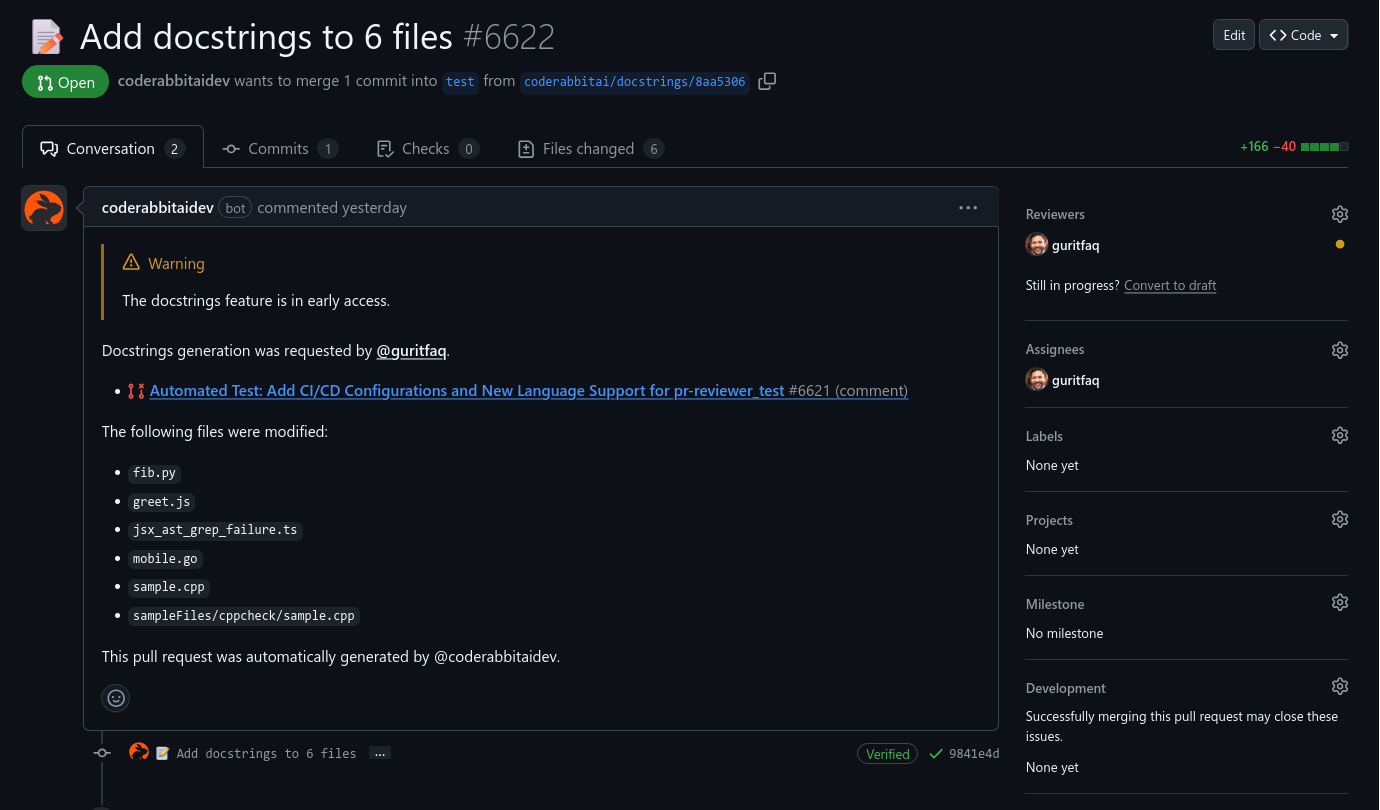 You review the generated PR like any other code change. CodeRabbit preserves existing docstrings and only documents functions that genuinely need it.
CodeRabbit automatically detects your docstring format by analyzing existing
documentation patterns. It matches JSDoc, Google-style, Sphinx, custom
formats, or even Go's doc comment conventions without any configuration.
## Platform support
Docstrings are committed to a new branch and a follow-up PR is opened against your original branch for review and merge.
Docstrings are committed to a new branch and a follow-up PR is opened against your original branch for review and merge.
Docstrings are committed to a new branch and a follow-up PR is opened against your original branch for review and merge.
Docstrings are posted as a PR comment for manual application. Branch-and-PR workflow is not supported on this platform.
## Language support
Docstring generation supports 18+ languages via [ast-grep](https://ast-grep.github.io/):
Bash, C, C++, C#, Elixir, Go, Java, JavaScript, Kotlin, Lua, PHP, Python, React TypeScript, Ruby, Rust, Swift, TypeScript
Language support is provided by `ast-grep`. If your language is missing, consider making a contribution following the `ast-grep` [language addition guide](https://ast-grep.github.io/contributing/add-lang.html#add-new-language-to-ast-grep).
## Configure per-directory styles
Different parts of your codebase need different documentation approaches. Use path-based instructions to match your team's standards:
```yaml .coderabbit.yaml wrap theme={null}
code_generation:
docstrings:
path_instructions:
- path: "src/**/*.ts"
instructions: |
Use TSDoc format with @param, @returns, and @example tags.
Include code examples for public API functions.
Focus on behavior and edge cases.
- path: "**/*test*"
instructions: |
Describe test purpose and expected behavior.
Keep docstrings concise - focus on what is being tested.
- path: "scripts/**/*.py"
instructions: |
Use Google-style docstrings with Args and Returns sections.
Include usage examples for utility scripts.
- path: "models/**/*.py"
instructions: |
Document database models with field descriptions and relationships.
Include example queries and common usage patterns.
```
Path patterns use [minimatch](https://github.com/isaacs/minimatch) syntax to target specific directories, file types, or naming conventions.
### Common configuration examples
```yaml Frontend components wrap theme={null}
- path: "components/**/*.tsx"
instructions: "Document props, usage examples, and accessibility considerations"
```
```yaml API endpoints wrap theme={null}
- path: "api/**/*.{js,ts}"
instructions: "Document request/response formats, status codes, and error handling"
```
```yaml Utility functions wrap theme={null}
- path: "utils/**/*"
instructions: "Focus on input validation, return types, and edge case behavior"
```
```yaml Database models wrap theme={null}
- path: "models/**/*.py"
instructions: "Document fields, relationships, and include example queries"
```
## Reviewing generated docstrings
When CodeRabbit opens a docstring PR, focus your review on:
**Content accuracy:**
* Parameter descriptions match actual function behavior
* Return value documentation reflects real outputs
* Edge cases and error conditions are correctly described
**Format consistency:**
* Generated format matches your codebase conventions
* Examples use appropriate syntax for your language
* Terminology aligns with your project's vocabulary
**Completeness:**
* All parameters are documented with appropriate detail
* Complex functions include usage examples
* Error conditions and exceptions are covered
Most generated docstrings need minimal adjustment. Common tweaks include refining parameter descriptions or adding project-specific terminology.
## Technical implementation
CodeRabbit uses [ast-grep](https://ast-grep.github.io/) for precise code parsing across different programming languages and coding styles. This enables accurate function detection while respecting your code structure and automatically detecting your preferred docstring format.
## What's next
See all available finishing touches and how to trigger them from any PR
Automatically implement fixes for unresolved CodeRabbit review findings
Define reusable, named recipes that encode your team's repeated tasks into one-click agentic actions
You review the generated PR like any other code change. CodeRabbit preserves existing docstrings and only documents functions that genuinely need it.
CodeRabbit automatically detects your docstring format by analyzing existing
documentation patterns. It matches JSDoc, Google-style, Sphinx, custom
formats, or even Go's doc comment conventions without any configuration.
## Platform support
Docstrings are committed to a new branch and a follow-up PR is opened against your original branch for review and merge.
Docstrings are committed to a new branch and a follow-up PR is opened against your original branch for review and merge.
Docstrings are committed to a new branch and a follow-up PR is opened against your original branch for review and merge.
Docstrings are posted as a PR comment for manual application. Branch-and-PR workflow is not supported on this platform.
## Language support
Docstring generation supports 18+ languages via [ast-grep](https://ast-grep.github.io/):
Bash, C, C++, C#, Elixir, Go, Java, JavaScript, Kotlin, Lua, PHP, Python, React TypeScript, Ruby, Rust, Swift, TypeScript
Language support is provided by `ast-grep`. If your language is missing, consider making a contribution following the `ast-grep` [language addition guide](https://ast-grep.github.io/contributing/add-lang.html#add-new-language-to-ast-grep).
## Configure per-directory styles
Different parts of your codebase need different documentation approaches. Use path-based instructions to match your team's standards:
```yaml .coderabbit.yaml wrap theme={null}
code_generation:
docstrings:
path_instructions:
- path: "src/**/*.ts"
instructions: |
Use TSDoc format with @param, @returns, and @example tags.
Include code examples for public API functions.
Focus on behavior and edge cases.
- path: "**/*test*"
instructions: |
Describe test purpose and expected behavior.
Keep docstrings concise - focus on what is being tested.
- path: "scripts/**/*.py"
instructions: |
Use Google-style docstrings with Args and Returns sections.
Include usage examples for utility scripts.
- path: "models/**/*.py"
instructions: |
Document database models with field descriptions and relationships.
Include example queries and common usage patterns.
```
Path patterns use [minimatch](https://github.com/isaacs/minimatch) syntax to target specific directories, file types, or naming conventions.
### Common configuration examples
```yaml Frontend components wrap theme={null}
- path: "components/**/*.tsx"
instructions: "Document props, usage examples, and accessibility considerations"
```
```yaml API endpoints wrap theme={null}
- path: "api/**/*.{js,ts}"
instructions: "Document request/response formats, status codes, and error handling"
```
```yaml Utility functions wrap theme={null}
- path: "utils/**/*"
instructions: "Focus on input validation, return types, and edge case behavior"
```
```yaml Database models wrap theme={null}
- path: "models/**/*.py"
instructions: "Document fields, relationships, and include example queries"
```
## Reviewing generated docstrings
When CodeRabbit opens a docstring PR, focus your review on:
**Content accuracy:**
* Parameter descriptions match actual function behavior
* Return value documentation reflects real outputs
* Edge cases and error conditions are correctly described
**Format consistency:**
* Generated format matches your codebase conventions
* Examples use appropriate syntax for your language
* Terminology aligns with your project's vocabulary
**Completeness:**
* All parameters are documented with appropriate detail
* Complex functions include usage examples
* Error conditions and exceptions are covered
Most generated docstrings need minimal adjustment. Common tweaks include refining parameter descriptions or adding project-specific terminology.
## Technical implementation
CodeRabbit uses [ast-grep](https://ast-grep.github.io/) for precise code parsing across different programming languages and coding styles. This enables accurate function detection while respecting your code structure and automatically detecting your preferred docstring format.
## What's next
See all available finishing touches and how to trigger them from any PR
Automatically implement fixes for unresolved CodeRabbit review findings
Define reusable, named recipes that encode your team's repeated tasks into one-click agentic actions