> ## Documentation Index
> Fetch the complete documentation index at: https://docs.coderabbit.ai/llms.txt
> Use this file to discover all available pages before exploring further.
# Generate unit tests
> Generate comprehensive unit tests automatically for your pull requests, including edge cases and error conditions.
export const OpenBetaBadge = ({tip = "This feature is currently in open beta. We are actively improving it based on your feedback. If you encounter any issues or have suggestions, please share them on our Discord community or visit the support page.", title = "Open Beta", cta = "Contact support", href = "/support", disabled = false}) => {
return
{title}
;
};
export const ProPlusPlanBadge = ({tip = "This feature is available as part of the Pro+ plan and Enterprise plan. Please refer to our pricing page for more information about our plans and features.", title = "Pro+ Plan", cta = "Read more", href = "https://coderabbit.ai/pricing", disabled = false}) => {
return
{title}
;
};
export const GitLabBadge = ({tip = "This feature is available on GitLab.", title = "GitLab", cta, href, disabled = false}) => {
return
{title}
;
};
export const GitHubBadge = ({tip = "This feature is available on GitHub and GitHub Enterprise.", title = "GitHub", cta, href, disabled = false}) => {
return
{title}
;
};
|
## Platform support
Use a PR comment command or the CodeRabbit Walkthrough checkbox.
Use a merge request comment command.
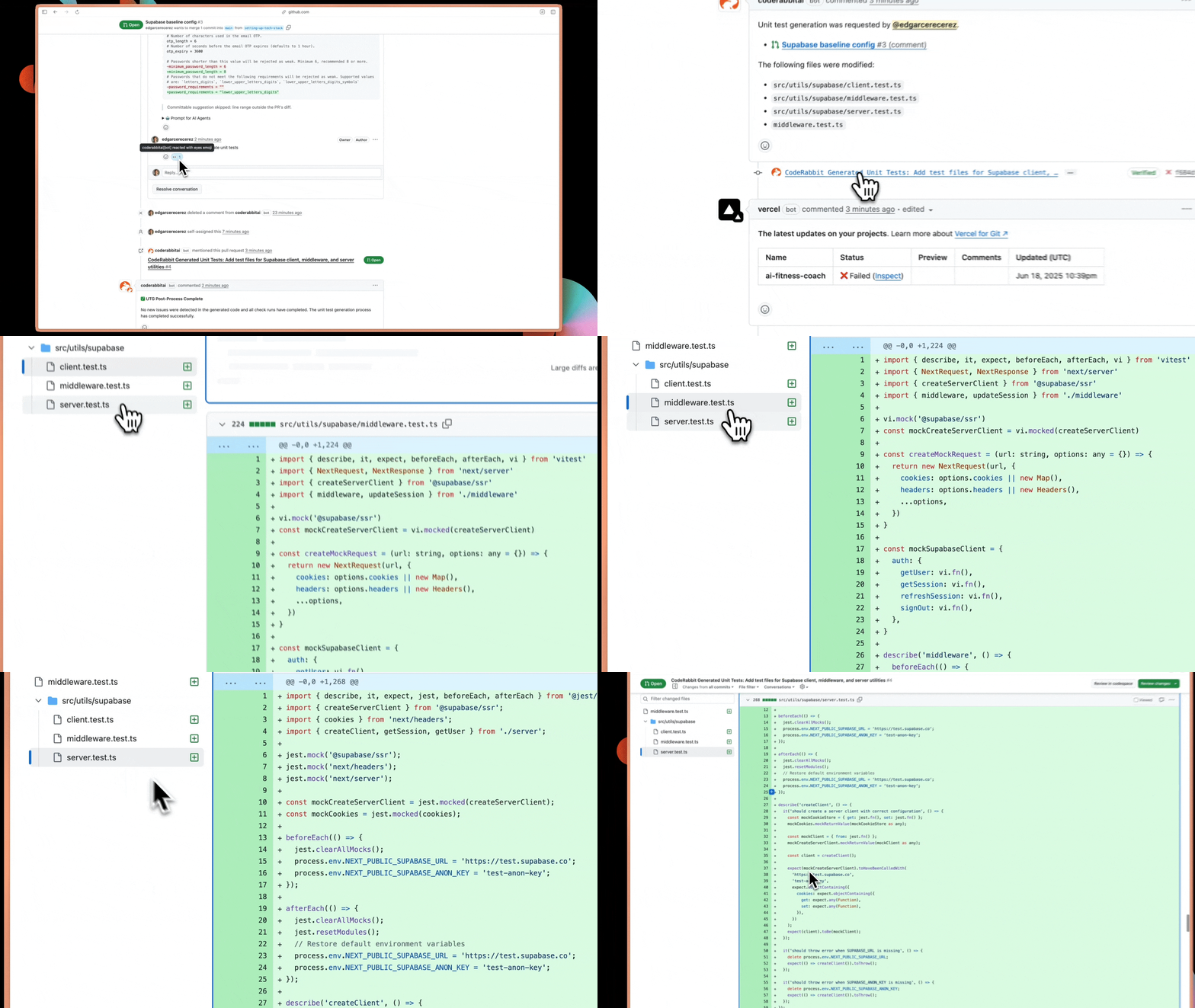 AI coding tools let you write code 10x faster, but comprehensive testing still happens manually. CodeRabbit bridges this gap by analyzing your code changes and generating sophisticated unit tests that understand your project's patterns, testing frameworks, and edge cases.
Type `@coderabbitai generate unit tests` in a GitHub pull request or GitLab merge request comment to generate tests automatically
On GitHub, use the **Generate unit tests** checkbox in the CodeRabbit Walkthrough for one-click generation
## How it works
Comment `@coderabbitai generate unit tests` in your PR or merge request. On GitHub, you can also check the box in the CodeRabbit Walkthrough.
CodeRabbit examines your code changes with full context - understanding your
testing frameworks, existing patterns, and team guidelines from previous
reviews to identify what needs coverage
Tests are generated based on your project's specific context, including
proper mocking strategies, framework conventions, and edge cases that matter
for your codebase
Receive tests in a separate PR or as a new commit on your current PR
branch
For separate PRs, CodeRabbit analyzes available CI workflows and fixes build failures, import errors, and dependency issues automatically
CodeRabbit's test generation goes beyond basic templates. It understands your project's testing patterns and generates tests that actually integrate with your existing test suite.
## Output delivery options
**Recommended for most teams** CodeRabbit creates a new pull request
containing all generated tests. This approach keeps your feature PR focused
while allowing independent review of test code. **Key advantage**:
CodeRabbit automatically fixes CI/CD integration issues. If tests fail due
to missing dependencies, import errors, or configuration problems,
CodeRabbit analyzes your GitHub Actions logs and pushes fixes. This means
you get working tests, not just test code that looks right.
Tests are added as a new commit to your existing pull request. This keeps
feature code and tests together but expands your PR scope. Good for smaller
changes where you want everything reviewed together.
## Path-specific customization
Configure test generation for different parts of your codebase using `.coderabbit.yaml`:
```yaml theme={null}
code_generation:
unit_tests:
path_instructions:
- path: "**/*.ts"
instructions: |
Use vitest for testing framework.
Generate comprehensive test cases including edge cases and error conditions.
Include proper TypeScript types in test expectations.
- path: "**/api/**"
instructions: |
Focus on request/response validation and error handling.
Mock external API calls using MSW.
Test authentication middleware and rate limiting.
- path: "**/components/**"
instructions: |
Use React Testing Library for component tests.
Test user interactions, accessibility, and error boundaries.
Mock complex props and verify state changes.
```
These instructions become part of CodeRabbit's context for future test generation, continuously improving test quality and consistency across your codebase.
## What's next
See all available finishing touches and how to trigger them from any PR
Automatically implement fixes for unresolved CodeRabbit review findings
Let CodeRabbit analyze the intent behind conflicting changes and commit a clean resolution to your branch
AI coding tools let you write code 10x faster, but comprehensive testing still happens manually. CodeRabbit bridges this gap by analyzing your code changes and generating sophisticated unit tests that understand your project's patterns, testing frameworks, and edge cases.
Type `@coderabbitai generate unit tests` in a GitHub pull request or GitLab merge request comment to generate tests automatically
On GitHub, use the **Generate unit tests** checkbox in the CodeRabbit Walkthrough for one-click generation
## How it works
Comment `@coderabbitai generate unit tests` in your PR or merge request. On GitHub, you can also check the box in the CodeRabbit Walkthrough.
CodeRabbit examines your code changes with full context - understanding your
testing frameworks, existing patterns, and team guidelines from previous
reviews to identify what needs coverage
Tests are generated based on your project's specific context, including
proper mocking strategies, framework conventions, and edge cases that matter
for your codebase
Receive tests in a separate PR or as a new commit on your current PR
branch
For separate PRs, CodeRabbit analyzes available CI workflows and fixes build failures, import errors, and dependency issues automatically
CodeRabbit's test generation goes beyond basic templates. It understands your project's testing patterns and generates tests that actually integrate with your existing test suite.
## Output delivery options
**Recommended for most teams** CodeRabbit creates a new pull request
containing all generated tests. This approach keeps your feature PR focused
while allowing independent review of test code. **Key advantage**:
CodeRabbit automatically fixes CI/CD integration issues. If tests fail due
to missing dependencies, import errors, or configuration problems,
CodeRabbit analyzes your GitHub Actions logs and pushes fixes. This means
you get working tests, not just test code that looks right.
Tests are added as a new commit to your existing pull request. This keeps
feature code and tests together but expands your PR scope. Good for smaller
changes where you want everything reviewed together.
## Path-specific customization
Configure test generation for different parts of your codebase using `.coderabbit.yaml`:
```yaml theme={null}
code_generation:
unit_tests:
path_instructions:
- path: "**/*.ts"
instructions: |
Use vitest for testing framework.
Generate comprehensive test cases including edge cases and error conditions.
Include proper TypeScript types in test expectations.
- path: "**/api/**"
instructions: |
Focus on request/response validation and error handling.
Mock external API calls using MSW.
Test authentication middleware and rate limiting.
- path: "**/components/**"
instructions: |
Use React Testing Library for component tests.
Test user interactions, accessibility, and error boundaries.
Mock complex props and verify state changes.
```
These instructions become part of CodeRabbit's context for future test generation, continuously improving test quality and consistency across your codebase.
## What's next
See all available finishing touches and how to trigger them from any PR
Automatically implement fixes for unresolved CodeRabbit review findings
Let CodeRabbit analyze the intent behind conflicting changes and commit a clean resolution to your branch