> ## Documentation Index
> Fetch the complete documentation index at: https://docs.coderabbit.ai/llms.txt
> Use this file to discover all available pages before exploring further.
# Code Review
> Experience CodeRabbit's automated code review by creating your first pull request
export const Hint = ({type, children, headline, tip, href, cta}) => {
const TIPS = {
learnings: {
headline: "Learnings",
tip: "Review preferences CodeRabbit learns from your chat conversations and applies automatically to future reviews.",
cta: "Learn about Learnings",
href: "/knowledge-base/learnings",
content: "Learnings"
},
walkthrough: {
headline: "PR Walkthrough",
tip: "A structured comment posted by CodeRabbit at the top of every pull request, summarizing changes, sequence diagrams, review effort, and more.",
cta: "Learn about PR Walkthroughs",
href: "/pr-reviews/walkthroughs",
content: "Walkthrough"
},
"finishing-touches": {
headline: "Finishing Touches",
tip: "Post-review agentic actions (Autofix, writing docstrings or unit tests, and more) you trigger from a PR comment or a checkbox in the Walkthrough.",
cta: "See all Finishing Touches",
href: "/finishing-touches",
content: "Finishing Touches"
},
"coding-plan": {
headline: "Coding Plan",
tip: "A detailed, codebase-aware implementation plan CodeRabbit generates from an issue or description, ready to hand off to any coding agent.",
cta: "Learn about Coding Plans",
href: "/plan",
content: "Coding Plan"
},
"knowledge-base": {
headline: "Knowledge Base",
tip: "The collected context sources CodeRabbit draws on during reviews: Learnings, Code Guidelines, issue trackers, connected MCP servers, and cross-repo analysis.",
cta: "Explore the Knowledge Base",
href: "/knowledge-base",
content: "Knowledge Base"
},
"path-instructions": {
headline: "Path Instructions",
tip: "Custom review rules that only apply to files matching a glob pattern, e.g. 'src/controllers/**'.",
cta: "Configure path instructions",
href: "/configuration/path-instructions",
content: "Path Instructions"
},
"change-stack": {
headline: "Change Stack",
tip: "An improved code inspection interface that reorganizes a pull request from a flat file list into a structured, layer-by-layer walkthrough with range-specific summaries and diagrams when useful.",
cta: "Learn about Change Stack",
href: "/pr-reviews/change-stack",
content: "Change Stack"
},
scope: {
headline: "Scope",
tip: "A named set of repositories, connections, and spend limits that controls what CodeRabbit Agent can access in a given Slack conversation.",
cta: "Learn about Scopes",
href: "/slack-agent/scopes",
content: "Scope"
},
"coderabbit-agent": {
headline: "CodeRabbit Agent for Slack",
tip: "An AI agent built into Slack that investigates issues, generates implementation plans, and opens pull requests right from the Slack threads.",
cta: "Explore CodeRabbit Agent",
href: "/slack-agent",
content: "CodeRabbit Agent"
},
"configuration-inheritance": {
headline: "Configuration Inheritance",
tip: "A setting that merges configuration values across multiple levels — repository YAML, central YAML, and UI settings — instead of using only the highest-priority source.",
cta: "Learn about Configuration Inheritance",
href: "/configuration/configuration-inheritance",
content: "Configuration Inheritance"
}
};
const defaults = TIPS[type] || ({});
return
{children ?? defaults.content}
;
};
## Create a pull request
Now that CodeRabbit is integrated with your repository, it's time to see it in action. You'll create a pull request with intentionally imperfect code to demonstrate how CodeRabbit identifies issues and provides actionable feedback.
The following steps guide you through creating a pull request that adds a small Python library with a few common code quality issues.
Use your usual Git workflow to perform the following steps in the `coderabbit-test` repository:
Create a branch named `add-utils`.
In that new `add-utils` branch, create a new file called `simple_utils.py`, with the following content:
```python theme={null}
# simple_utils.py - A tiny utility library
def reverse_string(text):
"""Reverses the characters in a string."""
return text[::-1]
def count_words(sentence):
return len(sentence.split())
def celsius_to_fahrenheit(celsius):
return (celsius * 9/5) + 32
```
Commit the added file to the `add-utils` branch. Use any text you want for the commit message.
Create a pull request that proposes to merge the `add-utils` branch into the `main` branch. Use any text you want for the pull request message.
After a few moments, CodeRabbit responds to the pull request using the `@coderabbitai` GitHub account. It performs the following actions, all of which are visible on the pull request's page on GitHub:
* If you didn't write a pull request summary, then CodeRabbit adds a new summary to the pull request.
* CodeRabbit posts a comment titled containing analysis and commentary about the content of the pull request.
* CodeRabbit attaches a detailed code review to the pull request as another comment.
Part of the review resembles the following screenshot:
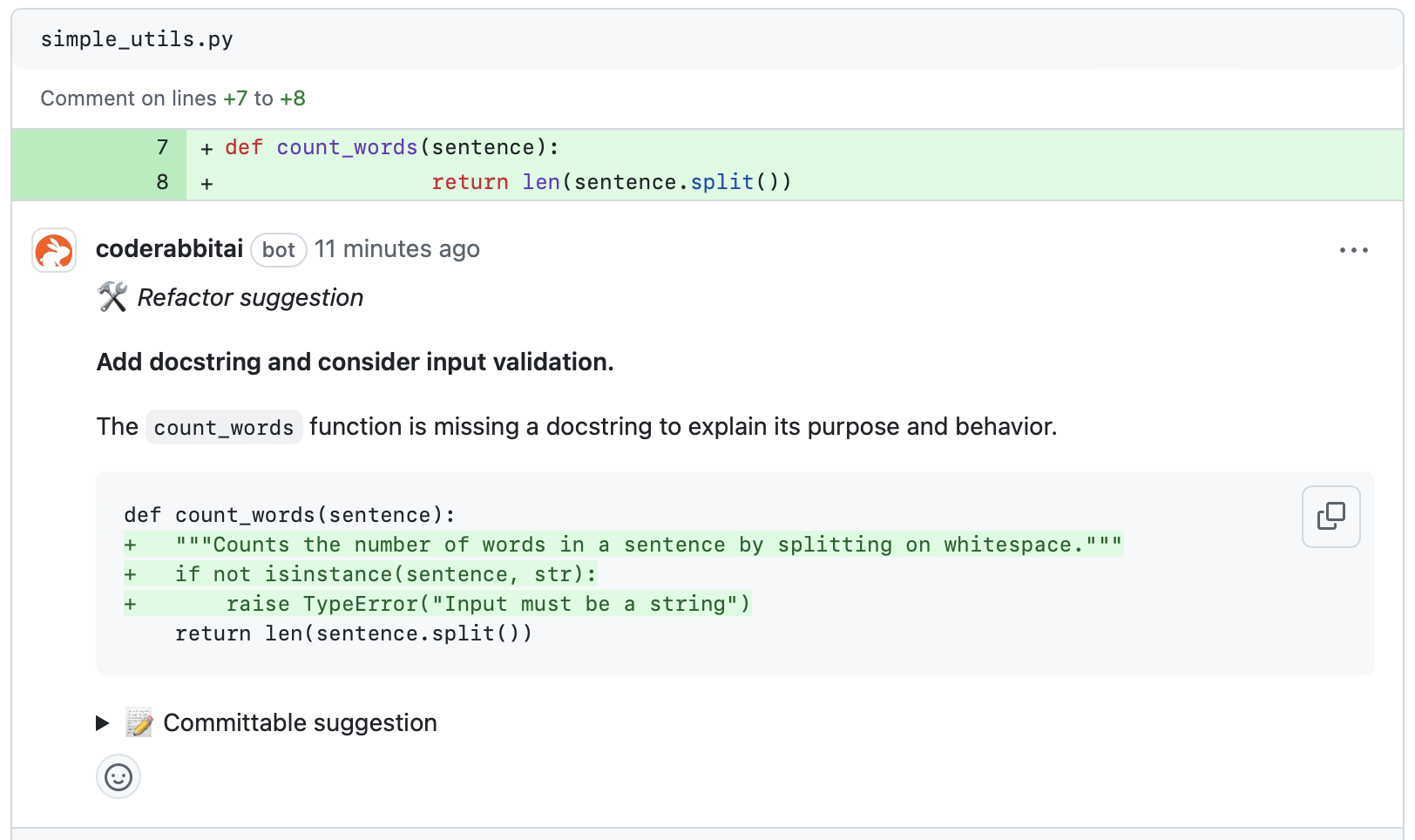 This shows that CodeRabbit has noticed some flaws with this Python library, including a lack of docstrings and input validation. The review comment identifies these flaws, and suggests how you might improve them.