> ## Documentation Index
> Fetch the complete documentation index at: https://docs.coderabbit.ai/llms.txt
> Use this file to discover all available pages before exploring further.
# Create issues
> Turn code discussions into tracked issues across GitHub, GitLab, Jira, and Linear directly from CodeRabbit's chat interface.
export const ProPlanBadge = ({tip = "This feature is available as part of the Pro, Pro+ and Enterprise plans. Please refer to our pricing page for more information about our plans and features.", title = "Pro Plan", cta = "Read more", href = "https://coderabbit.ai/pricing", disabled = false}) => {
return
{title}
;
};
export const AllPlatformsBadge = ({tip = "This feature is available on all supported platforms: GitHub, GitLab, Azure DevOps, and Bitbucket.", title = "All Platforms", cta, href, disabled = false}) => {
return
{title}
;
};
|
When reviewing code, important issues often surface in discussions but get lost without proper tracking. CodeRabbit bridges this gap by creating issues directly from pull request conversations or chat interactions, ensuring nothing falls through the cracks.
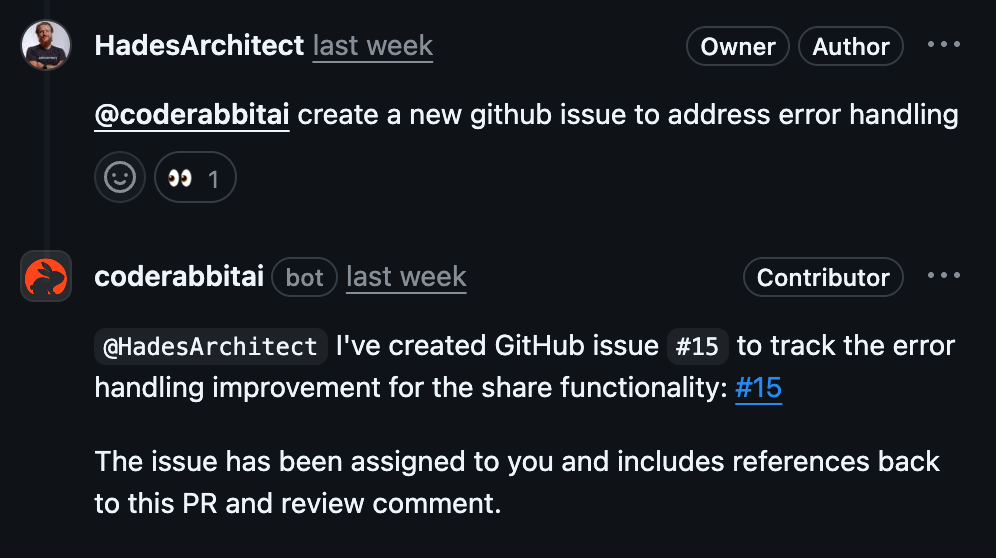
CodeRabbit supports issue creation across GitHub, GitLab, Jira, and Linear. You can create issues naturally through conversations—just mention `@coderabbitai` and describe what needs to be tracked.
## Creating issues through agentic chat
The most straightforward way to create issues is through CodeRabbit's chat interface. During pull request reviews or in comment threads, mention `@coderabbitai` and ask to create an issue. CodeRabbit analyzes the context and creates a well-structured issue with relevant details (code context, discussion history, etc.) for your chosen platform.
 ## Supported platforms
Git-based platform issues work automatically without additional setup.
CodeRabbit creates issues directly in your repository.
Create Jira tickets after configuring the **Jira integration**.
Generate Linear issues once you've set up the **Linear integration**.
## Best practices
Include relevant code snippets, error messages, or discussion context when
requesting issue creation. This helps CodeRabbit generate more detailed and
actionable issues.
If you have multiple issue platforms configured, explicitly mention which one
to use: "Create a Jira ticket for this" or "Add this to Linear."
Mention specific team members who should handle the issue: "Create an issue
for @username to investigate this performance problem."
Indicate urgency or deadlines: "Create a high-priority issue for the memory
leak in checkout flow" or "Add this to the next sprint."
For detailed information about configuring issue tracking integrations, see our [Issue Integrations](/integrations/issue-trackers) guide.
## Supported platforms
Git-based platform issues work automatically without additional setup.
CodeRabbit creates issues directly in your repository.
Create Jira tickets after configuring the **Jira integration**.
Generate Linear issues once you've set up the **Linear integration**.
## Best practices
Include relevant code snippets, error messages, or discussion context when
requesting issue creation. This helps CodeRabbit generate more detailed and
actionable issues.
If you have multiple issue platforms configured, explicitly mention which one
to use: "Create a Jira ticket for this" or "Add this to Linear."
Mention specific team members who should handle the issue: "Create an issue
for @username to investigate this performance problem."
Indicate urgency or deadlines: "Create a high-priority issue for the memory
leak in checkout flow" or "Add this to the next sprint."
For detailed information about configuring issue tracking integrations, see our [Issue Integrations](/integrations/issue-trackers) guide.