> ## Documentation Index
> Fetch the complete documentation index at: https://docs.coderabbit.ai/llms.txt
> Use this file to discover all available pages before exploring further.
# PR validation using linked issues
> CodeRabbit provides intelligent assessment of linked issues to validate whether pull requests properly address their requirements. This guide explains how to effectively use linked issues and write clear issue descriptions for optimal results.
To use linked issues with Jira or Linear, you must first enable the
corresponding integration. Note that these integrations are enabled for
private repositories by default, but disabled for public repositories. See
[Issue trackers](/integrations/issue-trackers) for setup instructions.
## Understanding linked issues
A linked issue is one that is explicitly referenced in your pull request description using platform-specific syntax:
```bash GitHub theme={null}
fixes #123
closes #123
resolves #123
```
```bash GitLab theme={null}
closes #123
fixes #123
https://gitlab.com/org/repo/-/issues/123
```
```bash Jira/Linear theme={null}
https://company.atlassian.net/browse/PROJ-123
https://linear.app/company/issue/DEV-123
```
When CodeRabbit detects linked issues, it analyzes them against your pull request changes to determine if the requirements are met:
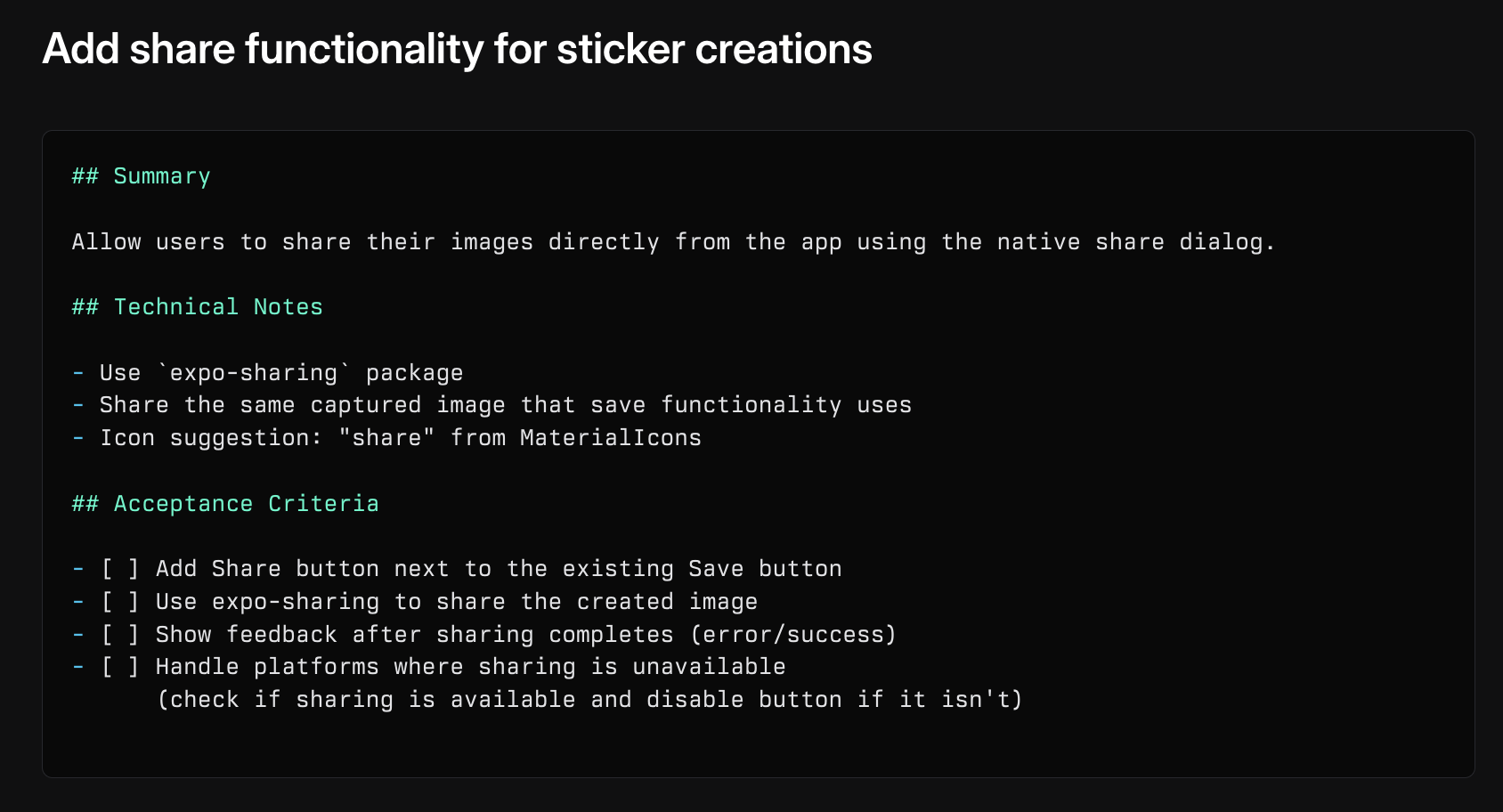 If a requirement from the linked issue isn't addressed, CodeRabbit flags it during review:
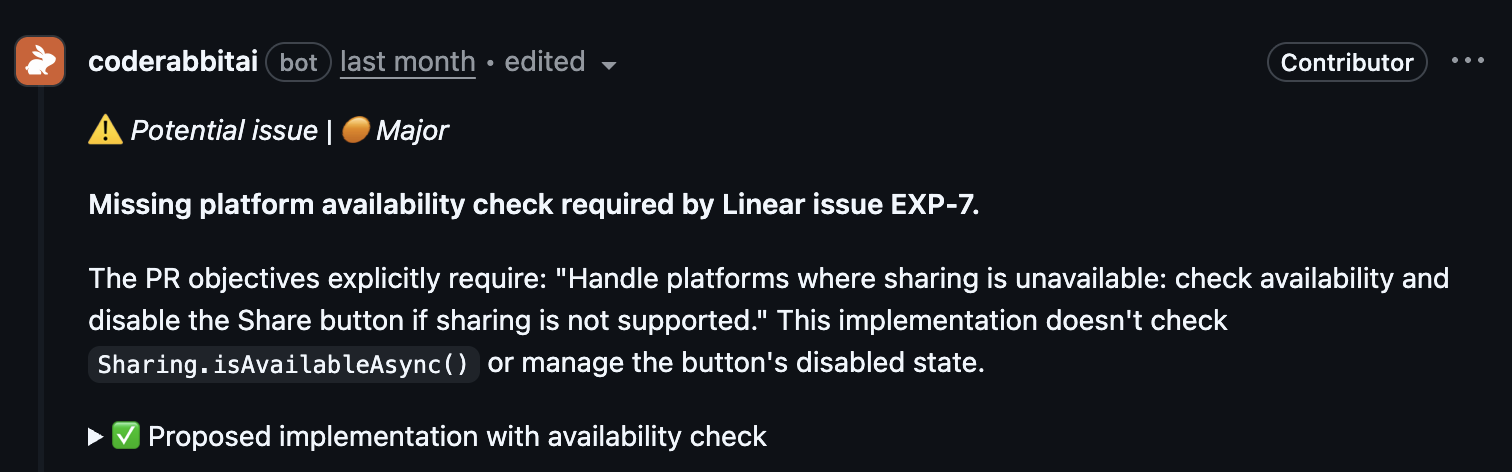 ## Best practices for issue writing
### Issue titles
Create descriptive, technical titles that clearly state the goal:
* "Add PrismaLint integration to configuration flow"
* "Fix race condition in user authentication"
* "Implement caching for GraphQL queries"
* "Fix bug"
* "Update code"
* "Improve performance"
### Issue descriptions
Write comprehensive descriptions that provide clear technical context:
* Clearly describe what needs to be changed
* Include technical details about affected components
* Reference specific files or functions if known
* Outline the desired implementation approach
* Include code examples or pseudo-code when relevant
* List specific acceptance criteria
**Example description:**
```markdown theme={null}
Problem:
The configuration system doesn't validate Prisma schema files before deployment,
leading to potential runtime errors.
Solution:
Integrate PrismaLint into the configuration flow to:
- Validate schema files during PR checks
- Enforce consistent naming conventions
- Prevent common Prisma anti-patterns
Affected Components:
- Configuration validation pipeline
- CI/CD workflow
- Schema validation logic
Acceptance Criteria:
- [ ] PrismaLint runs on all PR checks
- [ ] Failed validations block merging
- [ ] Clear error messages for schema issues
```
### Consistent terminology
Use consistent terminology between issues and pull requests:
* Use the same technical terms consistently
* Reference components with their exact names
* Maintain consistent naming patterns
* Mixing different terms for the same component
* Using vague or non-technical language
* Inconsistent capitalization or formatting
## Linking issues effectively
### In pull requests
```md theme={null}
Fixes #123
Resolves organization/repo#456
Closes https://github.com/org/repo/issues/789
```
```md theme={null}
This PR addresses:
- Fixes #123
- Closes #456
- Resolves https://jira.company.com/browse/PROJ-789
```
### Cross-references
For better traceability:
Link back to the pull request from the issue discussion
Include full URLs when referencing Jira, Linear, or other platforms
Ensure related issues reference each other for complete context
## How CodeRabbit assesses linked issues
CodeRabbit evaluates linked issues through this process:
Reviews issue titles and descriptions for requirements and context
Examines the code changes in the pull request
Determines if the changes meet the stated objectives
Returns one of three possible outcomes:
* ✅ **Addressed**: Objective completed (no explanation needed)
* ❌ **Not addressed**: Objective not met (explanation provided)
* ❓ **Unclear**: Uncertain if objective is met (explanation provided)
Only the issue title and description are considered in the assessment.
Comments and discussion threads are not currently analyzed.
## Tips for better assessments
* Include clear, measurable objectives
* List specific technical requirements
* Reference affected code components
* Explain why changes are needed
* Document current behavior
* Describe expected outcomes
* Include file paths when known
* Reference specific functions or classes
* Mention relevant technologies
* One main objective per issue
* Clear scope boundaries
* Specific acceptance criteria
## Related resources
Learn how to add custom instructions to your reviews
Automatically create issues from PR reviews
Set up Jira or Linear integrations for linked issues
## Best practices for issue writing
### Issue titles
Create descriptive, technical titles that clearly state the goal:
* "Add PrismaLint integration to configuration flow"
* "Fix race condition in user authentication"
* "Implement caching for GraphQL queries"
* "Fix bug"
* "Update code"
* "Improve performance"
### Issue descriptions
Write comprehensive descriptions that provide clear technical context:
* Clearly describe what needs to be changed
* Include technical details about affected components
* Reference specific files or functions if known
* Outline the desired implementation approach
* Include code examples or pseudo-code when relevant
* List specific acceptance criteria
**Example description:**
```markdown theme={null}
Problem:
The configuration system doesn't validate Prisma schema files before deployment,
leading to potential runtime errors.
Solution:
Integrate PrismaLint into the configuration flow to:
- Validate schema files during PR checks
- Enforce consistent naming conventions
- Prevent common Prisma anti-patterns
Affected Components:
- Configuration validation pipeline
- CI/CD workflow
- Schema validation logic
Acceptance Criteria:
- [ ] PrismaLint runs on all PR checks
- [ ] Failed validations block merging
- [ ] Clear error messages for schema issues
```
### Consistent terminology
Use consistent terminology between issues and pull requests:
* Use the same technical terms consistently
* Reference components with their exact names
* Maintain consistent naming patterns
* Mixing different terms for the same component
* Using vague or non-technical language
* Inconsistent capitalization or formatting
## Linking issues effectively
### In pull requests
```md theme={null}
Fixes #123
Resolves organization/repo#456
Closes https://github.com/org/repo/issues/789
```
```md theme={null}
This PR addresses:
- Fixes #123
- Closes #456
- Resolves https://jira.company.com/browse/PROJ-789
```
### Cross-references
For better traceability:
Link back to the pull request from the issue discussion
Include full URLs when referencing Jira, Linear, or other platforms
Ensure related issues reference each other for complete context
## How CodeRabbit assesses linked issues
CodeRabbit evaluates linked issues through this process:
Reviews issue titles and descriptions for requirements and context
Examines the code changes in the pull request
Determines if the changes meet the stated objectives
Returns one of three possible outcomes:
* ✅ **Addressed**: Objective completed (no explanation needed)
* ❌ **Not addressed**: Objective not met (explanation provided)
* ❓ **Unclear**: Uncertain if objective is met (explanation provided)
Only the issue title and description are considered in the assessment.
Comments and discussion threads are not currently analyzed.
## Tips for better assessments
* Include clear, measurable objectives
* List specific technical requirements
* Reference affected code components
* Explain why changes are needed
* Document current behavior
* Describe expected outcomes
* Include file paths when known
* Reference specific functions or classes
* Mention relevant technologies
* One main objective per issue
* Clear scope boundaries
* Specific acceptance criteria
## Related resources
Learn how to add custom instructions to your reviews
Automatically create issues from PR reviews
Set up Jira or Linear integrations for linked issues