> ## Documentation Index
> Fetch the complete documentation index at: https://docs.coderabbit.ai/llms.txt
> Use this file to discover all available pages before exploring further.
# Seat assignment
> Understand how CodeRabbit assigns seats to users, including trial mode, manual approval, and auto-approval methods.
export const AdminRoleBadge = ({tip = "This feature requires an organization owner, an admin role or the corresponding permission. Regular Members do not have access.", title = "Admin Only", cta = "View roles", href = "/management/roles", disabled = false}) => {
return
{title}
;
};
CodeRabbit ingests users from your git provider (GitHub, GitLab, Bitbucket, and Azure DevOps) and assigns seats based on your organization's active seat assignment mode. Understanding these modes helps you control who gets access to CodeRabbit reviews and how billing is affected.
For managing billing, invoices, and changing your seat count, see [Manage your subscription](/management/billing).
## Seat assignment methods
### Trial mode
This mode is only active during the trial. In trial mode, users are automatically provisioned with a seat when they raise a PR in a repository where CodeRabbit is installed.
To prevent users from getting a seat, you can filter them out using the
`ignore_usernames` filter.
After the trial ends, organizations automatically transition to manual
approval mode.
### Manual approval
In this mode, admins can update their seat counts manually. When a user without a seat raises a PR in a repository where CodeRabbit is installed, they receive a note on their PR indicating that they do not have a seat and will receive a free tier summary.
Use the `enable_free_tier` configuration setting to disable free tier reviews
for users without paid seats.
### Auto-approval
In this mode, users are automatically provisioned seats when they raise a PR in a repository where CodeRabbit is installed.
If there is an existing user with a seat who has not raised a CodeRabbit pull request in the last 30 days, that seat is reallocated to the new user. If all seats are taken, a new license is provisioned.
To prevent users from getting a seat, you can filter them out using the
`ignore_usernames` filter.
## Managing seat assignments
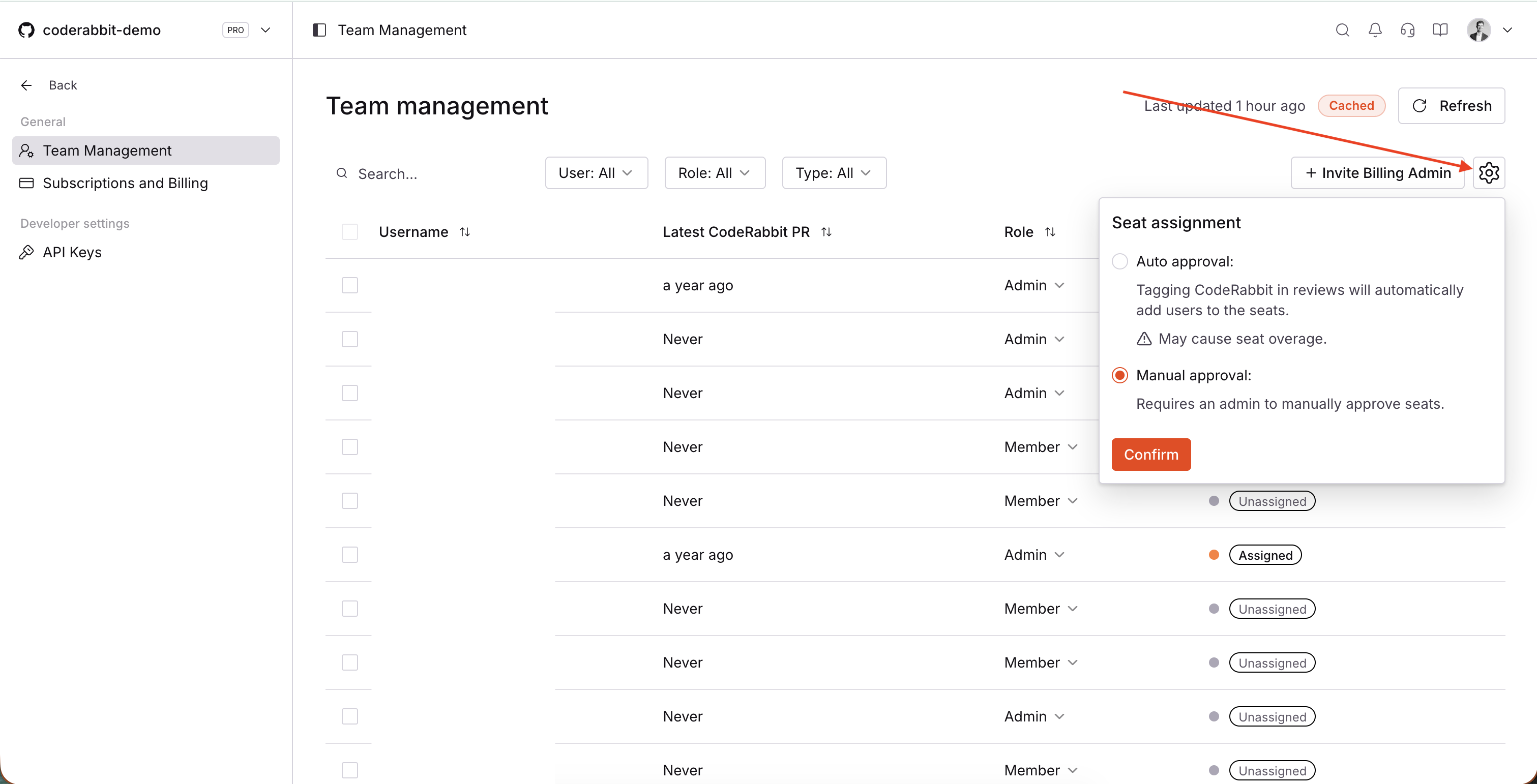
To change your seat assignment mode, navigate to **Team Management** in the CodeRabbit dashboard and click the settings icon next to **Invite Billing Admin**. From this menu, you can switch between auto-approval and manual approval modes. Click **Confirm** to save your changes.
 Enterprise customers can assign custom roles in addition to the built-in Admin, Member, and Billing Admin roles. For details on creating and managing custom roles, see [Custom roles and permissions](/management/custom-roles).
### Enterprise SSO workspaces
Enterprise SSO workspaces manage seats from **Workspace Team Management**. Open the seat assignment settings to switch between **Automatic** and **Manual** modes.
In **Automatic** mode, members are assigned a seat when they open a pull request. If all seats are taken, CodeRabbit can provision a new license according to your subscription.
In **Manual** mode, admins assign seats to members individually from **Workspace Team Management**. Individual seat assignment controls are disabled while Automatic mode is on.
**Workspace Team Management** does not assign consumed seats to billing admins. If a billing admin already has a seat, admins can still unassign it. For role-editing details, see [Workspace roles](/management/sso#workspace-roles).
## Pending unassignment
When you unassign a seat from a user on a monthly paid subscription, the seat is marked as "Pending unassignment" rather than being immediately unassigned. This allows for more flexibility in managing your team while maintaining fair billing practices.
### How "Pending unassignment" works
* **Delayed unassignment**: When you unassign a seat from a monthly subscriber, it remains active until the end of your current billing cycle
* **Continued access**: Users with "Pending unassignment" seats retain full CodeRabbit access until the billing cycle ends
* **Automatic cleanup**: At the end of the billing cycle, all "Pending unassignment" seats are automatically unassigned, and the users will lose the seat
This "Pending unassignment" behavior applies **only to monthly paid
subscriptions**. Annual subscriptions and other non-monthly subscription types
are not affected by this behavior.
### Billing implications
"Pending unassignment" seats are still counted as active seats for billing purposes during the current cycle. You will continue to be charged for these seats until they are automatically unassigned at the end of your billing period.
This approach ensures you get full value from your subscription while giving you the flexibility to adjust your team composition as needed.
## Troubleshooting
### Existing users having their seats removed
When auto-approval mode is enabled, users have their seats reassigned if they have not raised a PR in the last 30 days and a new user without a seat opens a PR.
### New users in auto-approval mode getting new licenses despite open seats
This is likely due to bot users or external users that have seats. These users are displayed separately from regular git provider organization members.
### Users without seats still receiving CodeRabbit reviews on their PRs
Users without paid seats to CodeRabbit still receive free-tier CodeRabbit reviews unless the `enable_free_tier` setting is disabled.
### Why does a user still have access after I unassigned their seat?
For monthly paid subscriptions, unassigned seats are marked as "Pending unassignment" and remain active until the end of the current billing cycle. This means users retain full CodeRabbit access during this period. See the [Pending unassignment](#pending-unassignment) section for more details on this behavior.
### When will a "Pending unassignment" seat become available for reassignment?
"Pending unassignment" seats are automatically unassigned at the end of your billing cycle. Once the billing cycle ends, the seat becomes fully available for reassignment to a new user. Until then, the seat remains allocated to the original user.
## What's next
Access billing history, change plans, and adjust seats
Control who can access CodeRabbit and manage administrative settings
Enterprise customers can assign custom roles in addition to the built-in Admin, Member, and Billing Admin roles. For details on creating and managing custom roles, see [Custom roles and permissions](/management/custom-roles).
### Enterprise SSO workspaces
Enterprise SSO workspaces manage seats from **Workspace Team Management**. Open the seat assignment settings to switch between **Automatic** and **Manual** modes.
In **Automatic** mode, members are assigned a seat when they open a pull request. If all seats are taken, CodeRabbit can provision a new license according to your subscription.
In **Manual** mode, admins assign seats to members individually from **Workspace Team Management**. Individual seat assignment controls are disabled while Automatic mode is on.
**Workspace Team Management** does not assign consumed seats to billing admins. If a billing admin already has a seat, admins can still unassign it. For role-editing details, see [Workspace roles](/management/sso#workspace-roles).
## Pending unassignment
When you unassign a seat from a user on a monthly paid subscription, the seat is marked as "Pending unassignment" rather than being immediately unassigned. This allows for more flexibility in managing your team while maintaining fair billing practices.
### How "Pending unassignment" works
* **Delayed unassignment**: When you unassign a seat from a monthly subscriber, it remains active until the end of your current billing cycle
* **Continued access**: Users with "Pending unassignment" seats retain full CodeRabbit access until the billing cycle ends
* **Automatic cleanup**: At the end of the billing cycle, all "Pending unassignment" seats are automatically unassigned, and the users will lose the seat
This "Pending unassignment" behavior applies **only to monthly paid
subscriptions**. Annual subscriptions and other non-monthly subscription types
are not affected by this behavior.
### Billing implications
"Pending unassignment" seats are still counted as active seats for billing purposes during the current cycle. You will continue to be charged for these seats until they are automatically unassigned at the end of your billing period.
This approach ensures you get full value from your subscription while giving you the flexibility to adjust your team composition as needed.
## Troubleshooting
### Existing users having their seats removed
When auto-approval mode is enabled, users have their seats reassigned if they have not raised a PR in the last 30 days and a new user without a seat opens a PR.
### New users in auto-approval mode getting new licenses despite open seats
This is likely due to bot users or external users that have seats. These users are displayed separately from regular git provider organization members.
### Users without seats still receiving CodeRabbit reviews on their PRs
Users without paid seats to CodeRabbit still receive free-tier CodeRabbit reviews unless the `enable_free_tier` setting is disabled.
### Why does a user still have access after I unassigned their seat?
For monthly paid subscriptions, unassigned seats are marked as "Pending unassignment" and remain active until the end of the current billing cycle. This means users retain full CodeRabbit access during this period. See the [Pending unassignment](#pending-unassignment) section for more details on this behavior.
### When will a "Pending unassignment" seat become available for reassignment?
"Pending unassignment" seats are automatically unassigned at the end of your billing cycle. Once the billing cycle ends, the seat becomes fully available for reassignment to a new user. Until then, the seat remains allocated to the original user.
## What's next
Access billing history, change plans, and adjust seats
Control who can access CodeRabbit and manage administrative settings