> ## Documentation Index
> Fetch the complete documentation index at: https://docs.coderabbit.ai/llms.txt
> Use this file to discover all available pages before exploring further.
# Plan structure and refinement
> Learn what a Coding Plan contains, how to review and iterate on it, and how version history works.
Every Coding Plan follows a consistent structure designed to give coding agents all the context they need. This page explains each section of a plan and how to refine it before handoff.
## Plan structure
Each Coding Plan contains the following sections:
| Section | Description |
| ------------------ | -------------------------------------------------------------------------------------------------------------------------------------------------------------------------- |
| **Summary** | A 2–3 sentence overview of the implementation approach. |
| **Research** | Deep codebase analysis leveraging CodeRabbit's project knowledge, identifying relevant files, patterns, dependencies, and architectural decisions specific to the project. |
| **Design Choices** | Key decisions made during planning, with rationale for each. |
| **Phases** | Logical chunks of work that should be done together. |
| **Tasks** | Individual tasks within each phase, with file-level specificity. |
| **Agent Prompt** | Machine-readable instructions for coding agents, available per phase and as a combined prompt. |
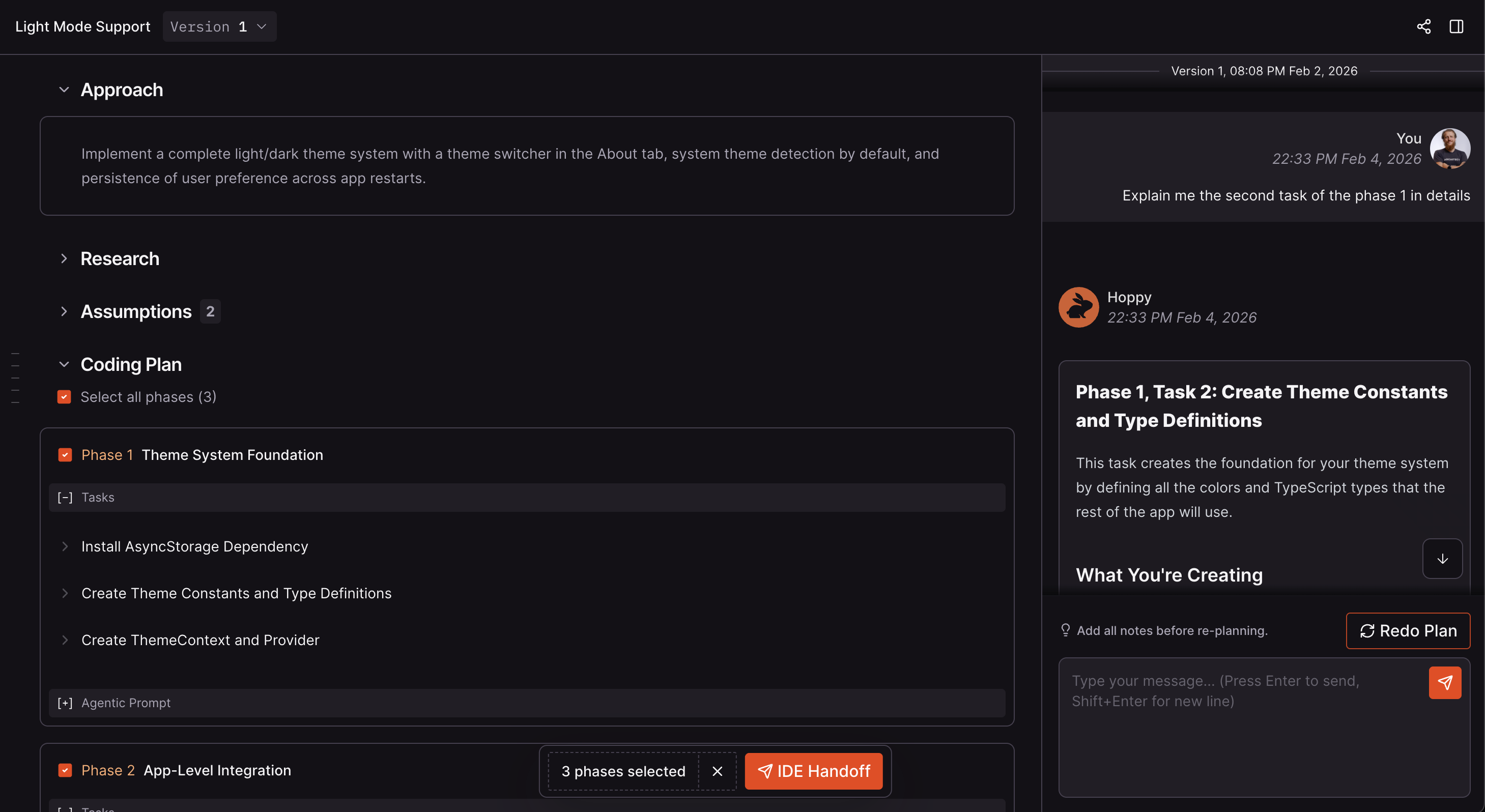
## Viewing a plan
Plans are displayed in the CodeRabbit web app with a dedicated plan viewer. Sections are collapsible, and a chat panel appears on the right for refinement.
 ## Refining a plan
After reviewing a Coding Plan, you can refine it through conversation with CodeRabbit:
* **Ask questions** to get clarification on why CodeRabbit chose a particular approach.
* **Challenge design choices** by suggesting an alternative architecture or pattern.
* **Request changes** by asking CodeRabbit to add, remove, or modify specific tasks or phases.
* **Provide additional context** by sharing constraints, requirements, or team preferences that the original plan didn't account for.
CodeRabbit responds and updates the plan accordingly.
## Re-planning and version history
When you need more than a small refinement, you can regenerate the plan entirely:
1. **Provide feedback** through chat explaining what should change.
2. **Trigger a re-plan:** click the **Redo** button.
3. CodeRabbit generates a **new plan version** incorporating your feedback.
Every re-plan creates a new version. Use the version selector at the top of the plan viewer to:
* View previous versions of the plan.
* Compare what changed between versions.
* Switch the active version.
You can only chat about the currently active version of a plan.
Version history preserves accountability and a complete decision trail. You can always trace back to understand what was planned, when it changed, and why.
## Next Step
Select phases and copy agent-ready prompts, or send plans directly to your IDE.
## Refining a plan
After reviewing a Coding Plan, you can refine it through conversation with CodeRabbit:
* **Ask questions** to get clarification on why CodeRabbit chose a particular approach.
* **Challenge design choices** by suggesting an alternative architecture or pattern.
* **Request changes** by asking CodeRabbit to add, remove, or modify specific tasks or phases.
* **Provide additional context** by sharing constraints, requirements, or team preferences that the original plan didn't account for.
CodeRabbit responds and updates the plan accordingly.
## Re-planning and version history
When you need more than a small refinement, you can regenerate the plan entirely:
1. **Provide feedback** through chat explaining what should change.
2. **Trigger a re-plan:** click the **Redo** button.
3. CodeRabbit generates a **new plan version** incorporating your feedback.
Every re-plan creates a new version. Use the version selector at the top of the plan viewer to:
* View previous versions of the plan.
* Compare what changed between versions.
* Switch the active version.
You can only chat about the currently active version of a plan.
Version history preserves accountability and a complete decision trail. You can always trace back to understand what was planned, when it changed, and why.
## Next Step
Select phases and copy agent-ready prompts, or send plans directly to your IDE.