> ## Documentation Index
> Fetch the complete documentation index at: https://docs.coderabbit.ai/llms.txt
> Use this file to discover all available pages before exploring further.
# Bitbucket Cloud
> Learn how to integrate CodeRabbit with Bitbucket Cloud repositories for automated AI-powered code reviews.
export const BitbucketBadge = ({tip = "This feature is available on Bitbucket.", title = "Bitbucket", cta, href, disabled = false}) => {
return
{title}
;
};
For an overview of how CodeRabbit integrates with Git platforms, see [Add CodeRabbit to your repository](/platforms).
For a hands-on tutorial with CodeRabbit performing code reviews on a live repository, see [Quickstart](/getting-started/quickstart).
CodeRabbit integrates with Bitbucket Cloud to improve your development workflow by:
* **Automated code reviews** for newly created pull requests
* **Intelligent comments and suggestions** displayed directly on pull requests
* **Real-time bot interaction** for immediate feedback and assistance
* **Seamless webhook integration** for continuous monitoring
This guide walks you through integrating CodeRabbit with your Bitbucket Cloud repositories.
To interact with CodeRabbit in pull request comments, use `@coderabbitai` — or the username of the service account you configure below, if it differs.
## Configure API Token
To enable CodeRabbit to interact with your Bitbucket repositories, you need to configure an API token. This token grants the necessary permissions for interacting with the Bitbucket pull request and discussion APIs.
**Service Account Required**
You must create a dedicated Bitbucket account specifically for CodeRabbit to ensure proper permissions and security isolation.
Create a new Bitbucket account specifically for CodeRabbit and treat it as a
service account.
* Name the account "CodeRabbit" for easy identification
* Use a dedicated email address for this service account
* If your Bitbucket workspace requires two-step verification, enable it on this account as well
Generate an API Token to enable the integration between CodeRabbit and your
Bitbucket repositories.
We recommend creating a dedicated service account and associating it with the
workspace where you want to install CodeRabbit. During the installation
process, CodeRabbit will automatically configure the required webhook for
seamless integration.
If you wish to change the review user, you must provide the API token for the
new user who will post reviews and comments. However, this requires manually
removing the previous user from the projects and associated webhooks. Once
this is done, you will need to reinstall the CodeRabbit app for each project.
### Best practices for service account setup
* **Use "CodeRabbit" as the username** for easy recognition
* **Use a dedicated email address** for management
* **Use the CodeRabbit logo** as the profile picture ([download here](https://www.coderabbit.ai/brand))
* **Grant developer access** to target projects
* **Ensure workspace membership** for the service account
* **Enable two-factor authentication** if required by workspace
**Important:** Code reviews will be attributed to the owner of the API token.
Ensure the service account is properly configured and recognizable to your
team.
### Generate an API token
Bitbucket provides an option to generate an API token for your CodeRabbit service account. Follow these steps:
Log in using the user designated for CodeRabbit reviews. This user serves as a service account for managing reviews and related activities.
Go to [API
Tokens](https://id.atlassian.com/manage-profile/security/api-tokens) in your Atlassian account settings.
* Enter a recognizable name for this API token (e.g., "CodeRabbit Integration")
* Set an expiration date based on your security policy
* On the next step, select **Bitbucket**
Ensure the following scopes are selected for CodeRabbit to function properly:
| Category | Scope | Description |
| ------------------ | ----------------------------- | -------------------------------------------------------------------------------------------------------------------------------------------------------------------------------------------------------------------------------------------------------------------------------------------------- |
| **Account & User** | `read:account` | Access account information |
| | `read:user:bitbucket` | Read user profile data |
| **Repository** | `read:repository:bitbucket` | Read repository content and metadata |
| | `write:repository:bitbucket` | Write access for code analysis |
| **Pull Requests** | `read:pullrequest:bitbucket` | Read pull request information |
| | `write:pullrequest:bitbucket` | Post reviews and comments |
| **Issues** | `read:issue:bitbucket` | Read issue information |
| | `write:issue:bitbucket` | Create and update issues |
| **Workspace** | `read:workspace:bitbucket` | Access workspace information |
| | `admin:project:bitbucket` | Manage all project webhooks ⓘ |
| **Webhooks** | `read:webhook:bitbucket` | Read webhook configurations |
| | `write:webhook:bitbucket` | Create and manage webhooks |
| **Pipelines** | `read:pipeline:bitbucket` | Read pipeline information |
| | `read:runner:bitbucket` | Access pipeline runner data |
* Click **Create**
* **Important:** Copy and securely store the API token immediately as it will only be displayed once
**Security Note:** The API token will only be displayed once upon creation.
Make sure to copy and store it securely before leaving the page.
### Configure API token in CodeRabbit
You can provide your API token to CodeRabbit in two ways:
CodeRabbit will automatically prompt you to provide the API token during the repository installation process if none is configured.
To provide the token beforehand:
1. Navigate to **Organization Settings** in the CodeRabbit app
2. Select the **Bitbucket User** tab in the sidebar
3. Enter your API token
4. The token will be validated and saved for future use
You can verify the correct service account is selected by comparing the user ID shown in the UI with your service account's user ID.
## Install CodeRabbit in your repositories
Once your API token is configured, you can install CodeRabbit in your Bitbucket repositories.
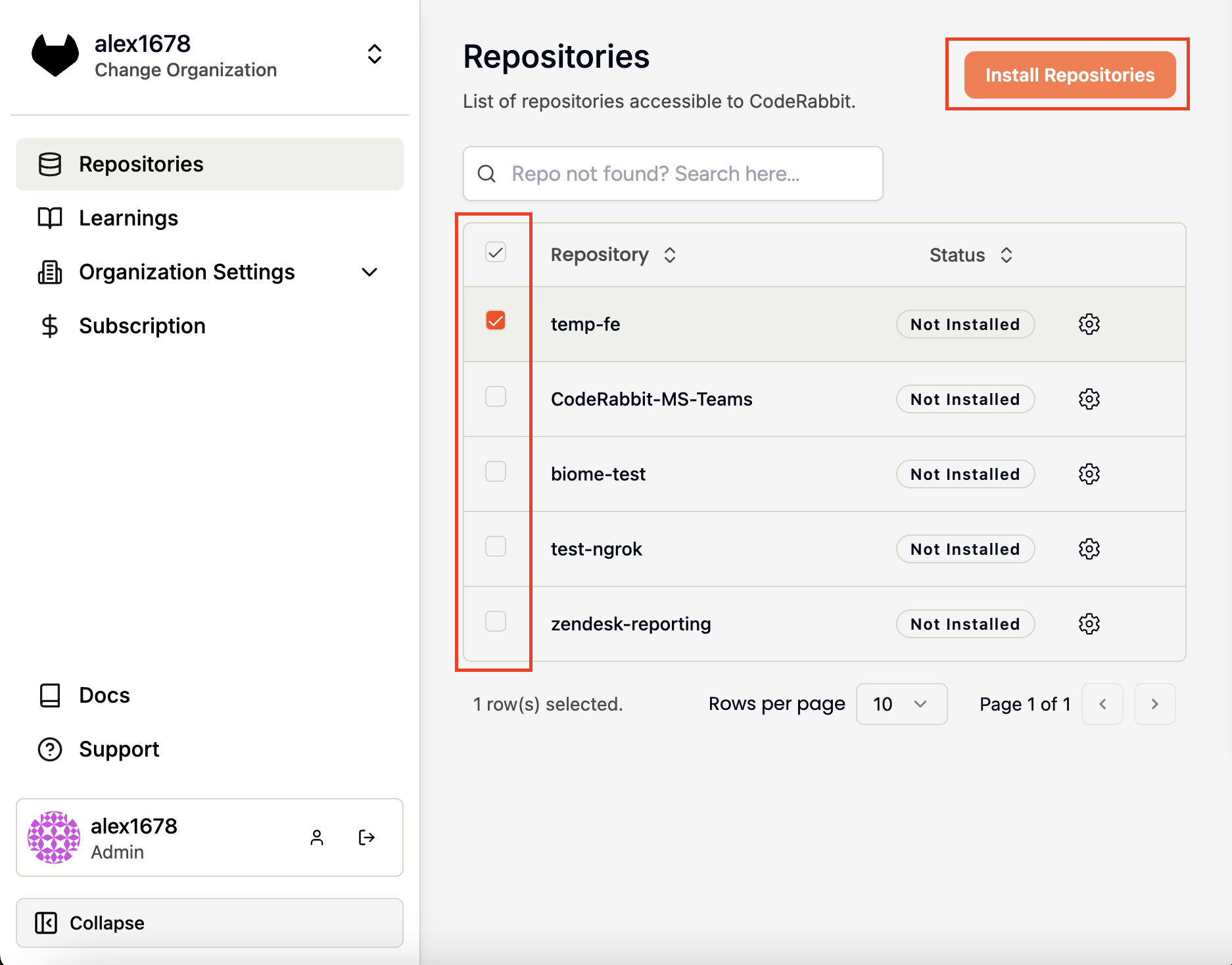
Navigate to the [Repositories
page](https://app.coderabbit.ai/settings/repositories) in the CodeRabbit
app.
* Check the boxes next to specific repositories where you want to install CodeRabbit
* To install on all repositories at once, select the checkbox at the top
Click **Install Repositories** to complete the setup.
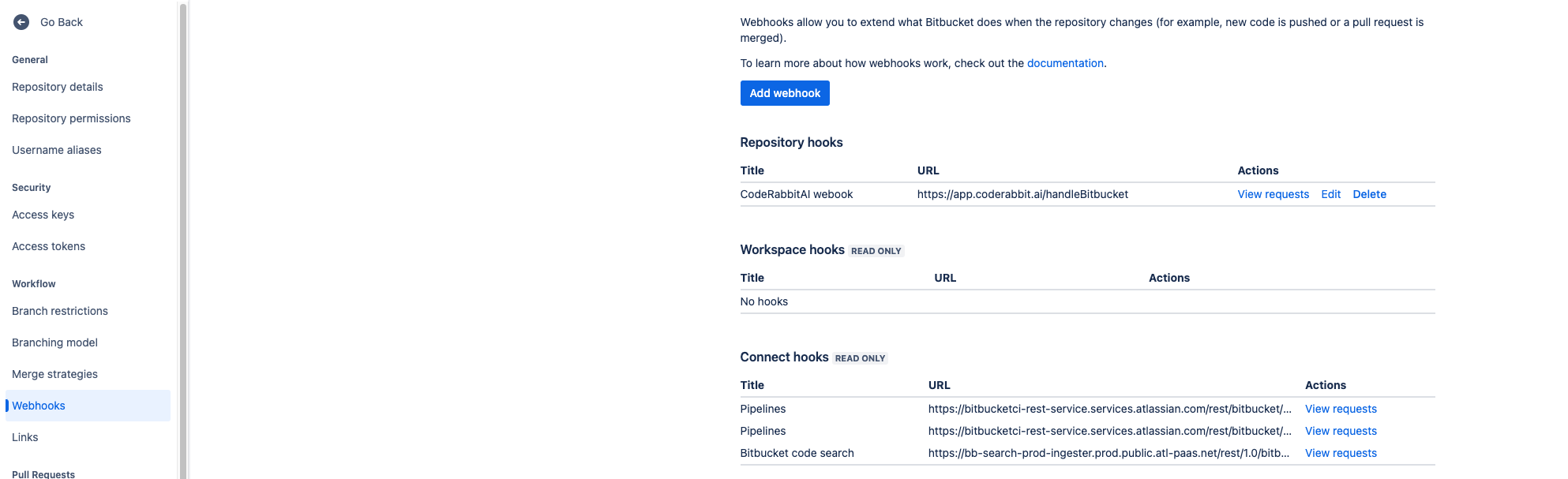
 **Webhook Configuration:** The webhook
`https://coderabbit.ai/bitbucketHandler` will be automatically installed for
the selected projects, enabling CodeRabbit to monitor and review your pull
requests.
**Webhook Configuration:** The webhook
`https://coderabbit.ai/bitbucketHandler` will be automatically installed for
the selected projects, enabling CodeRabbit to monitor and review your pull
requests.
 ## Manual webhook installation
If you install repositories from the **Repositories** page, CodeRabbit configures the webhook automatically. Use this flow only when you need to install the webhook manually or rotate the shared webhook secret.
The **Webhook Secret** page is available to Bitbucket organizations with organization settings access.
In the CodeRabbit app, open **Account** and select **Webhook Secret** from
the sidebar.
Use the **Webhook URL** field on that page to copy the exact endpoint that
your Bitbucket Cloud webhook should call.
Enter the secret that Bitbucket should send with webhook deliveries and
save it in CodeRabbit.
When creating or editing the webhook in Bitbucket, use the copied webhook
URL and enable these pull request events:
* **Opened**
* **Modified**
* **Comment Added**
If you change an existing webhook secret, CodeRabbit attempts to update
existing CodeRabbit-managed Bitbucket webhooks across installed repositories
automatically and reports how many were updated, skipped, or failed. If a
webhook was created manually, or if an automatic refresh fails, update the
secret directly in Bitbucket.
Manually configured Bitbucket webhooks can use the organization-level webhook secret when no per-repository secret is available.
## Configure network access
If your instance requires IP allowlisting, add these CodeRabbit IP addresses to your firewall:
```text IPs to allow list theme={null}
35.222.179.152/32, 34.170.211.100/32, 136.113.208.247/32
```
## Troubleshooting
If you encounter issues during setup or operation, here are common solutions:
If CodeRabbit isn't accessing repositories or reviewing pull requests:
1. **Check webhook status** in your Bitbucket repository settings
2. **Manually delete the webhook** if it exists but isn't working
3. **Refresh the repository page** in the CodeRabbit app
4. **Reinstall the webhook** using the CodeRabbit interface
If manually configured webhooks are rejected after saving or rotating a webhook secret:
1. **Confirm the webhook secret** in Bitbucket matches the value saved on CodeRabbit's **Webhook Secret** page
2. **Update manually created webhooks** directly in Bitbucket after rotating the secret
3. **Review skipped or failed refreshes** reported by CodeRabbit and update those repository webhooks directly
If you cannot install the webhook:
* **Verify permissions**: Ensure your Bitbucket service account has the necessary permissions
* **Check API token**: Confirm the API token is properly configured with all required scopes
* **Validate account access**: Ensure the service account has developer access to target repositories
If you're seeing authentication issues:
* **Regenerate API token** with the correct scopes
* **Update token in CodeRabbit** Organization Settings
* **Verify service account** has workspace membership
For additional support, visit the [support page](/support).
## Manual webhook installation
If you install repositories from the **Repositories** page, CodeRabbit configures the webhook automatically. Use this flow only when you need to install the webhook manually or rotate the shared webhook secret.
The **Webhook Secret** page is available to Bitbucket organizations with organization settings access.
In the CodeRabbit app, open **Account** and select **Webhook Secret** from
the sidebar.
Use the **Webhook URL** field on that page to copy the exact endpoint that
your Bitbucket Cloud webhook should call.
Enter the secret that Bitbucket should send with webhook deliveries and
save it in CodeRabbit.
When creating or editing the webhook in Bitbucket, use the copied webhook
URL and enable these pull request events:
* **Opened**
* **Modified**
* **Comment Added**
If you change an existing webhook secret, CodeRabbit attempts to update
existing CodeRabbit-managed Bitbucket webhooks across installed repositories
automatically and reports how many were updated, skipped, or failed. If a
webhook was created manually, or if an automatic refresh fails, update the
secret directly in Bitbucket.
Manually configured Bitbucket webhooks can use the organization-level webhook secret when no per-repository secret is available.
## Configure network access
If your instance requires IP allowlisting, add these CodeRabbit IP addresses to your firewall:
```text IPs to allow list theme={null}
35.222.179.152/32, 34.170.211.100/32, 136.113.208.247/32
```
## Troubleshooting
If you encounter issues during setup or operation, here are common solutions:
If CodeRabbit isn't accessing repositories or reviewing pull requests:
1. **Check webhook status** in your Bitbucket repository settings
2. **Manually delete the webhook** if it exists but isn't working
3. **Refresh the repository page** in the CodeRabbit app
4. **Reinstall the webhook** using the CodeRabbit interface
If manually configured webhooks are rejected after saving or rotating a webhook secret:
1. **Confirm the webhook secret** in Bitbucket matches the value saved on CodeRabbit's **Webhook Secret** page
2. **Update manually created webhooks** directly in Bitbucket after rotating the secret
3. **Review skipped or failed refreshes** reported by CodeRabbit and update those repository webhooks directly
If you cannot install the webhook:
* **Verify permissions**: Ensure your Bitbucket service account has the necessary permissions
* **Check API token**: Confirm the API token is properly configured with all required scopes
* **Validate account access**: Ensure the service account has developer access to target repositories
If you're seeing authentication issues:
* **Regenerate API token** with the correct scopes
* **Update token in CodeRabbit** Organization Settings
* **Verify service account** has workspace membership
For additional support, visit the [support page](/support).