> ## Documentation Index
> Fetch the complete documentation index at: https://docs.coderabbit.ai/llms.txt
> Use this file to discover all available pages before exploring further.
# PR Summaries
> Every time CodeRabbit reviews a pull request, it writes a plain-language **summary** directly into the PR description. The summary is on by default and fully configurable.
## What is the PR summary
CodeRabbit appends a generated summary to the bottom of the PR description after a review. The summary groups changes by type — new features, bug fixes, documentation updates, and so on — so reviewers can quickly understand the scope of a PR before diving into individual files.
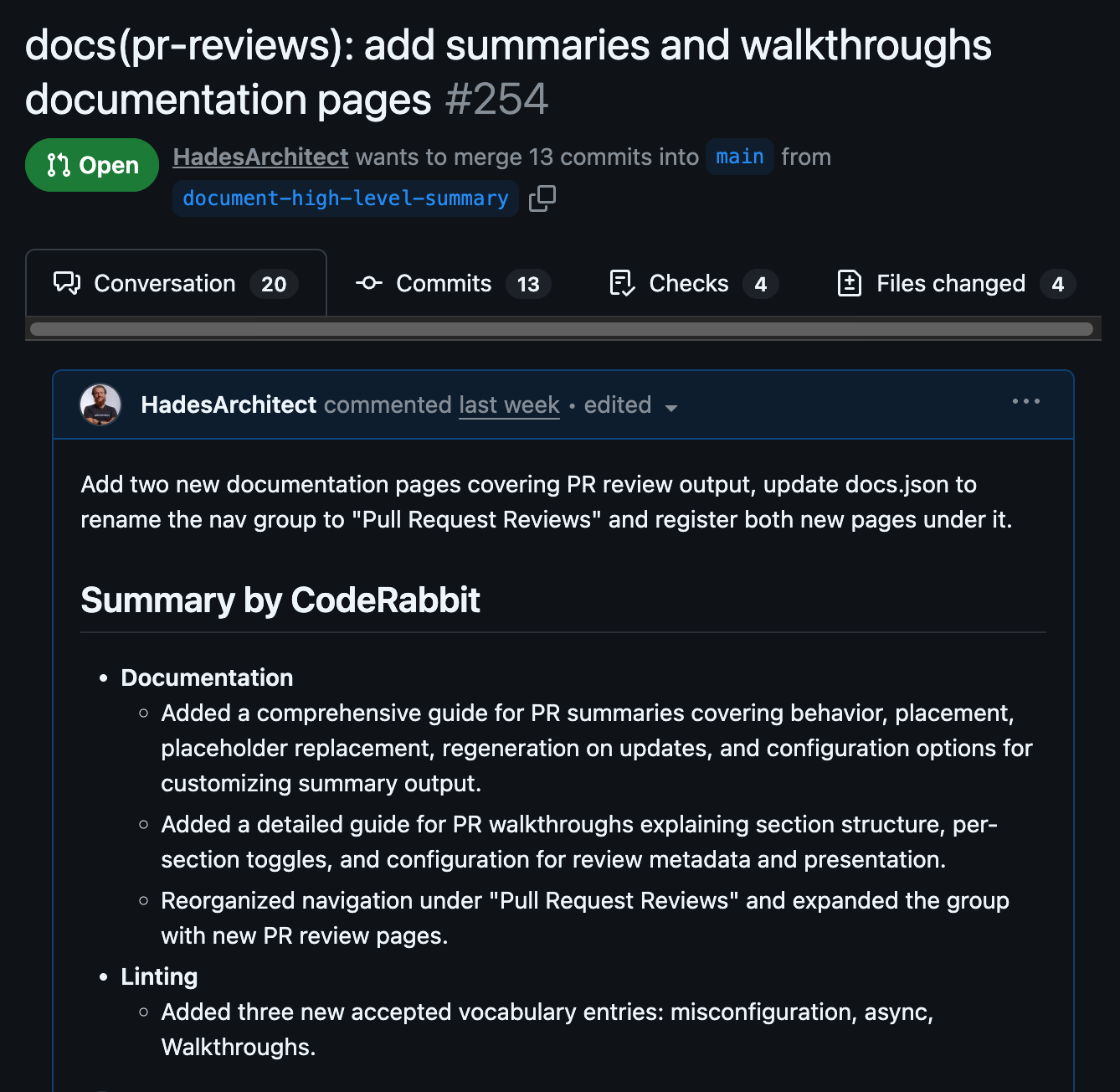 The summary is regenerated on every incremental push, so it always reflects the latest state of the branch.
## Controlling placement
By default the summary is appended to the bottom of the description. You can pin it to a specific location by adding a `@coderabbitai summary` placeholder anywhere in the description:
The summary is regenerated on every incremental push, so it always reflects the latest state of the branch.
## Controlling placement
By default the summary is appended to the bottom of the description. You can pin it to a specific location by adding a `@coderabbitai summary` placeholder anywhere in the description:
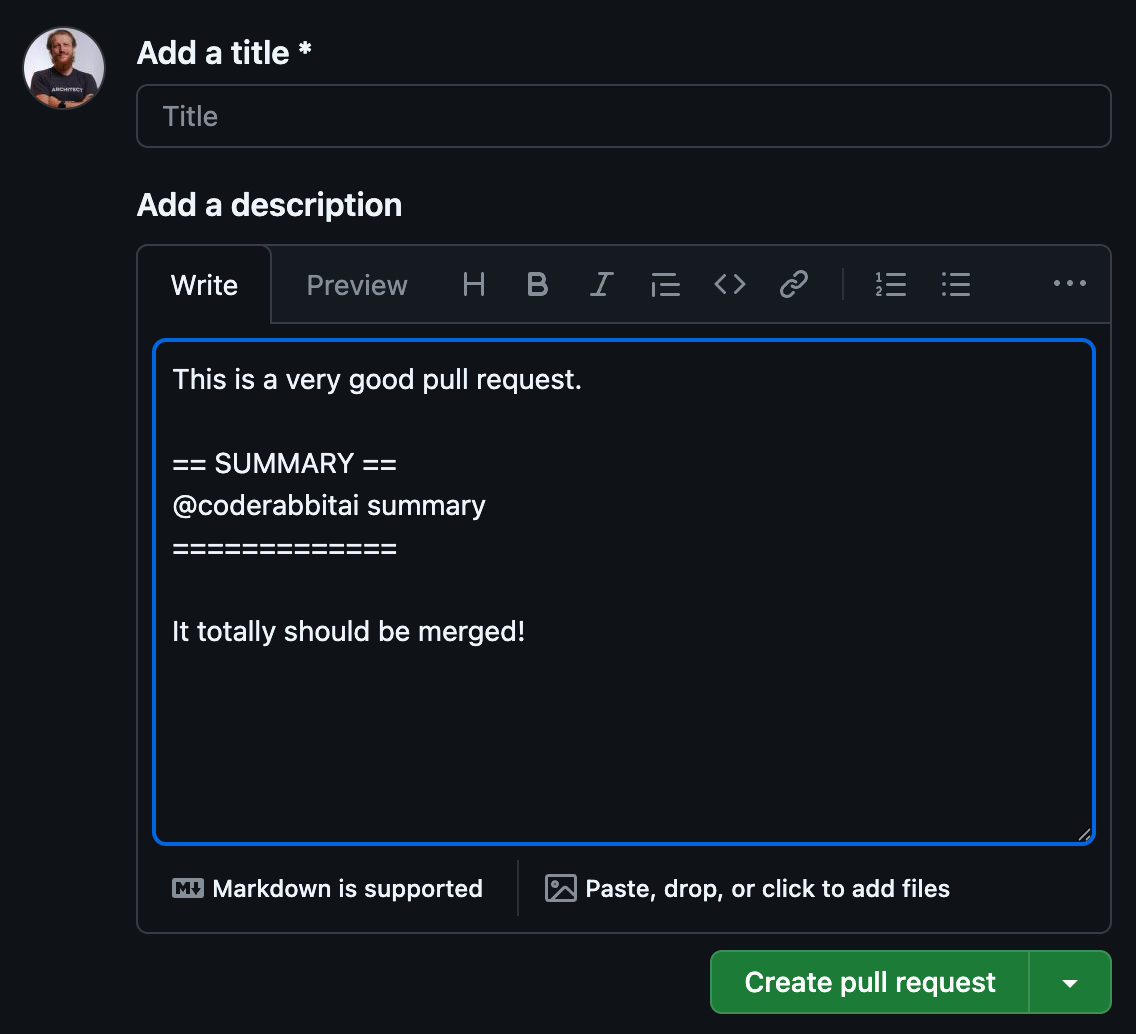 When the review runs, CodeRabbit replaces that placeholder with the generated summary. The placeholder text itself is configurable via [`high_level_summary_placeholder`](/reference/configuration#reviews) and defaults to `@coderabbitai summary`.
## Customizing the summary
The recommended way to configure summary settings is via the [`.coderabbit.yaml`](/getting-started/yaml-configuration) file. You can also adjust them through the CodeRabbit web interface at **Configuration → Reviews → Summary**.
[`high_level_summary_instructions`](/reference/configuration#reviews) accepts free-form text that tells CodeRabbit what to include and how to structure the summary. CodeRabbit follows these instructions on every review.
```yaml Structured sections wrap theme={null}
reviews:
high_level_summary_instructions: |
Divide the summary into five sections:
1. **📝 Description**: Describe the main change in the pull request in 60 words max. Explain what was changed, why it was needed, and the approach taken.
2. **📓 References**: A list of links to discussions, issues and pull requests related to the changes. You can look up for documentation, issues, or other pull requests that provide context or background for the changes.
3. **📦 Dependencies & Requirements**: List any new dependencies added or updated. Mention environment variable changes, configuration updates, or version requirements.
4. **📊 Contributor Summary**: A table showing contributions (lines of code added, removed, files changed) made by the contributor in this pull request. Format: `| Contributor | Lines Added | Lines Removed | Files Changed |`
Use bullet points or numbered lists for clarity. Keep it short and each section should be no more than 200 words. The Changes Summary table should be concise with only essential file paths (relative to repo root).
```
```yaml Release notes wrap theme={null}
reviews:
high_level_summary_instructions: |
Write the summary as a changelog entry targeting external consumers
of this codebase (API users, library consumers, end users).
Include only sections that apply — omit any that are empty:
- **Breaking Changes**: anything that requires callers to update their code or configuration.
- **New Features**: user-visible additions and improvements.
- **Bug Fixes**: user-visible fixes.
- **Deprecations**: features or APIs marked for future removal.
- **Migration Notes**: step-by-step instructions needed to upgrade.
Keep each bullet to one sentence. Do not mention file names or
internal implementation details.
```
## Moving the summary to the walkthrough
To keep your PR description clean and consolidate all CodeRabbit output in one place, set [`high_level_summary_in_walkthrough`](/reference/configuration#reviews) to `true`. The summary will appear at the top of the [walkthrough comment](/pr-reviews/walkthroughs) instead of the description.
```yaml .coderabbit.yaml theme={null}
reviews:
high_level_summary_in_walkthrough: true
```
## Disabling the summary
Set [`high_level_summary`](/reference/configuration#reviews) to `false` to stop CodeRabbit from writing a summary.
```yaml .coderabbit.yaml theme={null}
reviews:
high_level_summary: false
```
When `high_level_summary` is `false`, the summary is still generated and inserted if the `@coderabbitai summary` placeholder is present in the description. The setting only suppresses the automatic append behaviour.
For the full list of summary options with types and defaults, see the [configuration reference](/reference/configuration#reviews).
When the review runs, CodeRabbit replaces that placeholder with the generated summary. The placeholder text itself is configurable via [`high_level_summary_placeholder`](/reference/configuration#reviews) and defaults to `@coderabbitai summary`.
## Customizing the summary
The recommended way to configure summary settings is via the [`.coderabbit.yaml`](/getting-started/yaml-configuration) file. You can also adjust them through the CodeRabbit web interface at **Configuration → Reviews → Summary**.
[`high_level_summary_instructions`](/reference/configuration#reviews) accepts free-form text that tells CodeRabbit what to include and how to structure the summary. CodeRabbit follows these instructions on every review.
```yaml Structured sections wrap theme={null}
reviews:
high_level_summary_instructions: |
Divide the summary into five sections:
1. **📝 Description**: Describe the main change in the pull request in 60 words max. Explain what was changed, why it was needed, and the approach taken.
2. **📓 References**: A list of links to discussions, issues and pull requests related to the changes. You can look up for documentation, issues, or other pull requests that provide context or background for the changes.
3. **📦 Dependencies & Requirements**: List any new dependencies added or updated. Mention environment variable changes, configuration updates, or version requirements.
4. **📊 Contributor Summary**: A table showing contributions (lines of code added, removed, files changed) made by the contributor in this pull request. Format: `| Contributor | Lines Added | Lines Removed | Files Changed |`
Use bullet points or numbered lists for clarity. Keep it short and each section should be no more than 200 words. The Changes Summary table should be concise with only essential file paths (relative to repo root).
```
```yaml Release notes wrap theme={null}
reviews:
high_level_summary_instructions: |
Write the summary as a changelog entry targeting external consumers
of this codebase (API users, library consumers, end users).
Include only sections that apply — omit any that are empty:
- **Breaking Changes**: anything that requires callers to update their code or configuration.
- **New Features**: user-visible additions and improvements.
- **Bug Fixes**: user-visible fixes.
- **Deprecations**: features or APIs marked for future removal.
- **Migration Notes**: step-by-step instructions needed to upgrade.
Keep each bullet to one sentence. Do not mention file names or
internal implementation details.
```
## Moving the summary to the walkthrough
To keep your PR description clean and consolidate all CodeRabbit output in one place, set [`high_level_summary_in_walkthrough`](/reference/configuration#reviews) to `true`. The summary will appear at the top of the [walkthrough comment](/pr-reviews/walkthroughs) instead of the description.
```yaml .coderabbit.yaml theme={null}
reviews:
high_level_summary_in_walkthrough: true
```
## Disabling the summary
Set [`high_level_summary`](/reference/configuration#reviews) to `false` to stop CodeRabbit from writing a summary.
```yaml .coderabbit.yaml theme={null}
reviews:
high_level_summary: false
```
When `high_level_summary` is `false`, the summary is still generated and inserted if the `@coderabbitai summary` placeholder is present in the description. The setting only suppresses the automatic append behaviour.
For the full list of summary options with types and defaults, see the [configuration reference](/reference/configuration#reviews).