> ## Documentation Index
> Fetch the complete documentation index at: https://docs.coderabbit.ai/llms.txt
> Use this file to discover all available pages before exploring further.
# Security Architecture Review
> Assess the security implications of architecture-level changes in pull requests covered by Security Agent.
export const OpenBetaBadge = ({tip = "This feature is currently in open beta. We are actively improving it based on your feedback. If you encounter any issues or have suggestions, please share them on our Discord community or visit the support page.", title = "Open Beta", cta = "Contact support", href = "/support", disabled = false}) => {
return
{title}
;
};
export const GitLabBadge = ({tip = "This feature is available on GitLab.", title = "GitLab", cta, href, disabled = false}) => {
return
{title}
;
};
export const GitHubBadge = ({tip = "This feature is available on GitHub and GitHub Enterprise.", title = "GitHub", cta, href, disabled = false}) => {
return
{title}
;
};
export const BitbucketBadge = ({tip = "This feature is available on Bitbucket.", title = "Bitbucket", cta, href, disabled = false}) => {
return
{title}
;
};
export const AzureBadge = ({tip = "This feature is available on Azure DevOps.", title = "Azure", cta, href, disabled = false}) => {
return
{title}
;
};
|
Security Architecture Review is a security-first assessment of architecture-level changes in a pull request. It follows changed components across trust boundaries, controls, sensitive operations, and downstream dependencies to help reviewers understand the potential security impact of a design change.
Security Architecture Review is included with the [Security Agent](/security-agent) and is available through [Change Stack](/pr-reviews/change-stack). It complements CodeRabbit's line-level findings by focusing on system behavior and exposure that can span multiple files or services, such as an authorization decision crossing an API boundary, a credential reaching a new execution environment, or sensitive data entering a new service or external integration.
You must have access to the pull request and have an active Security Agent subscription or trial to load the assessment and supporting code.
## When the review appears
CodeRabbit generates the assessment only when the review is covered by an active Security trial or Security add-on and contains enough security-relevant architecture evidence for a useful design-level analysis. Relevant evidence can include changes to trust or identity boundaries, security controls, sensitive data flows, infrastructure, tool authority, or downstream dependencies.
When generated, the assessment appears in the CodeRabbit walkthrough comment and in **Overview** in Change Stack. Pull requests without a material architecture signal continue through the standard review path and do not show an empty Security Architecture Review section.
## How it works
Security Architecture Review evaluates the reviewed diff using the codebase context available to CodeRabbit. It focuses on design-level security implications that can span files, components, and trust boundaries.
Identifies changed components, trust boundaries, security controls, sensitive operations, and affected dependencies.
Follows how data, identity, privileges, and authority move through the changed design, including potential blast radius and containment.
Connects the risk assessment and retained concerns to supporting Change Stack layers and identifies gaps where evidence is incomplete.
The assessment is limited to the reviewed commit and available context. Missing evidence is a coverage gap, not evidence that the design is safe.
## Interpret the assessment
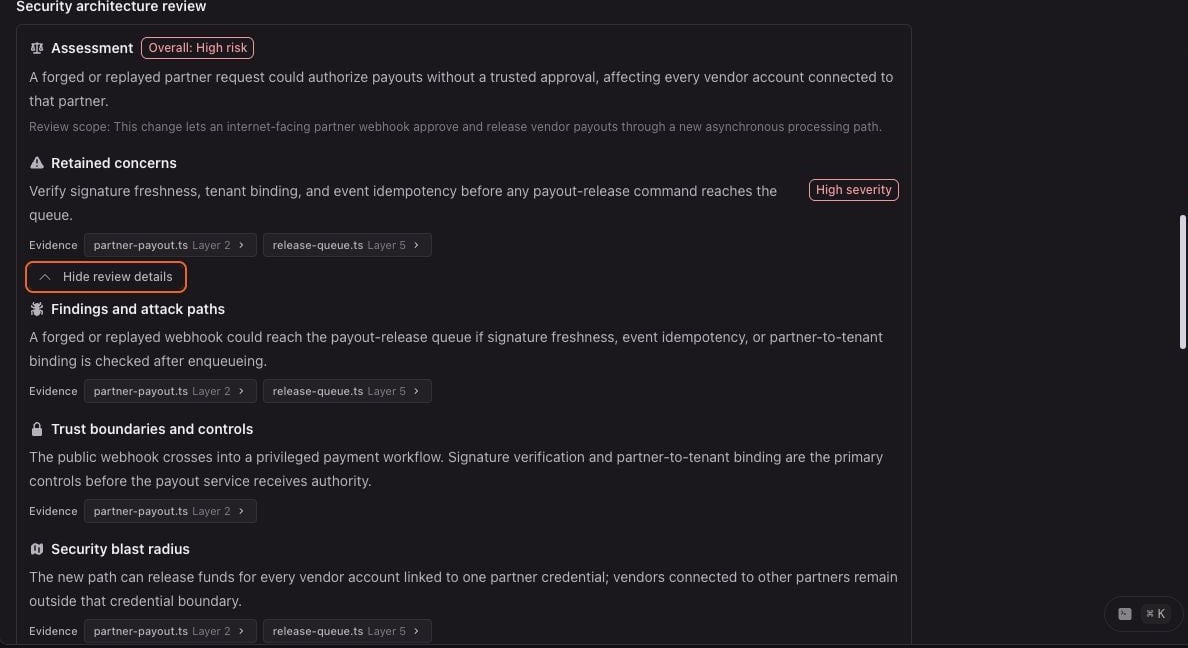
The assessment starts with an overall risk label and an explanation of why that label applies. The labels are ordered from **Minimal** to **Critical**:
| Risk label | How to read it |
| ---------- | ------------------------------------------------------------------------------------------ |
| Minimal | The lowest security architecture risk identified within the analyzed scope. |
| Low | Limited security architecture risk identified within the analyzed scope. |
| Moderate | Meaningful security architecture impact that warrants reviewer attention. |
| High | Substantial security architecture risk that warrants close review before merge. |
| Critical | The highest security architecture risk, indicating severe exposure or unresolved concerns. |
The assessment can also include:
* **Review scope** — Why the pull request required an architecture-level security review.
* **Retained concerns** — The most important concerns, each with a severity and supporting evidence when available.
* **Findings and attack paths** — Potential paths from an entry point or untrusted input to a security-sensitive operation.
* **Trust boundaries and controls** — Boundaries crossed by the change and the controls expected to protect them.
* **Security Blast Radius** — Systems, services, assets, users, or environments that could be affected.
* **Hardening proposals** — Suggested defense-in-depth improvements. These are proposals, not observed vulnerabilities.
* **Resilience and maintainability implications** — Reliability or ownership concerns included only when they affect security guarantees, containment, or recovery.
Select **See review details** in Change Stack to expand the supporting sections.
 ## Follow the evidence
Evidence links in the assessment connect a concern or claim to the relevant file and layer in Change Stack. Select an evidence link to open that layer and inspect the cited range in the reviewed diff. When more than two references support a claim, select **+N more** to see the additional evidence.
Use [Security Blast Radius](/security-agent/blast-radius) to explore the same concerns across affected components. The **Security** control shows the number and highest severity of architecture findings. Expand **Security findings** to read each finding, then select a highlighted component to inspect its evidence and relationships.
## Limitations
* The result covers only the files, context, and commit available to the review. It is not a repository-wide security audit.
* No Security Architecture Review section, or no retained concerns, does not prove that a pull request is secure.
* Missing or partial evidence can limit the analysis. CodeRabbit reports supported conclusions and does not treat unavailable evidence as proof of safety.
* Hardening proposals describe possible improvements and should not be interpreted as confirmed vulnerabilities without supporting evidence.
* The assessment does not replace threat modeling, security testing, required approvals, or provider merge protections.
## What's next
Map the assessment's findings onto affected components and evidence-backed relationships in Change Stack.
Review the pull request by architectural layer and follow evidence back to the exact changed ranges.
Explore repository-level security scanning, attack-surface mapping, and security findings outside the current pull request.
## Follow the evidence
Evidence links in the assessment connect a concern or claim to the relevant file and layer in Change Stack. Select an evidence link to open that layer and inspect the cited range in the reviewed diff. When more than two references support a claim, select **+N more** to see the additional evidence.
Use [Security Blast Radius](/security-agent/blast-radius) to explore the same concerns across affected components. The **Security** control shows the number and highest severity of architecture findings. Expand **Security findings** to read each finding, then select a highlighted component to inspect its evidence and relationships.
## Limitations
* The result covers only the files, context, and commit available to the review. It is not a repository-wide security audit.
* No Security Architecture Review section, or no retained concerns, does not prove that a pull request is secure.
* Missing or partial evidence can limit the analysis. CodeRabbit reports supported conclusions and does not treat unavailable evidence as proof of safety.
* Hardening proposals describe possible improvements and should not be interpreted as confirmed vulnerabilities without supporting evidence.
* The assessment does not replace threat modeling, security testing, required approvals, or provider merge protections.
## What's next
Map the assessment's findings onto affected components and evidence-backed relationships in Change Stack.
Review the pull request by architectural layer and follow evidence back to the exact changed ranges.
Explore repository-level security scanning, attack-surface mapping, and security findings outside the current pull request.