> ## Documentation Index
> Fetch the complete documentation index at: https://docs.coderabbit.ai/llms.txt
> Use this file to discover all available pages before exploring further.
# CodeRabbit Agent for Slack
> Bring AI-powered investigation, planning, and action into your Slack workspace with shared controls, persistent knowledge, and governed access.
export const Hint = ({type, children, headline, tip, href, cta}) => {
const TIPS = {
learnings: {
headline: "Learnings",
tip: "Review preferences CodeRabbit learns from your chat conversations and applies automatically to future reviews.",
cta: "Learn about Learnings",
href: "/knowledge-base/learnings",
content: "Learnings"
},
walkthrough: {
headline: "PR Walkthrough",
tip: "A structured comment posted by CodeRabbit at the top of every pull request, summarizing changes, sequence diagrams, review effort, and more.",
cta: "Learn about PR Walkthroughs",
href: "/pr-reviews/walkthroughs",
content: "Walkthrough"
},
"finishing-touches": {
headline: "Finishing Touches",
tip: "Post-review agentic actions (Autofix, writing docstrings or unit tests, and more) you trigger from a PR comment or a checkbox in the Walkthrough.",
cta: "See all Finishing Touches",
href: "/finishing-touches",
content: "Finishing Touches"
},
"coding-plan": {
headline: "Coding Plan",
tip: "A detailed, codebase-aware implementation plan CodeRabbit generates from an issue or description, ready to hand off to any coding agent.",
cta: "Learn about Coding Plans",
href: "/plan",
content: "Coding Plan"
},
"knowledge-base": {
headline: "Knowledge Base",
tip: "The collected context sources CodeRabbit draws on during reviews: Learnings, Code Guidelines, issue trackers, connected MCP servers, and cross-repo analysis.",
cta: "Explore the Knowledge Base",
href: "/knowledge-base",
content: "Knowledge Base"
},
"path-instructions": {
headline: "Path Instructions",
tip: "Custom review rules that only apply to files matching a glob pattern, e.g. 'src/controllers/**'.",
cta: "Configure path instructions",
href: "/configuration/path-instructions",
content: "Path Instructions"
},
"coderabbit-review": {
headline: "CodeRabbit Review",
tip: "An improved code inspection interface that reorganizes a pull request from a flat file list into a structured, layer-by-layer walkthrough with range-specific summaries and diagrams.",
cta: "Learn about CodeRabbit Review",
href: "/pr-reviews/coderabbit-review",
content: "CodeRabbit Review"
},
scope: {
headline: "Scope",
tip: "A named set of repositories, connections, and spend limits that controls what CodeRabbit Agent can access in a given Slack conversation.",
cta: "Learn about Scopes",
href: "/slack-agent/scopes",
content: "Scope"
},
"coderabbit-agent": {
headline: "CodeRabbit Agent for Slack",
tip: "An AI agent built into Slack that investigates issues, generates implementation plans, and opens pull requests right from the Slack threads.",
cta: "Explore CodeRabbit Agent",
href: "/slack-agent",
content: "CodeRabbit Agent"
},
"configuration-inheritance": {
headline: "Configuration Inheritance",
tip: "A setting that merges configuration values across multiple levels — repository YAML, central YAML, and UI settings — instead of using only the highest-priority source.",
cta: "Learn about Configuration Inheritance",
href: "/configuration/configuration-inheritance",
content: "Configuration Inheritance"
}
};
const defaults = TIPS[type] || ({});
return
{children ?? defaults.content}
;
};
export const EarlyAccessBadge = ({tip = "This feature is in early access. Enable it by setting `early_access: true` in your `.coderabbit.yaml`, or by toggling Early Access on the web interface.", title = "Early Access", cta = "View configuration", href = "/reference/configuration#param-early-access", disabled = false}) => {
return
{title}
;
};
CodeRabbit Agent is an AI agent for **your entire SDLC** right in Slack. Investigate issues, generate implementation plans, discuss requirements with colleagues, pull in context from tools like Linear or Figma, and ask CodeRabbit to open a pull request — all from the channel or thread where the conversation is already happening, or in a direct conversation through the CodeRabbit Slack app. Context carries over between messages, durable facts are saved for future conversations, and every run can be reviewed after the fact.
CodeRabbit application for Slack uses AI (Large Language Models) to generate responses, which may occasionally be inaccurate. Verify important information independently because responses do not constitute professional advice. Some features, including the AI Agent/Assistant, require a paid Slack plan and may not be available on free plans.
## What you can do
CodeRabbit Agent covers the full arc from investigation through implementation. Here are some of the things your team can do without leaving Slack.
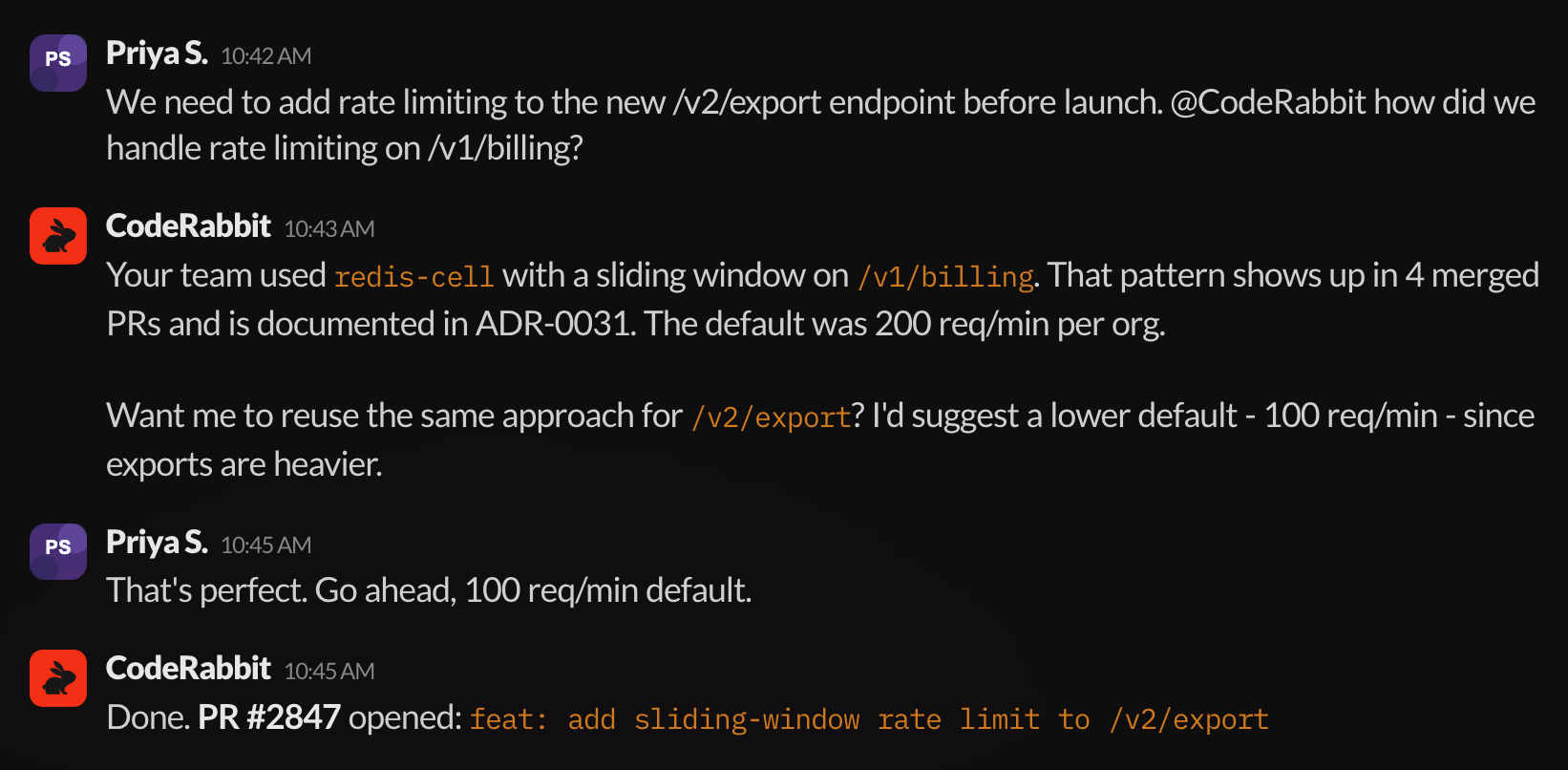
Ask the Agent to explore your codebase, review merged PRs and design documents, and surface the approach your team already follows. Once the investigation is complete, the Agent can suggest changes and open a pull request, all within the same Slack thread.
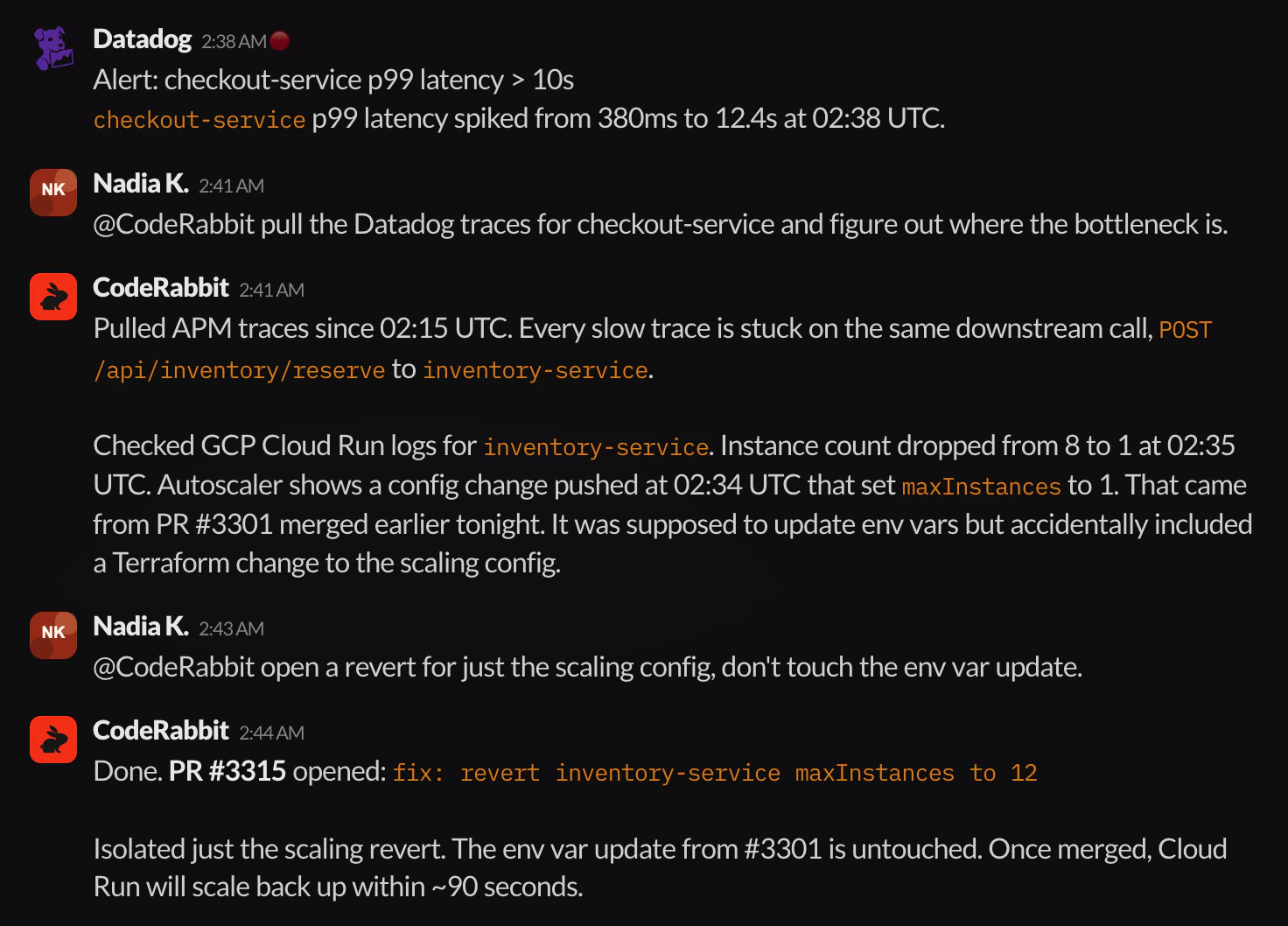
 Let the Agent pull telemetry from connected tools, correlate the data with recent code changes, and pinpoint the root cause. Once the team agrees on the fix, the Agent can open a surgical revert or patch PR.
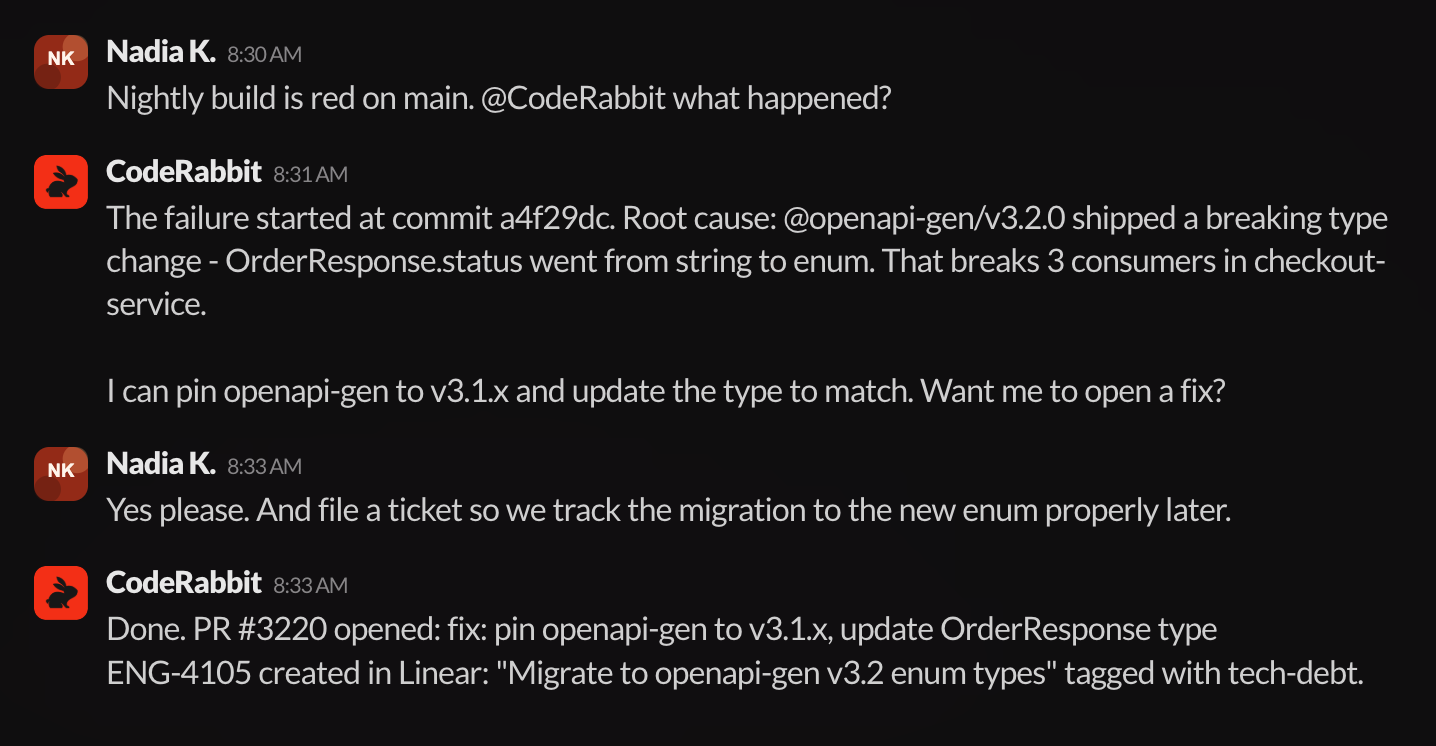
 When investigation turns into action, your team can continue the discussion in a thread — referencing context from connected tools like Jira, Linear, or Notion — and then ask CodeRabbit Agent to open a pull request that incorporates the full conversation, or create issues in your connected trackers.
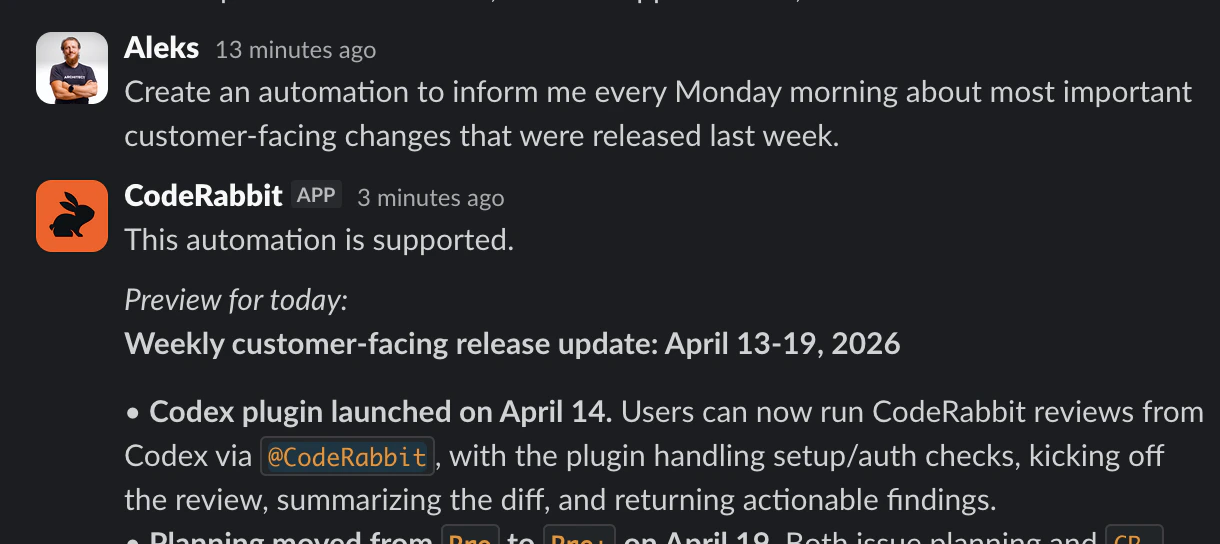
 Schedule tasks that CodeRabbit Agent can run [on a cadence](/slack-agent/automations) (*run this task every day*) or on each new **matching channel message**. Message-triggered automations can watch a channel for new alerts, notices, or other repeated inputs and reply in the triggering thread.
 ## Core Concepts
The agent pulls your org's context together, across every tool and team conversation, into one place.
* **Code** · The repositories, recent changes, and opened PRs.
* **Tickets** · Jira, Linear, or wherever your team tracks work.
* **Docs** · Notion pages, Confluence wikis, internal runbooks.
* **Monitoring** · Datadog, PostHog, Sentry, and your observability stack.
* **Cloud** · AWS, GCP, and the infra that runs under it all.
Set up external tools and APIs through [Connections](/slack-agent/connections).
The agent builds a Knowledge base from Slack and your systems. Decisions, fixes, and patterns are captured as they happen and refined through daily use, so it reflects how your team actually works.
* **Team knowledge** · Org-wide know-how, shared across teams, channels, and repos.
* **Channel memory** · Retains team-specific patterns, runbooks, and conventions.
* **Thread memory** · Carries forward everything from the current task.
Learn more about how facts are stored and scoped in the [CodeRabbit Agent Knowledge Base](/slack-agent/knowledge-base).
The agent works in a shared thread alongside your team. Anyone can guide, contribute, and move tasks forward. It learns from team conversations and stays aligned as work evolves.
* **Synchronous** · The agent lives in the Slack thread.
* **Steerable** · Redirect or expand the work mid-task.
* **Resumable** · Stop, switch devices, come back tomorrow.
See [Working in Slack](/slack-agent/use-in-slack) for how mentions, threads, and direct conversations work day to day.
Access, knowledge, and spend, scoped to the channel and user. Every run is explainable and attributed, so you see what the agent did, for whom, and what it cost.
* **Access** · Scoped to who you are and what you do. See [Admin and security](/slack-agent/admin-and-security).
* **Knowledge** · Scoped to the channel where it belongs.
* **Tool control** · Decide which integrations are available where. See [Scopes](/slack-agent/scopes).
* **Cost control** · Attributed by team and channel, not individual keys. See [Usage](/slack-agent/usage).
## Billing
CodeRabbit Agent is billed separately from CodeRabbit [review subscriptions](/management/plans). Your CodeRabbit plan covers pull request reviews, IDE and CLI reviews, and related features. CodeRabbit Agent usage is measured in **agent minutes**, the actual runtime each Slack Agent run spends working, and is billed independently.
This means:
* A CodeRabbit Pro, Pro+, or Enterprise subscription does **not** include Agent usage.
* Agent charges are based on accumulated agent minutes, not on the number of seats or reviews in your CodeRabbit plan.
* You can use Agent without a paid CodeRabbit review plan, and vice versa.
Some Agent trials include a limited Agent Minutes grant. While that grant is active, CodeRabbit Agent uses the included minutes first. When the trial grant is exhausted or expires, CodeRabbit Agent pauses new work for the workspace until an admin activates the Agent plan.
During a trial, included Agent Minutes govern usage. After that, on an active Agent plan, [scope spend controls](/slack-agent/scopes#spend-controls) set billing-period guardrails for user-started runs and automation or trigger runs.
Track your agent-minute consumption from the [Usage](/slack-agent/usage) dashboard.
## What's next
Whether you are setting up CodeRabbit Agent for Slack for the first time or exploring what it can do, start at [agent.coderabbit.ai](https://agent.coderabbit.ai/) and follow the pages below to get up and running.
Get CodeRabbit Agent for Slack running in your workspace in minutes.
Learn how mentions and direct conversations work day to day.
Connect external tools like Jira, Notion, Sentry, and Google Drive to your workspace.
## Core Concepts
The agent pulls your org's context together, across every tool and team conversation, into one place.
* **Code** · The repositories, recent changes, and opened PRs.
* **Tickets** · Jira, Linear, or wherever your team tracks work.
* **Docs** · Notion pages, Confluence wikis, internal runbooks.
* **Monitoring** · Datadog, PostHog, Sentry, and your observability stack.
* **Cloud** · AWS, GCP, and the infra that runs under it all.
Set up external tools and APIs through [Connections](/slack-agent/connections).
The agent builds a Knowledge base from Slack and your systems. Decisions, fixes, and patterns are captured as they happen and refined through daily use, so it reflects how your team actually works.
* **Team knowledge** · Org-wide know-how, shared across teams, channels, and repos.
* **Channel memory** · Retains team-specific patterns, runbooks, and conventions.
* **Thread memory** · Carries forward everything from the current task.
Learn more about how facts are stored and scoped in the [CodeRabbit Agent Knowledge Base](/slack-agent/knowledge-base).
The agent works in a shared thread alongside your team. Anyone can guide, contribute, and move tasks forward. It learns from team conversations and stays aligned as work evolves.
* **Synchronous** · The agent lives in the Slack thread.
* **Steerable** · Redirect or expand the work mid-task.
* **Resumable** · Stop, switch devices, come back tomorrow.
See [Working in Slack](/slack-agent/use-in-slack) for how mentions, threads, and direct conversations work day to day.
Access, knowledge, and spend, scoped to the channel and user. Every run is explainable and attributed, so you see what the agent did, for whom, and what it cost.
* **Access** · Scoped to who you are and what you do. See [Admin and security](/slack-agent/admin-and-security).
* **Knowledge** · Scoped to the channel where it belongs.
* **Tool control** · Decide which integrations are available where. See [Scopes](/slack-agent/scopes).
* **Cost control** · Attributed by team and channel, not individual keys. See [Usage](/slack-agent/usage).
## Billing
CodeRabbit Agent is billed separately from CodeRabbit [review subscriptions](/management/plans). Your CodeRabbit plan covers pull request reviews, IDE and CLI reviews, and related features. CodeRabbit Agent usage is measured in **agent minutes**, the actual runtime each Slack Agent run spends working, and is billed independently.
This means:
* A CodeRabbit Pro, Pro+, or Enterprise subscription does **not** include Agent usage.
* Agent charges are based on accumulated agent minutes, not on the number of seats or reviews in your CodeRabbit plan.
* You can use Agent without a paid CodeRabbit review plan, and vice versa.
Some Agent trials include a limited Agent Minutes grant. While that grant is active, CodeRabbit Agent uses the included minutes first. When the trial grant is exhausted or expires, CodeRabbit Agent pauses new work for the workspace until an admin activates the Agent plan.
During a trial, included Agent Minutes govern usage. After that, on an active Agent plan, [scope spend controls](/slack-agent/scopes#spend-controls) set billing-period guardrails for user-started runs and automation or trigger runs.
Track your agent-minute consumption from the [Usage](/slack-agent/usage) dashboard.
## What's next
Whether you are setting up CodeRabbit Agent for Slack for the first time or exploring what it can do, start at [agent.coderabbit.ai](https://agent.coderabbit.ai/) and follow the pages below to get up and running.
Get CodeRabbit Agent for Slack running in your workspace in minutes.
Learn how mentions and direct conversations work day to day.
Connect external tools like Jira, Notion, Sentry, and Google Drive to your workspace.