

About CodeRabbit learnings
As your team works with CodeRabbit, it learns your team’s code-review preferences based on chat interactions, and adds these preferences to an internal database that it associates with your Git platform organization. We call these internal records learnings.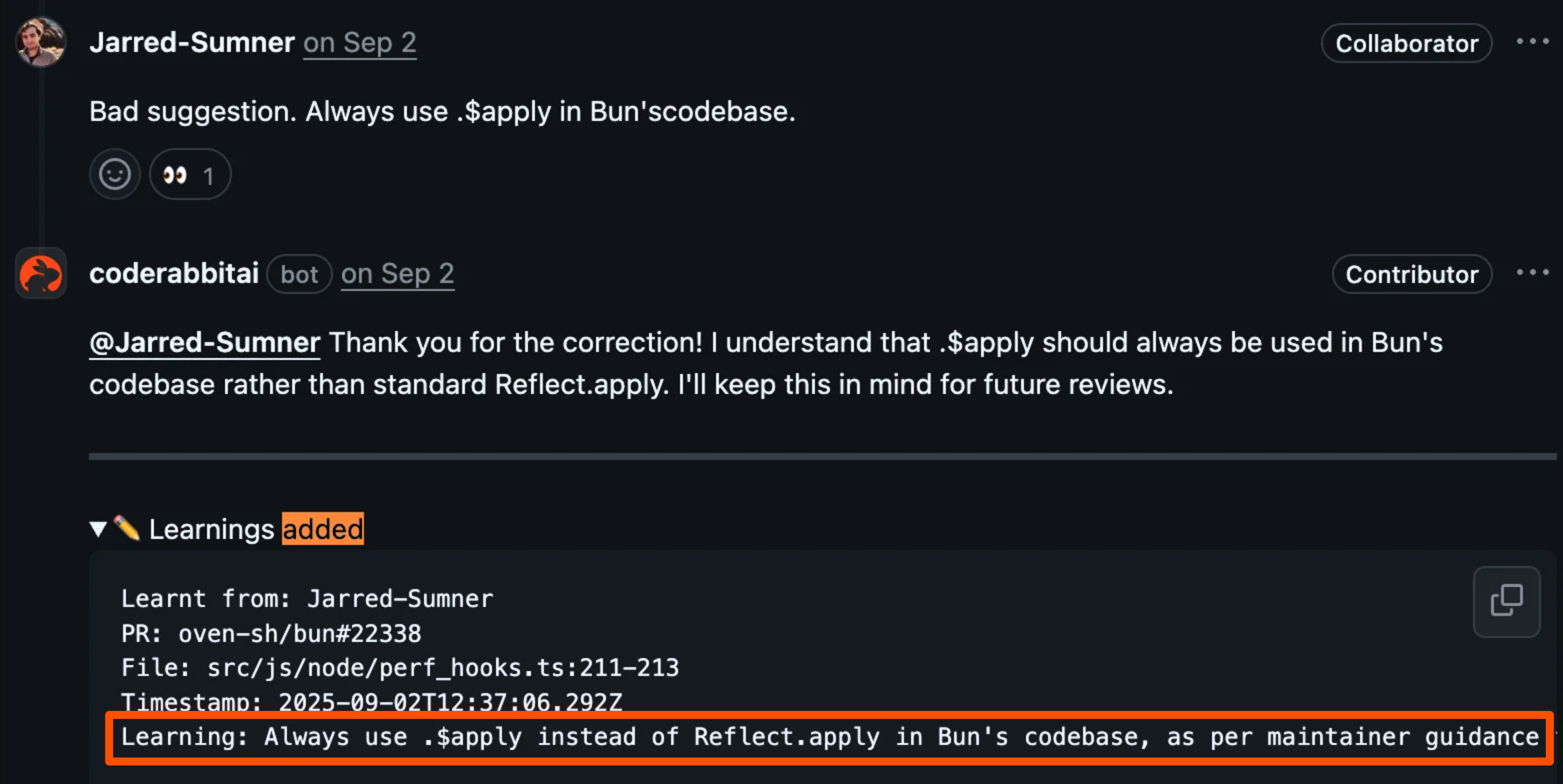
- Special instructions about reviewing particular files.
- Guidance for reviewing all of the files of one repository.
- Code-review preferences that CodeRabbit must apply across all of your organization’s repositories.
Every time CodeRabbit prepares to add a comment to a pull request or issue, it loads the learnings that apply based on your configured scope. Depending on your settings, CodeRabbit applies either the repository’s learnings only, or all of your organization’s learnings. CodeRabbit uses these learnings as additional context or instructions for its comment.
Learnings created from an open pull request first apply only to that source pull request. A learning tied to a filename pattern becomes eligible when that pattern matches a changed file. CodeRabbit then evaluates the learning against the changed code and applies it only when it is relevant to that change. Relevant path matches retain priority when CodeRabbit selects which relevant learnings to apply.
Filename-pattern matching is consistent across common path formats: patterns match paths with or without leading
./ or / prefixes, paths that use Windows-style separators, and files whose names start with a dot. This behavior requires no configuration change or customer action.
Use learnings for incremental preferences that emerge during code reviews—preferences that don’t require a formal configuration change but should be applied to future reviews. Use review instructions or coding guidelines for formal, documented standards.
You can review and edit your organization’s CodeRabbit learnings at any time, as detailed later in this page.
Add learnings
Adding a learning via comment
To add learnings to the database CodeRabbit keeps about your organization’s preferences, communicate your preferences using natural language, in a comment attached to any pull request or issue. If CodeRabbit decides to create one or more learnings based on a comment, then it makes this explicit in its response to that comment by adding a collapsible section titled Learnings Added to its own response comment. Imagine a scenario where CodeRabbit has reviewed a GitHub-based pull request from your team that adds a feature to an authentication middleware library. CodeRabbit has flagged a certain file as needing improvement, attaching this comment to the relevant lines in its review:Consider using nested try-catch blocks here to handle different error scenarios more comprehensively.If this critique disagrees with your team’s coding practices specific to try-catch blocks, then you can reply to this CodeRabbit comment using a comment of your own, addressed to the
@coderabbitai service account on GitHub:
@coderabbitai Actually, we’ve found that nested try-catch blocks make our auth middleware harder to debug in production. We prefer early returns with specific error codes - it’s cleaner and our monitoring tools can track them better.CodeRabbit considers your reply, and decides to make a learning out of it. It acknowledges this in another reply:
You’re absolutely right about the debugging benefits. Early returns with specific error codes do provide better clarity and monitoring capabilities. I’ll remember this preference for your authentication middleware. Thank you for the guidance!CodeRabbit also adds a Learnings added section to this comment, making explicit the fact that this chat has modified its future behavior with your team. CodeRabbit then creates a new learnings record for itself. Along with metadata such as the pull request number, filename, and GitHub user associated with the learning, CodeRabbit adds this self-instructive text to the new record:
In authentication middleware, prefer returning early with specific error codes rather than nested try-catch blocks. This improves readability and makes error tracking easier in production environments.If your organization requires approval before newly created chat-sourced learnings are applied, CodeRabbit creates a pending request instead of immediately adding the learning to the active learning set. Admins can approve or disapprove the request from the Learnings dashboard, and pending requests auto-approve after the configured delay unless an admin rejects them first. Existing learnings are not affected. On CodeRabbit SaaS, CodeRabbit-inferred Learnings created automatically by the review pipeline continue to apply immediately to their source pull request, and remain withheld from other pull requests until the source pull request merges.
Add learnings from files
You can import content from any file in your repository as learnings. This is useful for converting existing team documentation into learnings that CodeRabbit will apply during reviews. To import a file as learnings, mention the file in a pull request comment:- Converting existing team documentation into CodeRabbit learnings
- Bulk-adding multiple preferences at once
- Importing learnings from an exported CSV file
If you have AI agent configuration files like
.cursorrules, CLAUDE.md, or .github/copilot-instructions.md, use code guidelines instead. CodeRabbit automatically detects and applies these files without manual import.Credential redaction
When a learning is newly created during PR Review, imported, approved, or edited by an administrator, CodeRabbit replaces recognizable credentials with credential-type markers before storing the text and creating its vector embedding. Markers identify the credential type, for example,***REDACTED_GITHUB_TOKEN***, ***REDACTED_STRIPE_KEY***, or ***REDACTED_URI_PASSWORD***. For each connection URI, CodeRabbit removes only the password; the scheme, username, host, port, and path remain.
CodeRabbit later reuses the same redacted text in PR Review context and CSV exports. Ordinary guidance and code examples that discuss authentication without containing a high-confidence secret remain unchanged. Redaction occurs only at write time and does not backfill or clean previously stored learnings.
Best practices for new learnings
When communicating with CodeRabbit during an active code review, follow these practices to create effective learnings:Consider if it’s a pattern or a one-off
Determine whether a correction represents a team-wide preference that should apply to all future reviews, or a situation specific to this pull request. Not every correction should become a learning. For one-time exceptions, such as unusual temporary code patterns during a migration, resolve the comment without creating a learning. For systemic preferences that should persist across reviews, provide feedback that CodeRabbit can store as a learning.Explain the why, not just the what
Don’t just tell CodeRabbit what to do, explain the reasoning. The “why” helps CodeRabbit apply the learning correctly in similar-but-not-identical situations:Reply to specific comments for maximum context
Prefer to reply directly to the comment on the specific line of code rather than leaving general comments on the PR. This gives CodeRabbit more context when considering feedback, allowing it to create more specific learnings. A generic comment on the PR might produce a vague learning. Replying to a specific line produces a learning tied to that file pattern and context.View learnings
To view the learnings that CodeRabbit has associated with your organization, go to app.coderabbit.ai/learnings. This opens the Learnings dashboard, which gives you an at-a-glance overview of your organization’s learnings along with a sortable, filterable table. By default, the table is sorted by Last used descending.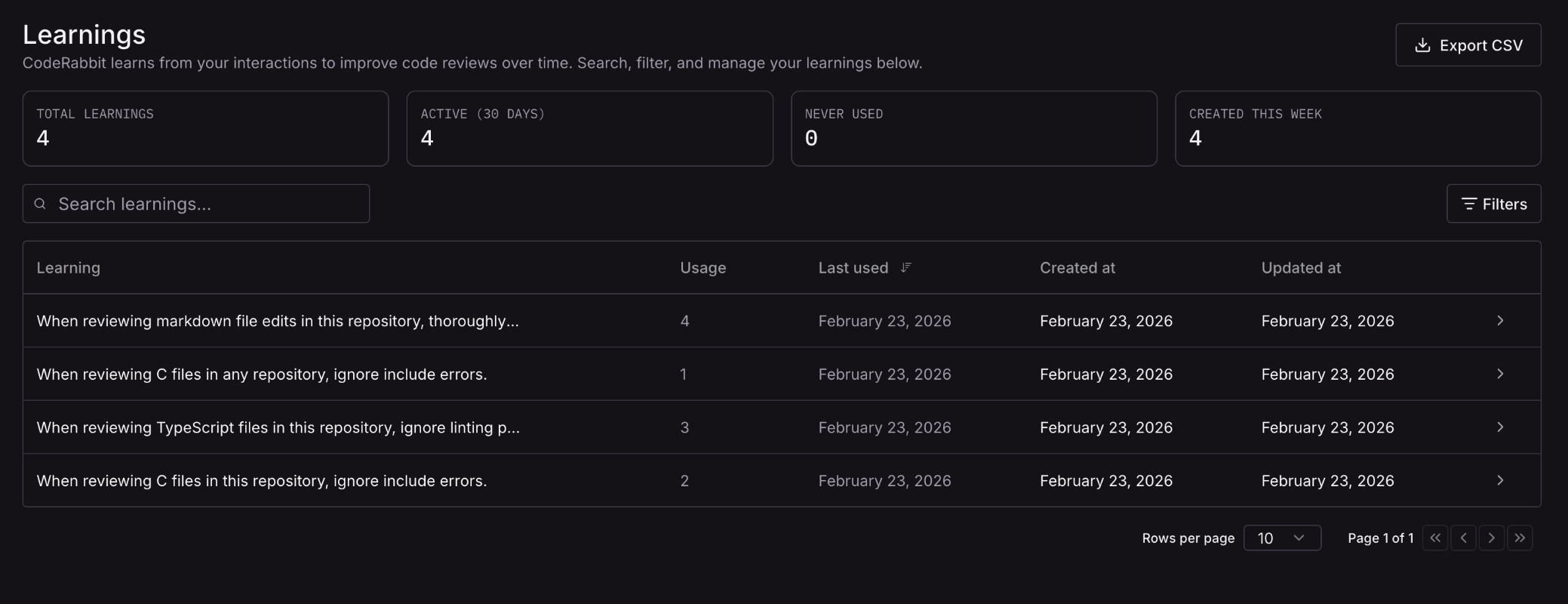
CodeRabbit Learnings dashboard
KPI cards
At the top of the dashboard, four KPI (Key Performance Indicator) cards summarize the state of your learnings. Clicking a card filters and sorts the table to the relevant subset.
Use these cards to quickly identify which learnings are actively influencing reviews, which ones might be stale, and what your team has added recently.
Table columns
The learnings table contains the following columns:View learning details
Click any row in the table, or click the Action button on the row, to open a detailed view of that learning. The detail view displays the following fields:
From this view you can also edit the description or delete the learning.
Review pending learnings
Organizations that require approval for newly created chat-sourced learnings have a Pending approvals tab on the Learnings dashboard. This tab lists new learnings waiting for review, including the requested learning text, source repository, source pull request when available, requester, request date, and auto-approval deadline. CodeRabbit applies credential redaction again before storing approved text. Administrators can approve or disapprove pending learnings. You can act on a single pending learning or select multiple rows for bulk approval or disapproval.Sort learnings
You can sort the table by any column. Click a column header to sort by that column in ascending order, and click it again to switch to descending order. Sorting lets you quickly find your most-used learnings, your oldest learnings, or the ones most recently updated.Filter displayed learnings
Over time, the learnings that CodeRabbit gathers for your organization can become quite numerous. This can make manually browsing the full list difficult. The CodeRabbit web interface has search and filtering tools to help you find specific learnings, based on the topic of the learning text, or on other metadata. To filter the displayed learnings by topic or concept, enter that topic or concept into the Search learnings field. Because this is a vector-based similarity search, the returned learnings don’t necessarily contain the exact text of your search terms. For example, to see the top learnings that have to do with error reporting, entererror reporting into Search learnings. This will find learnings about exceptions, try-catch, error codes, and other semantically related topics.
To filter the displayed learnings by repository, file path, or user, click the Filters button at the top right of the table and select additional criteria. Your repositories, file paths, and users will automatically populate as tags when you search the values.
Edit or delete learnings
You can edit and delete learnings in three ways: Via the web interface: If your account has the Admin CodeRabbit role with your organization, then you can edit the text of any stored learning or delete it through the CodeRabbit dashboard. When you save an edit, CodeRabbit applies credential redaction again before storing the updated text. To edit or delete a learning via the web interface:- Click the Action button on the learning’s row in the table, which resembles a right arrow.
- Edit the Description to edit the learning, or press Delete to delete it.
@coderabbitai and describing the change you want.
Via the public API: Enterprise teams can update or delete Learnings programmatically. Deletion is idempotent, so retrying the same request is safe.
Export and transfer learnings
You can export your organization’s learnings and import them into another CodeRabbit account. This is useful when migrating accounts or consolidating organizations.Export learnings
To export your learnings:- Visit the CodeRabbit web interface.
- Navigate to Learnings in the sidebar.
- Click the export option to download your learnings as a CSV file.
Import learnings to a new account
To import learnings into a new CodeRabbit account:- Ensure the new account is connected to your repository and has an active CodeRabbit subscription.
- Add the exported learnings CSV file to a branch in your repository.
- Create a pull request from that branch.
- Use CodeRabbit chat to request the import:
Configure learnings storage and application
CodeRabbit has several configuration options that modify the storage and application of learnings. Theknowledge_base.learnings settings are:
enum
default:"auto"
Choose scope: ‘local’ (repo), ‘global’ (org), or ‘auto’ (local for public repos, global for private repos).
local: Uses only the learnings of the repository being reviewedglobal: Uses all of your organization’s learnings in every reviewauto(default): When reviewing a public repository, uses only that repository’s learnings. When reviewing a private repository, uses all of your organization’s learnings
integer
default:0
0–30
Days admins have to approve or reject a learning before it is automatically applied. Must be an integer between 0 and 30. Set to 0 to apply learnings immediately without approval.
Opt out of learnings storage
CodeRabbit enables learnings by default. To disable learnings, enable the Opt out setting, which disables the knowledge base features that require data retention, including learnings, and removes any existing stored knowledge base data.On self-hosted CodeRabbit, you can also disable all features that require long-term data retention by setting
knowledge_base.opt_out to true. See Opt out of data retention.Specify the scope of learnings
Theknowledge_base.learnings.scope setting lets you specify the scope that CodeRabbit applies to all of the learnings it has collected about your organization. With the default, auto, CodeRabbit applies only a public repository’s own learnings and applies all of your organization’s learnings when reviewing a private repository. With global, it applies all of your organization’s learnings to all code reviews. With local, it applies only the learnings associated with the repository being reviewed.
Learnings from an open pull request
On CodeRabbit SaaS, a Learning created while a pull request is open remains available only to that source pull request and is withheld from reviews of other pull requests. When Learnings retrieval is available, the source pull request can retrieve its 20 most recent source-scoped Learnings. After the source pull request merges into any branch, its Learnings become available repository-wide and enter normal retrieval. Closing the source pull request without merging keeps its Learnings scoped to that pull request. Approval and dashboard editing continue to work for source-scoped Learnings. See Review pending learnings and Edit or delete learnings.Require approval before applying learnings
Useknowledge_base.learnings.approval_delay to control whether newly created chat-sourced learnings apply immediately or wait for admin review. This setting is available on all pricing plans and can be configured at the organization or repository level. The value is an integer from 0 to 30, measured in days.
- Using configuration file
- Using Web Interface
.coderabbit.yaml
0applies newly created chat-sourced learnings immediately. This is the default.1through30creates pending requests for newly created chat-sourced learnings and auto-approves each request after that many days unless an admin disapproves it first. Existing learnings are not affected. On CodeRabbit SaaS, CodeRabbit-inferred Learnings created automatically by the review pipeline continue to apply immediately to their source pull request.
0 when you want CodeRabbit to learn from chat feedback without an approval step.
When to use each scope
The defaultauto scope can be suboptimal for organizations with diverse repositories. Consider these scenarios:
Use 'local' for diverse tech stacks
Use 'local' for diverse tech stacks
If your organization has repositories with different conventions—such as a
Python backend and a React frontend—use
local scope to prevent
cross-contamination of learnings. Without local scope, learnings about
Python exception handling might incorrectly influence React component
reviews, or vice versa..coderabbit.yaml
Use 'global' for consistent org-wide standards
Use 'global' for consistent org-wide standards
If your organization maintains consistent coding standards across all
repositories—such as security practices, documentation requirements, or naming
conventions—use
global scope to apply learnings universally..coderabbit.yaml
Use 'auto' for mixed visibility
Use 'auto' for mixed visibility
The
auto setting works well when you have both public and private
repositories, and you want to:- Keep public repository learnings isolated
- Share learnings across private repositories
Troubleshooting
Learnings appear to not be working
If CodeRabbit seems to ignore your learnings—for example, continuing to make suggestions that contradict existing learnings—try this workaround:- Review existing learnings. Go to your project’s Learnings page and verify that all relevant learnings are active and clearly phrased.
- Consider possible conflicts with path instructions or coding guidelines. Path instructions precede learnings.
-
Add a reinforcement rule. Introduce a new rule that explicitly tells the model to stop and reconsider the Learnings before continuing the review. For example:
- Save and re-test. Commit this change and observe the next few automated reviews. CodeRabbit should now respect the learnings more consistently.
Maintaining learnings over time
Team conventions evolve, and learnings can become stale. To maintain learnings effectively:- Quarterly review. Set a reminder to review your learnings every quarter. Look for learnings that reference deprecated patterns, old file structures, or outdated team decisions.
- Delete contradictory learnings. If you find learnings that conflict with current practices, delete them to avoid confusing CodeRabbit.
- Update rather than accumulate. When team standards change, update or delete old learnings rather than adding new ones that contradict them. Multiple conflicting learnings on the same topic can produce inconsistent behavior.
- Use the similarity search to find learnings about areas where your practices have changed.
- Filter by creation date to find the oldest learnings.
- Review learnings from team members who are no longer active.
API reference
What’s next
Review instructions
Add path-based rules to tell CodeRabbit exactly how to review specific files and directories
Code guidelines
Let CodeRabbit automatically detect and apply your existing coding standards from files like CLAUDE.md and .cursorrules
Multi-repo analysis
Link related repositories so CodeRabbit can spot breaking changes and API mismatches across repo boundaries