

@coderabbitai and describe what needs to be tracked.
Creating issues through agentic chat
The most straightforward way to create issues is through CodeRabbit’s chat interface. During pull request reviews or in comment threads, mention@coderabbitai and ask to create an issue. CodeRabbit analyzes the context and creates a well-structured issue with relevant details (code context, discussion history, etc.) for your chosen platform. For Jira, you can create a new issue or a sub-task for an existing issue.
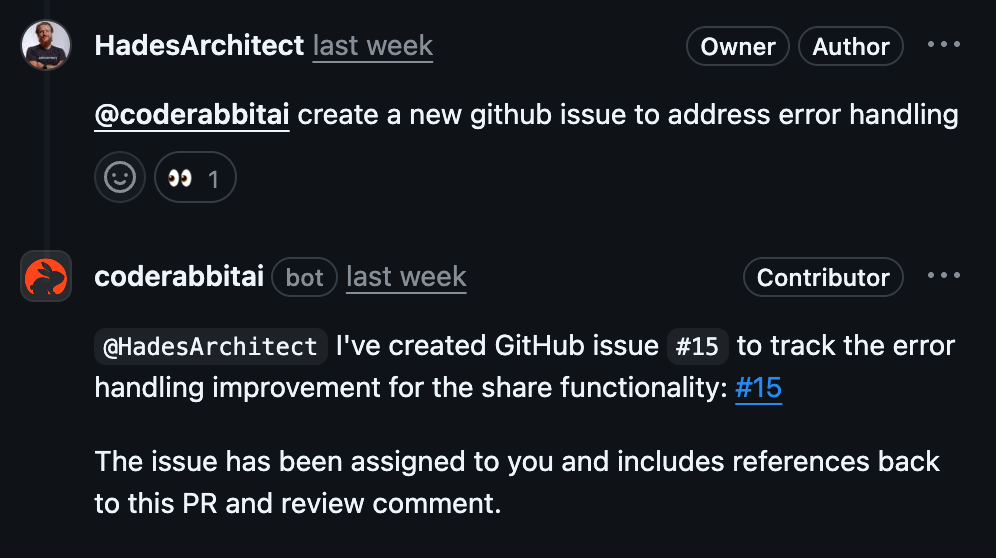
Creating an issue through CodeRabbit's agentic chat interface
Supported platforms
GitHub and GitLab
Git-based platform issues work automatically without additional setup.
CodeRabbit creates issues directly in your repository.
Jira
Create Jira tickets after configuring the Jira integration.
Linear
Generate Linear issues once you’ve set up the Linear integration.
Customize Jira issue descriptions
For Jira issues, you can usechat.integrations.jira.issue_template to shape the description CodeRabbit writes when it creates an issue from chat. The setting is a free-form string that CodeRabbit adds to the Jira agent prompt, instructing the model to preserve the headings, keep their order, and fill each section from the request and PR context.
The recommended content is Markdown headings, one per line, up to 3,000 characters—optionally with bullets, checkboxes, or fixed boilerplate text—or leave the setting empty to let CodeRabbit choose the structure. Keep it limited to description guidance: direct instructions about project, issue type, labels, assignee, or custom fields aren’t a reliable control channel and may be ignored or may accidentally appear in the description. See Configure CodeRabbit for Jira for an example.
Best practices
Provide context
Include relevant code snippets, error messages, or discussion context when
requesting issue creation. This helps CodeRabbit generate more detailed and
actionable issues.
Specify the platform
If you have multiple issue platforms configured, explicitly mention which one to use: “Create a Jira ticket for this” or “Add this to Linear.”
Include assignee information
Mention specific team members who should handle the issue: “Create an issue
for @username to investigate this performance problem.”
Set priority and timing
Indicate urgency or deadlines: “Create a high-priority issue for the memory
leak in checkout flow” or “Add this to the next sprint.”