

Browse and modify your settings using the web interface
To view or modify your repository settings using the CodeRabbit web interface:1
Open repository settings
Visit the CodeRabbit web interface and click Repositories in the sidebar
2
Select repository
Click the gear-shaped Settings icon of the repository whose settings you want to view or modify
3
Disable Organization Settings
If the Use Organization Settings toggle is on, click it to turn it off to customize this repository’s settings
If you leave the toggle on, CodeRabbit applies settings from the organization-configuration page to this repository
4
Modify settings
Browse and modify your settings. Click Apply Changes when you are finished.
The settings page opens in Concise mode by default, which shows the most commonly used settings, switch to All to access all possible options.
Settings view modes
The web interface provides three ways to view and edit your repository settings. To switch modes, use the Change mode dropdown at the top. All three modes read from the same underlying configuration, so changes persist when you switch between them.Visual Modes
- Concise (default): A curated subset of the most commonly changed settings, organized into categories like General, Reviews, Pre-merge checks, and Finishing touches.
- All Settings: The complete list of every available setting. Switch to this mode if you need to access less common settings such as individual tool configurations, chat settings, knowledge base, code generation, and issue enrichment.
Use Cmd+K (Mac) or Ctrl+K (Windows/Linux) to open the command palette and search for any setting across all modes.
Text Mode
- YAML Editor: Direct YAML editing with syntax highlighting, real-time schema validation, and clipboard support. Only non-default values are shown. The YAML format matches
.coderabbit.yamlfor easy transfer between the web interface and repository files.
In YAML Editor mode, validation errors must be resolved before saving changes.
Preview
In Concise and All Settings modes, a live Preview panel appears on the right side of the settings page. This panel shows a mock PR review comment that visualizes how your settings affect the information CodeRabbit displays in pull request reviews.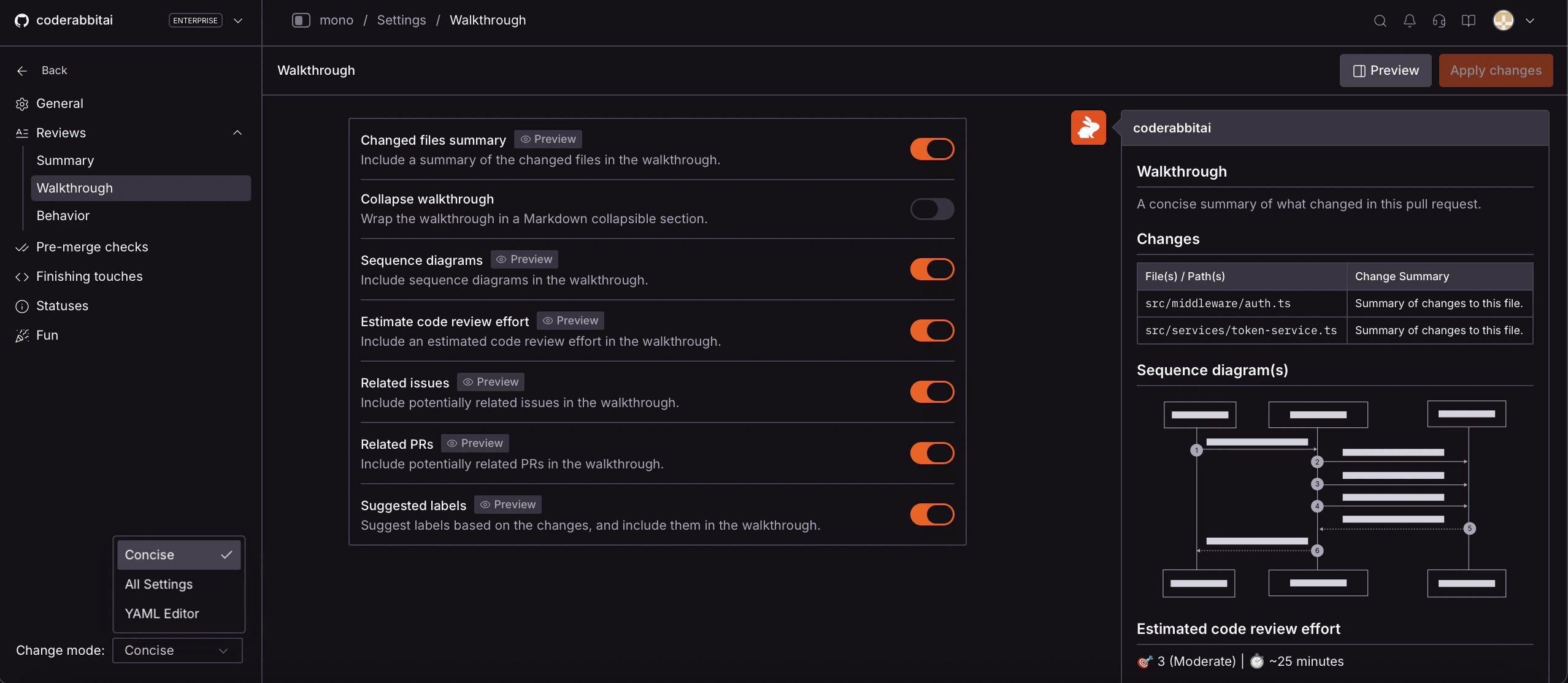
Concise mode with the Preview panel showing a live mock of how walkthrough settings affect the PR review comment
- Toggle the preview using the Preview button in the top-right corner. Preview is enabled by default.
- Settings that affect the PR review output are tagged with Preview, so you can identify which settings have a visible impact.
- When you change a setting with preview support, the preview panel automatically scrolls to the affected section and highlights the change.