

CodeRabbit, next to your CI results. On GitHub and GitHub Enterprise Server with CodeRabbit Cloud, it is a check run when reviews.review_progress is true, the default, and a commit status when it is false. On GitLab, Azure DevOps, and Bitbucket, and on GitHub with self-hosted CodeRabbit, it is a commit status, which Bitbucket shows as a build status. Branch rules can require it before a pull request merges.
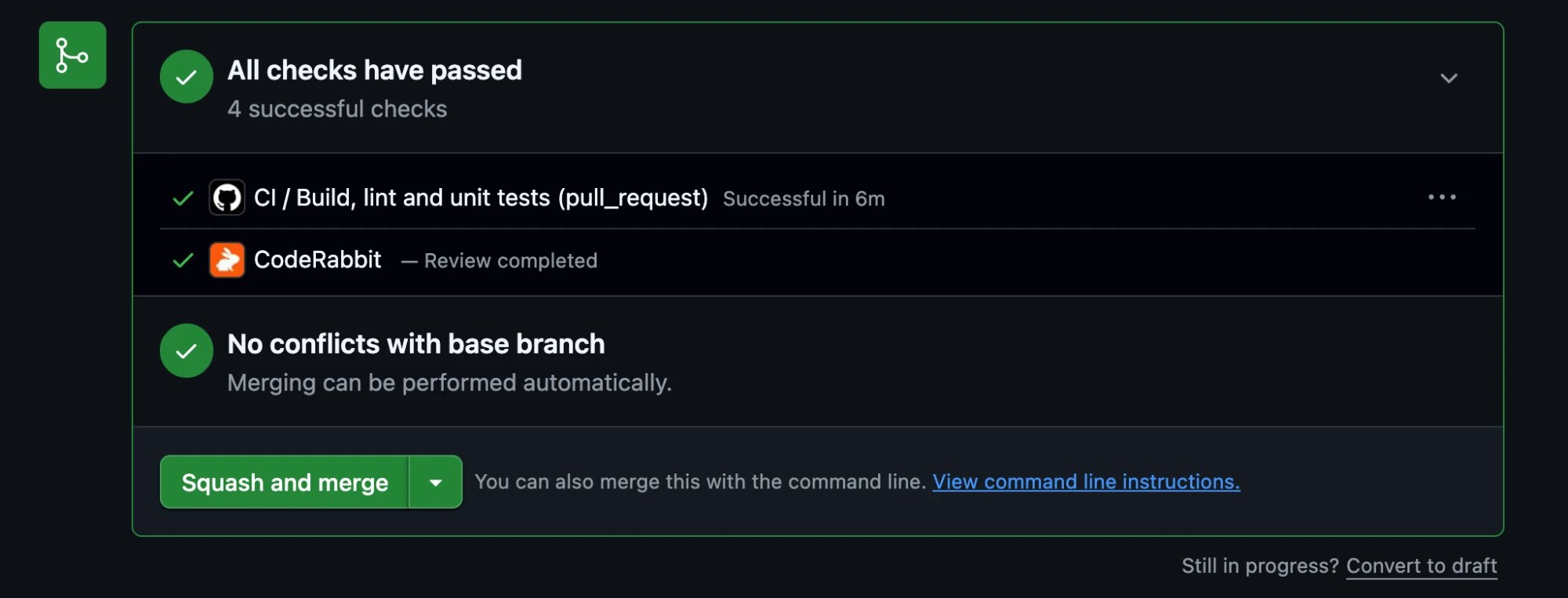
The CodeRabbit commit status in a GitHub pull request's merge box, next to a CI check
The
CodeRabbit check is separate from review status messages, the comments in which CodeRabbit explains why it skipped a review. reviews.review_status controls those comments and does not affect the check.What the check means
On GitHub, the check run’s title is shown next to its name, and the check’s summary lists each review stage and how long it took once the review ends. A skipped review shows Skipped and a rate-limited review shows Neutral. GitLab, Azure DevOps, and Bitbucket have no skipped or neutral state, so the commit status reports success for these reviews, and its description says what happened. Each platform uses its own names for the states, such as
succeeded and failed on Azure DevOps.
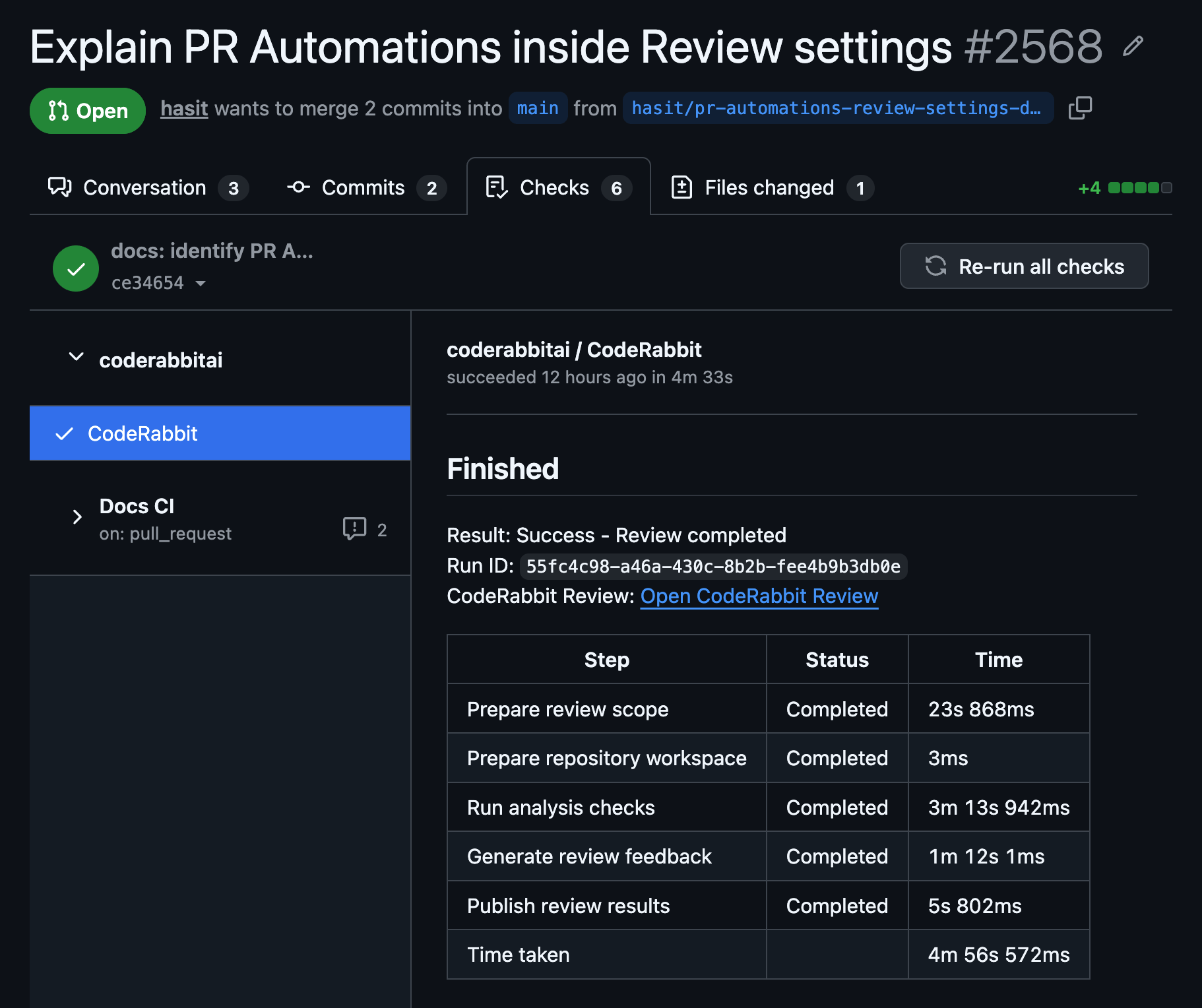
The CodeRabbit check run in a GitHub pull request's Checks tab, with its title and the time each review stage took
When the check fails
- Read the error. On GitHub with a check run, open the
CodeRabbitcheck: its title isReview failed, and its summary starts withResult: Error. For most errors, such as an unexpected failure or a failure to post review comments, it says onlyReview failed. Some errors name their cause, as listed under Failure descriptions. On GitHub with self-hosted CodeRabbit orreviews.review_progressset tofalse, and on other platforms, the commit status description shows the error instead. There it can be one of the descriptions in the second table of that section. - Run the review again. Push a new commit, or comment
@coderabbitai full review, which reviews the same commit again. The check turns green when the new review succeeds. Prefer@coderabbitai full reviewover a plain@coderabbitai review: when CodeRabbit recorded the failed commit as reviewed, a plainreviewreplies that the last commit was already reviewed and leaves the failure in place. - If the review keeps failing, a person on the ruleset’s bypass list, or an administrator when branch protection allows it, can merge the pull request without the check. To stop review errors from blocking merges, set
reviews.fail_commit_statustofalse.
Status carried forward from previous reviewed commit. If that status was a failure, the new commit fails too. The next review that succeeds on the new head commit, including one you start with @coderabbitai full review, replaces it.
On GitHub, adding or removing a label that does not start a review leaves an existing failure in place. Any other skipped review on the same commit replaces the failure with a skipped check.
When there is no check
CodeRabbit posts nothing for a commit when:- CodeRabbit never received or processed the event, for example because the app is not installed on the repository or a webhook was lost.
- A newer push replaced the commit before the review started.
- You requested a review of a commit that CodeRabbit already reviewed. CodeRabbit replies in the pull request instead.
reviews.commit_statusisfalseon a platform that uses the commit status.- CodeRabbit lacks permission to post it, for example because the GitHub App installation has not accepted the Checks or Commit statuses permission, or because the Azure DevOps credential lacks Code access to post statuses. Fix the permission, then comment
@coderabbitai full review.
CodeRabbit check yet. A required check that never appears keeps the pull request from merging. Comment @coderabbitai full review to run a review and post the check.
Require the check before merging
GitHub
In a branch ruleset or branch protection rule, turn on Require status checks to pass before merging and addCodeRabbit. GitHub lists the check after CodeRabbit has reported it on a recent commit in the repository. If you select an expected source for the check, select the CodeRabbit app. GitHub matches a required check by name, so the requirement is met by the check run and also by the commit status that CodeRabbit posts when check runs are off.
GitHub treats a check that succeeded, was skipped, or ended as neutral as passing. A required CodeRabbit check therefore blocks merging while a review is in progress, when a review fails with fail_commit_status set to true, when a review is cancelled, and while no check exists. It does not block skipped or rate-limited reviews.
If the branch uses a merge queue, CodeRabbit reports a successful CodeRabbit check titled Pull request review passed on the commit that the merge queue creates, so the required check does not hold up the queue. CodeRabbit does not review that commit.
See Choose an approval policy for setups that combine the check with CodeRabbit’s approval and human reviews.
GitLab
CodeRabbit adds theCodeRabbit commit status to the merge request’s head pipeline when a pipeline exists for the head commit. Otherwise, GitLab adds the status to a separate external pipeline. If the project requires Pipelines must succeed, a pending or failed CodeRabbit status is part of the pipeline result. Test the setup on one merge request before you rely on it.
Bitbucket
CodeRabbit reports a build status namedCodeRabbit with the key coderabbitai/<pull request number>. Merge checks that require successful builds, or no failed builds, can include it. Test the setup on one pull request before you rely on it.
Azure DevOps
TheCodeRabbit status is a Git commit status, not a pull request status, so an Azure DevOps status branch policy cannot require it. To start automation when a review finishes, see Detecting review completion.
Fail the check when a review errors
reviews.fail_commit_status decides what the check reports when a review errors. It is false by default.
false: On GitHub, the check run ends as neutral. On other platforms, the commit status is success, and its description isReview failedor names the error. A required check passes, so a failed review never blocks merging.true: The check fails, with the same title or description. A required check blocks merging until a later review succeeds.
Failure descriptions
On GitHub, these errors appear in the check’s summary. On other platforms, they are the commit status description. By default, withreviews.review_progress set to true, an unexpected error or a failure to post review comments shows only Review failed. These errors show their cause:
When
reviews.review_progress is false, or with self-hosted CodeRabbit, these descriptions replace Review failed:
Review publication stopped: pull request is no longer open is not an error. It means the pull request was closed while CodeRabbit was publishing its review. On GitHub, it shows as a cancelled check titled Review cancelled. On other platforms, it is the commit status description.
What the check does and doesn’t guarantee
No setting guarantees that CodeRabbit reviews every pull request before it merges. The check reports what CodeRabbit did with a commit. The strongest setup on GitHub is:- A required
CodeRabbitcheck in a ruleset or branch protection rule. reviews.fail_commit_statusset totrue, so a failed review blocks merging.- Global overrides that set
reviews.review_progress,reviews.commit_status, andreviews.fail_commit_status, so a repository or pull request cannot change them.
- CodeRabbit skips the review, reviews are paused, or a usage limit stops the review. The check passes.
- The review covers only the commits pushed since the last review, or leaves out files excluded by path filters or size limits. The check passes.
- On GitHub, the pull request comes from a branch in the same repository and changes these settings in its own
.coderabbit.yaml, which CodeRabbit reads for pull requests opened by members and collaborators. A review command can also change them for one run with--with-config. Global overrides take precedence over both. - A person or app on the ruleset’s bypass list merges the pull request.
- The pull request goes through a merge queue, where CodeRabbit reports a successful check without reviewing the merge-queue commit.
Platform differences
- On GitHub, if CodeRabbit cannot create or complete the check run, for example because the GitHub App installation has not accepted the Checks write permission, CodeRabbit posts the final result as a
CodeRabbitcommit status instead, as long asreviews.commit_statusistrue. - CodeRabbit posts
Review queuedwhile an automatic review waits to start on GitLab, Azure DevOps, and Bitbucket, but not on GitHub or from self-hosted CodeRabbit. Review approvedappears only in the commit status, when Automatic Approvals approves the pull request after a review or after its review threads are resolved. An@coderabbitai approvecommand does not post it.- Only GitLab, Azure DevOps, and Bitbucket Data Center carry a status forward from an earlier commit. Bitbucket Cloud never does.
Configuration
- Using configuration file
- Using web interface
.coderabbit.yaml
reviews.review_progressapplies to GitHub with CodeRabbit Cloud. When it istrue, the default, CodeRabbit reports each review as a check run. When it isfalse, CodeRabbit posts the commit status instead.reviews.commit_statusturns the commit status on or off on GitLab, Azure DevOps, Bitbucket, and on GitHub with self-hosted CodeRabbit or withreview_progressset tofalse. When it isfalse, those platforms show noCodeRabbitcheck, andfail_commit_statushas no effect there. On GitHub with check runs, it only allows the commit status fallback described above.reviews.fail_commit_statusapplies to the check run and the commit status.
What’s next
Choose an approval policy
Combine CodeRabbit’s approval, human reviews, and GitHub branch rules to decide what a pull request needs before it merges.
Automatic Approvals
Let CodeRabbit approve pull requests once its review is complete and its feedback is resolved.
Manage code reviews
Request another review, pause reviews, or resolve threads with
@coderabbitai commands.