

Intended use
The CodeRabbit Reverse Tunnel is intended for organizations with the constraints defined below:- Your self-managed Git instance or internal MCP server runs in a private subnet, private cloud account, or on-premises network.
- Your services cannot receive inbound connections from CodeRabbit or the public internet.
- Your security policy does not allow inbound firewall exceptions, vendor IP allowlisting on the Git platform side, or external PrivateLink peering.
For services that CodeRabbit can already reach directly, use the standard GitHub Enterprise Server guide, self-managed GitLab guide, or MCP servers guide. At the moment there is no self-service interface; reverse tunnel setup is handled by CodeRabbit Sales or Support.
Components
The CodeRabbit Reverse Tunnel has four components:- Reverse Tunnel Gateway — A CodeRabbit-managed edge service that accepts Connector sessions and exposes tenant-scoped HTTPS routes for CodeRabbit services to call into.
- Reverse Tunnel Connector — A lightweight, CodeRabbit-provided container that runs inside your network and establishes a long-lived outbound connection (WSS over HTTPS) to the Reverse Tunnel Gateway. CodeRabbit then sends runtime requests — clone, read pull requests, post review comments — over this pre-established tunnel. The Connector dials out from your network; no inbound ports are opened.
- Route key — A unique, opaque routing identifier issued by CodeRabbit for each destination. CodeRabbit uses the route key to direct runtime traffic to the correct Connector session, so your private address is never exposed in the URL path. Each route is provisioned for a specific purpose, either Git platform traffic or MCP traffic, and the gateway enforces that purpose.
- Connector token — A bearer token issued by CodeRabbit for your tenant. Multiple Connector replicas can share the same token.
Architecture
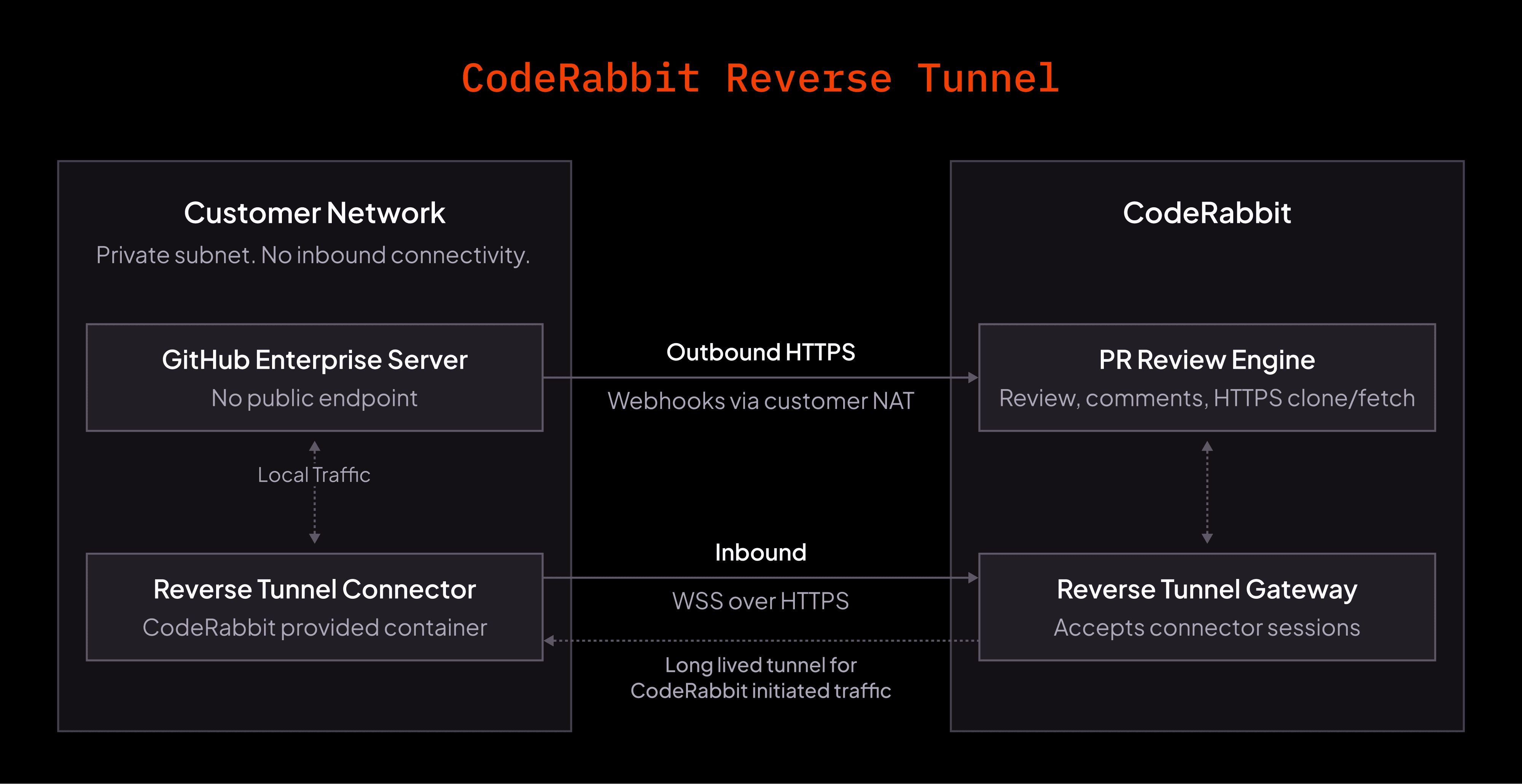
CodeRabbit Reverse Tunnel architecture
The tunnel carries only CodeRabbit-initiated inbound traffic. Outbound webhooks continue to flow through your existing customer NAT and use the webhook secret or token configured for that platform.
PR review flow through the Tunnel
End-to-end view of how a single pull request moves through the CodeRabbit Reverse Tunnel.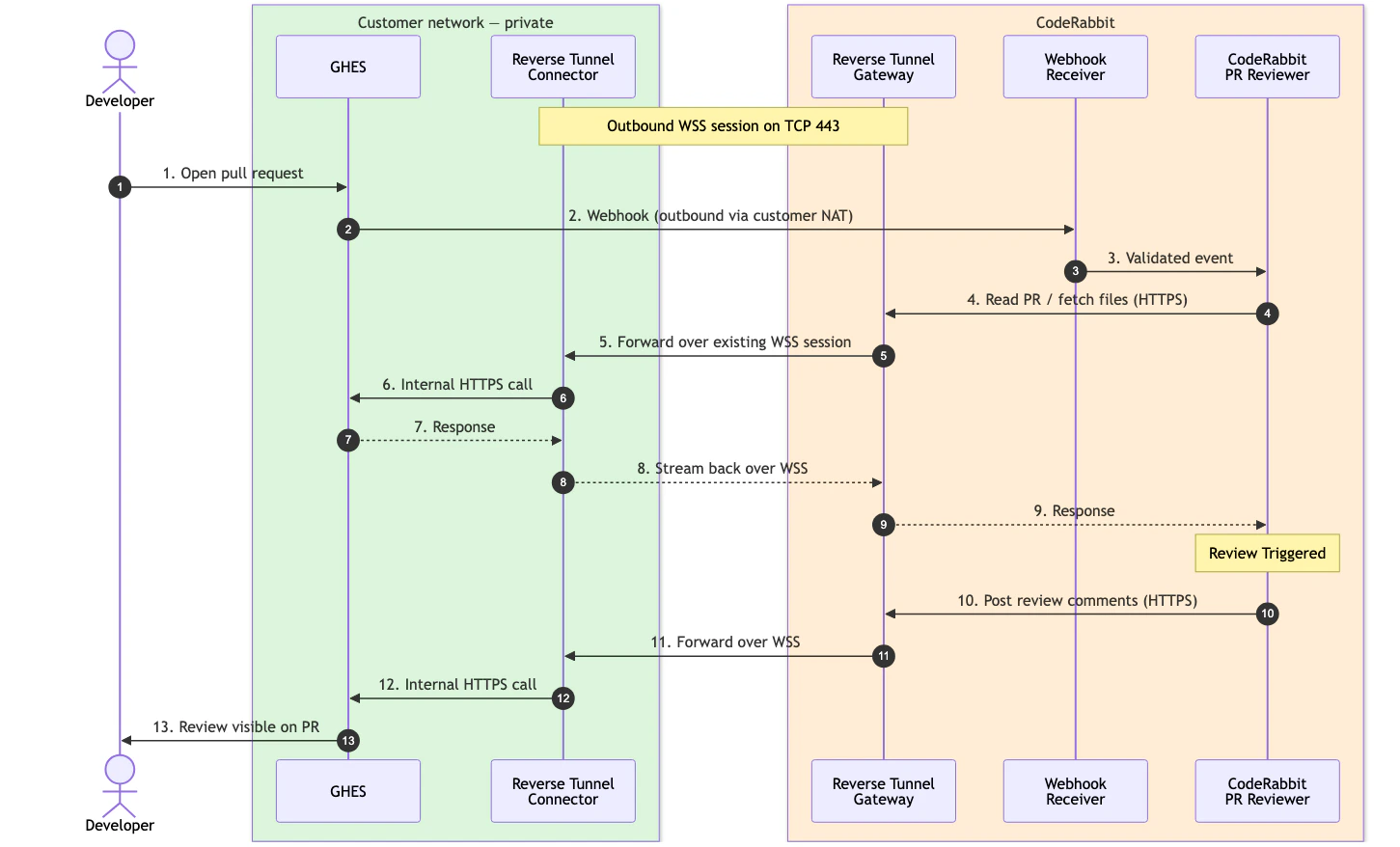
Pull request review flow over CodeRabbit Reverse Tunnel
- Developer opens a pull request inside your private Git platform.
- Your Git platform sends a webhook to CodeRabbit outbound through your customer NAT.
- CodeRabbit reads the pull request through the tunnel. The Reverse Tunnel Gateway routes the request over the existing WSS session; the Reverse Tunnel Connector forwards it to your Git platform and streams the response back.
- CodeRabbit runs the review and writes the feedback.
- CodeRabbit posts the comments back through the same tunnel, and the review appears on the pull request.
High availability
Run at least two connector replicas for production. All replicas for the same tenant normally run the same connector configuration, which means the same gateway URL and the same set of routes, each with its own connector token, route key, target base URL, and origin TLS policy. By default, the gateway tracks the live connector sessions for the route and uses an active session for each new request. Round-robin routing is also supported withREVERSE_TUNNEL_DIRECT_CONNECTOR_ROUTING=true.
Important behavior:
- New requests can use another live connector after a connector disconnects.
- In-flight requests are not transparently moved to another connector.
- The connector reconnects automatically with exponential backoff after a lost WSS session.
Capacity and limitations
The tunnel streams request and response bodies with backpressure, so it supports large HTTPS clone/fetch traffic. Capacity is still bounded by your connector replicas, network egress, and the capacity of each destination origin.FAQ
Does CodeRabbit need inbound access to our network?
Does CodeRabbit need inbound access to our network?
No. The connector opens an outbound WSS session to CodeRabbit. CodeRabbit-initiated traffic rides over that existing session to your services.
Can we run multiple connector pods?
Can we run multiple connector pods?
Yes. Multiple connector replicas can serve the same route key. Default routing uses an active live session for each new request, and round-robin routing is also supported with
REVERSE_TUNNEL_DIRECT_CONNECTOR_ROUTING=true. Give each live replica a unique REVERSE_TUNNEL_CONNECTOR_ID.Can we restrict outbound destinations?
Can we restrict outbound destinations?
Yes. The connector needs outbound HTTPS to the CodeRabbit gateway and HTTPS reachability to each destination origin you configure as a route. Your Git platform also needs outbound HTTPS to the CodeRabbit webhook receiver.
What happens if the tunnel drops during a review?
What happens if the tunnel drops during a review?
The connector reconnects automatically. In-flight requests fail and are retried only when CodeRabbit can safely retry the operation.
Can this forward other internal services?
Can this forward other internal services?
Only services CodeRabbit provisions a route for. The tunnel carries CodeRabbit-initiated HTTPS traffic to the destinations configured as routes, currently Git platforms and MCP servers. It is not a general-purpose private-network proxy, and a route provisioned for one purpose cannot be used for another.
What’s next
Connector configuration
Configure one connector to serve several routes, including internal MCP servers.
GitHub Enterprise Server setup
Create the OAuth App, GitHub App, webhook secret, and permissions used by the GHES integration.
Self-managed GitLab setup
Review the standard self-managed GitLab requirements used with reverse-tunnel onboarding.